Key takeaways
- Use quality Ethernet cable rated for the distance, and use outdoor-rated, UV-resistant cable for exterior runs.
- Place the NVR somewhere cool and ventilated, and consider a UPS so power blips do not corrupt the drive.
- Follow the maker’s instructions for weatherproofing outdoor connectors.
- If cable work involves drilling through walls or near electrical wiring, consult a licensed electrician or installer.
- Check local rules on recording audio and on pointing cameras at neighboring property.
For most homeowners who want continuous recording without a monthly cloud fee, a PoE camera kit with a bundled NVR from Reolink, Amcrest or Lorex is the simplest route, while anyone already invested in a UniFi network will find UniFi Protect with a UNVR a cleaner fit, and tinkerers with a NAS can run Synology Surveillance Station instead. The right pick depends on how many cameras you need, how long you want to store footage, and how much setup you are willing to do.
Our top picks



As an Amazon Associate we earn from qualifying purchases at no extra cost to you.
What an NVR System Actually Is
An NVR, or network video recorder, is a box with hard drive bays that records video streamed over your local network from IP cameras. In a typical home kit the cameras connect by Ethernet cable and receive power through Power over Ethernet, either from ports built into the NVR or from a separate PoE switch. Because footage is stored on your own drive, you are not tied to a subscription for basic recording, which is the main appeal compared with cloud-only cameras.
The trade-off is installation. Running cable to each camera takes time, and you are responsible for network security, drive health and backups. If cable runs are impractical, a wireless system may suit you better.
At a Glance: NVR Systems Compared
| System | Best for | Key stated traits | Limits |
|---|---|---|---|
| Reolink NVR kits (RLK series) | First-time buyers wanting a complete box | PoE cameras bundled with an NVR, local storage, app access, several channel counts across kits | Ecosystem is mostly closed to non-Reolink cameras on some models |
| Amcrest NVR kits | Buyers who want ONVIF flexibility | NVRs with PoE ports and options to add third-party ONVIF cameras, per the maker | Software feels basic to some reviewers |
| Lorex NVR systems | Retail-style kits with brand support | Bundled cameras with person or vehicle detection on selected models | Some features depend on specific camera and NVR pairings |
| Swann NVR kits | Budget-conscious DIY | Wired PoE kits sold in multi-camera bundles | Fewer advanced options |
| UniFi Protect (UNVR) | People with a UniFi network | Polished app, integrated with UniFi cameras, local storage | Camera choices stay within the UniFi family, plus a higher entry cost tier |
| Synology Surveillance Station | NAS owners | Runs on a Synology NAS and supports many camera brands via licenses | Additional camera licenses may be needed beyond the included count |
Reolink: The Straightforward Kit
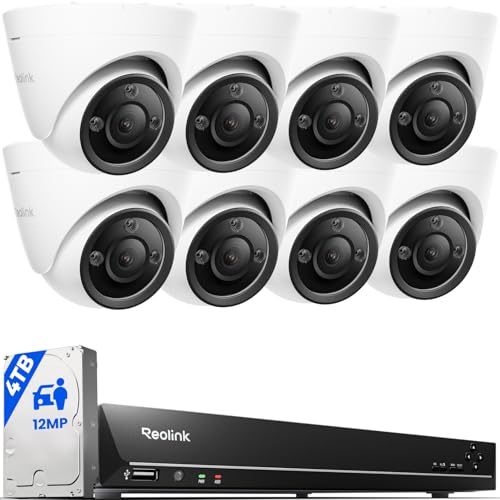
Reolink sells complete kits that pair an NVR with several PoE cameras, typically in 4-camera and 8-camera configurations with different resolutions. Reviewers frequently describe setup as approachable: plug cameras into the NVR, connect it to the router and scan a code in the app. The maker lists features such as person and vehicle detection on selected cameras and local storage with a pre-installed drive in many kits.
The limits worth knowing: advanced users sometimes want more third-party camera support, and remote viewing depends on a Reolink cloud relay unless you configure other access. Always read the model-specific page, since feature sets differ between kits.
Amcrest: Flexible and ONVIF-Friendly
Amcrest offers both bundled kits and stand-alone NVRs. The maker positions its recorders as compatible with ONVIF cameras, which means you can mix in other brands. That flexibility appeals to buyers who may expand later or already own some IP cameras. Reviewers tend to describe the interface as functional rather than polished, so expect a slightly steeper learning curve.
Lorex: Familiar Retail Brand
Lorex kits are widely sold and emphasize ease of purchase and brand support. Selected models include smart detection such as person or vehicle recognition. Because feature availability can depend on the pairing of camera and recorder, compare the exact kit page rather than the brand overall. Lorex has also introduced newer wire-free and fusion style products, so confirm that the system you are looking at is a wired NVR kit if that is what you want.
UniFi Protect: The Network Enthusiast Route
Ubiquiti’s UniFi Protect runs on a UNVR or a compatible UniFi gateway and manages UniFi cameras through a unified app. Independent reviewers often praise the interface and the way cameras integrate with the rest of a UniFi network. The cost is lock-in: cameras generally need to be UniFi models, and the entry level is higher than a basic kit. If you already run UniFi switches, the PoE ports are convenient.
Synology Surveillance Station: Use What You Own
If you have a Synology NAS, its Surveillance Station package can record from many IP camera brands. The maker includes a limited number of free camera licenses and sells more as needed. This is a strong option for people who want to consolidate storage and have the patience to configure cameras themselves. It is less plug-and-play than a bundled kit.
What to Look For When Choosing
Channel count and resolution
Count the cameras you need now, then add spares. An 8-channel NVR leaves room to grow. Higher resolution such as 4K gives more detail but needs more storage and a recorder rated for that bitrate.
Storage
Surveillance drives are built for continuous writing. The maker will list supported drive sizes and the number of bays. As a rule of thumb, more cameras, higher resolution and continuous recording all shorten retention, while motion-only recording stretches it.
PoE budget
The NVR’s PoE ports share a total power budget. Pan-tilt and heated cameras draw more power, so check the budget before adding them. Standard PoE runs are limited to about 100 meters of Ethernet cable.
Smart detection
Person and vehicle detection reduces false alerts from trees and shadows. Processing may happen in the camera or in the NVR, depending on the model.
Remote access and security
Use strong unique passwords, keep firmware updated and avoid exposing the recorder directly to the internet. Use the maker’s secure relay or a VPN instead. Change default credentials during setup.
Budget Tiers
| Tier | What to expect | Examples |
|---|---|---|
| Budget | Bundled 4-camera kit, basic detection, one drive | Swann and entry Reolink or Amcrest kits |
| Mid-range | 8-channel recorder, 4K cameras, person and vehicle detection | Higher Reolink kits, Lorex 4K systems, Amcrest 4K NVRs |
| Premium | Integrated ecosystem, polished software, expandable storage | UniFi Protect, Synology setups |
Installation and Safety Notes
- Use quality Ethernet cable rated for the distance, and use outdoor-rated, UV-resistant cable for exterior runs.
- Place the NVR somewhere cool and ventilated, and consider a UPS so power blips do not corrupt the drive.
- Follow the maker’s instructions for weatherproofing outdoor connectors.
- If cable work involves drilling through walls or near electrical wiring, consult a licensed electrician or installer.
- Check local rules on recording audio and on pointing cameras at neighboring property.
Pick X If… Decision Table
| Pick this | If you… |
|---|---|
| Reolink kit | Want the simplest complete wired kit with local storage |
| Amcrest NVR | Want to mix ONVIF cameras and expand over time |
| Lorex system | Prefer a familiar brand with bundled cameras |
| Swann kit | Need the most affordable multi-camera bundle |
| UniFi Protect | Already run a UniFi network and value polish |
| Synology Surveillance Station | Already own a Synology NAS |
Alternatives
- Wireless or battery cameras with cloud storage: easier to install, but they usually carry subscription costs and depend on Wi-Fi strength.
- Software NVRs such as Frigate or Blue Iris: run on your own PC or mini server for maximum control; they demand more technical skill.
- Professional-grade brands such as Axis or Hanwha: built for businesses and typically sold through installers.
Planning Your Camera Layout and Storage
Before choosing a kit, sketch the property and mark where each camera would go. Entry points, driveways and blind corners come first. Measure the cable path from each position to the place where the NVR will sit, and add some slack, since real routes through attics, walls and conduits are longer than a straight line on a floor plan.
Decide how long footage should be kept. A household that reviews clips after an incident may be content with one to two weeks, while a small business might want a month or more. Retention time determines hard drive size, and recorders with more than one bay give you room to expand. Motion-based recording extends storage at the risk of missing events that the detection fails to catch.
Think about who will view the footage and how. If several family members need access, check how the app handles multiple users and permissions. If you want clips emailed or pushed to a phone, look at what the maker supports. Also plan where the NVR lives: a ventilated, lockable spot reduces the chance that someone can simply take the recorder with the evidence.
Frequently Asked Questions
Do I need a monthly subscription with an NVR system?
Not for basic recording. Footage is stored on the drive inside the NVR. Some makers offer optional cloud backup or extra features for a fee, but local recording and viewing generally work without it.
How many days of footage will one hard drive hold?
It depends on camera count, resolution, frame rate and whether you record continuously or on motion. Makers often publish estimates for their kits. Motion-only recording and lower bitrates extend retention significantly.
Can I add cameras from another brand?
Some recorders support ONVIF cameras, which allows mixing brands, while others work best or only with their own cameras. Check the NVR’s compatibility list before buying cameras.
Is PoE better than wireless for security cameras?
Wired PoE delivers power and data over one cable and avoids Wi-Fi dropouts, which many reviewers consider more reliable. Wireless is easier to install but depends on signal quality and batteries or power outlets.
Should I put a UPS on my NVR?
It is a good idea because a sudden power loss during writing can stress a drive and stop recording. A small UPS also keeps cameras running through brief outages if PoE comes from the recorder.
How do I keep my NVR safe from hackers?
Change default passwords, update firmware, disable unused remote-access features and avoid port forwarding. Use the maker’s secure relay or a VPN for remote viewing, and place cameras on a separate network segment if your router supports it.