Key takeaways
- Place door and window sensors on the frame and door so the two halves sit within the gap the maker states.
- Position motion sensors in corners at the height the manual suggests, away from heaters, vents and direct sunlight.
- Place the base station centrally, away from large metal objects and routers that may interfere.
- Test each sensor after installation and after replacing batteries.
- Tell everyone in the household the code and how to disarm to prevent false alarms.
- Smoke and CO detection should follow your local code and the alarm manufacturer’s instructions. An alarm system add-on does not replace certified detectors.
- For electrical work, such as a hardwired siren or panel power, use a licensed electrician.
For most homeowners and renters, a DIY wireless kit from SimpliSafe, Ring Alarm, or Abode offers the easiest install and flexible monitoring, while people who want a deeper smart-home hub often lean toward Abode, and anyone wanting professionally installed service with a contract may prefer ADT or Vivint. The right pick depends on how you rent or own, what monitoring you want, and whether you also need cameras, smoke and CO sensing, or integration with other smart devices.
Our top picks


As an Amazon Associate we earn from qualifying purchases at no extra cost to you.
Wireless Alarm Systems at a Glance
| System | Best for | What the maker lists | Monitoring | Limits |
|---|---|---|---|---|
| SimpliSafe | Renters and first-time buyers wanting simple setup | Wireless base station, keypad, entry and motion sensors, optional cameras and smoke or CO alerts | Optional professional monitoring without a long contract, per the maker | Fewer third-party smart-home options |
| Ring Alarm | Ring camera and doorbell owners | Base station, keypad, sensors, range extender, cellular backup with a plan | Optional professional monitoring subscription | Best inside the Ring ecosystem |
| Abode | Smart-home tinkerers | Hub with support for Zigbee and Z-Wave devices, plus common integrations | Optional self or professional monitoring | More setup choices can be confusing |
| Wyze Home Monitoring | Budget buyers already using Wyze devices | Hub, sensors, keypad and optional professional monitoring | Optional subscription | Smaller sensor range and ecosystem |
| Blink Home Security | Camera-first, simple systems | Sync module with cameras and basic sensors | Cloud storage, self-monitoring | Not a full alarm panel |
| ADT and Vivint | People who want professional installation | Panel, sensors and installation by the company | Contract-based monitoring | Higher recurring commitment, less DIY flexibility |
Maker specifications and plans change, so the exact current kit contents and monitoring terms should be read on each company’s own site. The comparison reflects what the makers and independent outlets generally describe.
How Wireless Alarm Systems Work
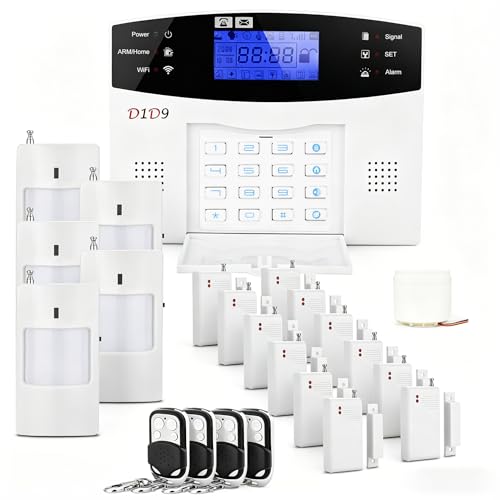
A wireless alarm uses a central hub or base station that listens to battery-powered sensors over radio. Typical sensors include door and window contacts, motion detectors, glass-break detectors, and optional smoke, CO or water leak sensors. When a sensor trips, the hub sounds a siren and sends alerts to your phone. If professional monitoring is active, a monitoring center may attempt to contact you and dispatch authorities according to the plan.
Wireless systems are easy to install because there is no wiring in walls. They also move with you, which is why they suit renters. Their main considerations are battery maintenance, radio interference and range in larger homes, plus the need for a backup in case home broadband or power goes out.
What to Look For
Cellular and battery backup
Systems that rely only on home Wi-Fi may lose connection during an outage. Many panels offer battery backup and an optional cellular connection. If you live in an area with frequent storms, this feature is especially useful for staying connected.
Sensor mix and coverage
Count entry doors, ground-floor windows and key rooms. Starter kits often contain a few contact sensors and one motion sensor, so many homes will need extras. Pet-immune motion sensors reduce false alarms in homes with pets, as the maker states for their models.
Monitoring options
DIY systems typically offer a free or basic tier with local siren and phone notifications, and an optional paid tier with professional monitoring. Compare what each plan includes, such as cellular backup, video verification and cancel terms. Check your local rules, as some cities require permits or charge for false alarm dispatches.
Smoke and CO detection
Some systems can monitor smoke or CO alarms, but they do not replace the home’s primary alarms. Install certified smoke and carbon monoxide alarms as local codes and the manufacturer’s instructions require, and test them regularly.
Cameras and doorbells
Cameras add visual confirmation. Ring and SimpliSafe, for example, sell their own cameras and doorbells. If you already own cameras from one brand, the matching alarm ecosystem may save effort.
Privacy and data
Read the maker’s privacy policy, especially for cloud video storage, and use strong unique passwords and two-factor authentication on the account.
Picks by Budget Tier
Budget tier
Wyze and Blink are typically described by reviewers as low-cost entry points, particularly for people who want a few sensors and cameras. They suit apartments and small homes but offer fewer sensor types than the larger platforms.
Mid-range tier
SimpliSafe, Ring Alarm and Abode sit in the middle. Reviewers often cite SimpliSafe for ease of setup, Ring Alarm for integration with Ring cameras and Alexa, and Abode for its compatibility with many third-party devices and protocols. Each lets you add sensors as needs grow.
Premium tier
ADT and Vivint offer professional installation, managed monitoring and bundled equipment, usually under contract terms. They suit people who prefer a technician to set everything up and are comfortable with a longer commitment. Read cancellation and equipment ownership terms closely.
Decision Table: Pick X If…
| Pick this | If… |
|---|---|
| SimpliSafe | You rent or want a simple kit with flexible monitoring |
| Ring Alarm | You already use Ring cameras or Alexa |
| Abode | You want to connect many smart-home devices and customize automations |
| Wyze | You want a low-cost system and already own Wyze products |
| Blink | You mainly want cameras with simple door alerts |
| ADT or Vivint | You prefer professional installation and contract-based monitoring |
| Wired professional system | You own a large home and want hardwired reliability |
Installation and Safety Notes
- Place door and window sensors on the frame and door so the two halves sit within the gap the maker states.
- Position motion sensors in corners at the height the manual suggests, away from heaters, vents and direct sunlight.
- Place the base station centrally, away from large metal objects and routers that may interfere.
- Test each sensor after installation and after replacing batteries.
- Tell everyone in the household the code and how to disarm to prevent false alarms.
- Smoke and CO detection should follow your local code and the alarm manufacturer’s instructions. An alarm system add-on does not replace certified detectors.
- For electrical work, such as a hardwired siren or panel power, use a licensed electrician.
Alternatives
Camera-only setups
If you want visual coverage and not alarm panels, standalone cameras from Ring, Blink, Eufy or Wyze can be enough. They notify you of motion but do not provide a siren or entry sensors in the same way.
Hardwired systems
Wired panels from companies such as Honeywell or DSC are installed by professionals and are known for reliability in larger homes. They require more work and cost.
Smart locks and door sensors
Smart locks combined with simple contact sensors provide a light-touch option for small spaces. They give alerts, but not the full deterrent effect of a siren and monitored panel.
Costs to Plan For Beyond the Kit
The starter kit is only part of the budget picture. Most buyers add extra door and window sensors, a second keypad or key fob, and a camera or doorbell. Monitoring plans usually run month to month or year to year, and cellular backup is often bundled only with paid tiers. Before buying, list every entry point and decide which tier of monitoring fits your risk and routine. Also check whether sensors from one maker work with a different hub, since most ecosystems are closed. Ask whether equipment stays with you if you cancel, and whether the maker offers a trial period or return window. Insurance carriers sometimes offer a discount for monitored systems, so a short call to your insurer may influence which tier makes sense.
Finally, think about who will use the system daily. A simple keypad and fobs suit families with children or older relatives, while app-based arming suits tech-comfortable households. The best system is the one everyone actually arms.
Frequently Asked Questions
Are wireless alarm systems reliable?
Modern wireless systems generally work well when sensors are within range and batteries are maintained. Makers include tamper alerts and low-battery warnings to help. Adding a cellular backup helps when Wi-Fi fails.
Do I need professional monitoring?
Not necessarily. Self-monitoring sends alerts to your phone, which works if you are reachable. Professional monitoring adds a team that may contact you and dispatch help, which is useful if you travel or cannot respond quickly.
Will a wireless alarm work during a power outage?
Most base stations include a backup battery for a period stated by the maker. The system may need a cellular connection to send alerts if your internet goes down. Check the stated backup duration for the model you choose.
Can renters use these systems?
Yes. Adhesive-mounted sensors and plug-in base stations typically leave no permanent marks, and the kit can move with you. Read your lease and follow the manufacturer’s mounting instructions.
How many sensors will I need?
A good starting point is one contact sensor on each exterior door and ground-floor window, plus a motion sensor in main hallways or living areas. Larger homes need more. Most makers sell add-on sensors so you can expand later.
Can these systems detect fires or carbon monoxide?
Some can monitor compatible smoke and CO detectors, but they do not replace the certified alarms required by local code. Install and test those alarms as the manufacturer directs, and call emergency services if an alarm sounds.