Key takeaways
- Home size: Count entry doors, ground-floor windows and key rooms. Larger homes need more sensors and possibly range extenders.
- Renting: Adhesive sensors and no-drill kits suit rentals. Check your lease.
- Pets: Look for pet-immune motion sensors with a stated weight limit if you have animals.
- Smoke and CO: A security system does not replace certified smoke and carbon monoxide alarms. Keep those installed and tested per local guidance. If a system offers smoke or CO monitoring, treat it as an add-on.
- Power and wiring: If you add hardwired devices or any work inside electrical panels, hire a qualified electrician.
- Local rules: Some cities require alarm permits or registration for monitored systems and fines for repeated false alarms. Check local rules.
- Account security: Use strong, unique passwords and two-factor authentication on the app.
- Test regularly: Test sensors, siren and backup power on the schedule in the manual.
For most households, SimpliSafe is the DIY security system that reviewers most often name best overall, Abode suits smart-home fans who want Apple Home, Alexa, Google, Z-Wave and Zigbee support, Ring Alarm fits people already using Ring cameras, and Wyze is the low-cost starter. Pick based on the ecosystem you already use, whether you want professional monitoring, and how much you rely on your internet connection, since not every system has cellular backup.
Our top picks



As an Amazon Associate we earn from qualifying purchases at no extra cost to you.
What DIY systems include
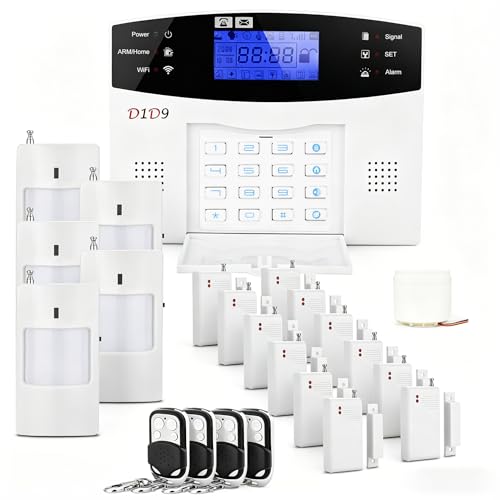
A typical kit has a base station, keypad, door and window sensors, motion detectors and a siren. You install it yourself with adhesive or screws and set it up through an app. Most offer optional professional monitoring on a monthly plan, with self-monitoring as a free or low-cost alternative. Cameras, smoke and carbon monoxide listening, water sensors and smart locks can often be added.
At a glance: current options
| System | Best for | Key points reviewers report | Limits |
|---|---|---|---|
| SimpliSafe | Best overall, flexible monitoring | Contract-free professional monitoring; self-monitoring available; Active Guard monitoring; crisp video | Fewer third-party smart home links than Abode |
| Abode | Smart home users | Deep Apple Home support with Alexa, Google, Z-Wave and Zigbee; self-monitor or professional plan | Smaller camera selection per one reviewer |
| Ring Alarm / Alarm Pro | Existing Ring or Alexa households | Strong video quality; optional Virtual Security Guard add-on | One reviewer found the Wi-Fi router setup harder than others |
| Wyze Home Monitoring | Tightest budget | Starter pack described as the only top DIY kit under a low price threshold; low monthly monitoring | No cellular backup per one reviewer; past camera privacy incidents reported |
Key decisions
Monitoring: self or professional
Self-monitoring sends alerts to your phone and leaves action to you. Professional monitoring adds a call center that can dispatch emergency services. Roundups note that SimpliSafe and Abode let you switch plans without long contracts. Plans differ, so read the terms.
Connectivity and backup
Look for cellular backup and battery backup in the base station. Without cellular backup, an internet outage can block alerts. One reviewer flags this for Wyze. A system that keeps working during a power or internet outage is more dependable for a security purpose.
Smart home integration
Abode is noted for the widest compatibility. Ring works best with Alexa and Ring cameras. Check what your existing smart speakers, locks and lights support.
Cameras and video
Ring is often credited with leading video quality in the DIY group. If cameras matter most, compare resolution, field of view, night vision and storage plan terms before buying. Review the maker’s privacy and data practices as well.
Budget tiers
Budget
Wyze offers the cheapest starter pack and lowest monitoring plan. The trade-offs are the lack of cellular backup in the reviewer’s account and past camera-security incidents reported in 2022 to 2024. Review current maker updates.
Mid-range
SimpliSafe and Ring Alarm kits sit here, with starter packages commonly in the same range. Both are broadly named for ease of setup and broad sensor selection.
Premium
Larger kits from SimpliSafe, Ring or Abode with cameras, extra sensors and professional monitoring rise in cost. Abode’s flexibility appeals to advanced users willing to invest.
Fit, install and safety notes
- Home size: Count entry doors, ground-floor windows and key rooms. Larger homes need more sensors and possibly range extenders.
- Renting: Adhesive sensors and no-drill kits suit rentals. Check your lease.
- Pets: Look for pet-immune motion sensors with a stated weight limit if you have animals.
- Smoke and CO: A security system does not replace certified smoke and carbon monoxide alarms. Keep those installed and tested per local guidance. If a system offers smoke or CO monitoring, treat it as an add-on.
- Power and wiring: If you add hardwired devices or any work inside electrical panels, hire a qualified electrician.
- Local rules: Some cities require alarm permits or registration for monitored systems and fines for repeated false alarms. Check local rules.
- Account security: Use strong, unique passwords and two-factor authentication on the app.
- Test regularly: Test sensors, siren and backup power on the schedule in the manual.
Pick X if you…
| If you… | Pick | Why |
|---|---|---|
| Want the best all-round package | SimpliSafe | Named best overall in several 2026 roundups |
| Live in the Apple Home world | Abode | Deep Apple Home plus other protocols |
| Already use Ring cameras or Alexa | Ring Alarm | Fits the existing ecosystem and video quality |
| Need the lowest entry cost | Wyze | Cheapest starter and monitoring, with limits noted |
| Want no long contract | SimpliSafe or Abode | Flexible monitoring plans reported |
Alternatives
- Professionally installed system: Provides wiring, support and often longer contracts. Costs more and may lock you in.
- Cameras and smart locks only: Cheaper partial coverage if you only need to watch an entry.
- Other no-monthly-fee systems: Several outlets maintain lists of systems that work without a subscription, which suit self-monitoring households.
Source caveat
Review sites disagree on rankings, and costs and plan names change often. One outlet ranks Abode first for its HomeKit support, while others rank SimpliSafe first. Confirm current kit contents, monitoring terms and backup features on each maker’s page.
Practical buying checklist
Before you order
- List what you need to protect: Count doors, ground-floor windows, interior rooms and any garage or outbuilding. This sets the size of the kit.
- Decide on cameras: Indoor, outdoor and doorbell cameras can be part of the system or run separately. Check whether video storage needs a subscription.
- Check backup features: Battery backup in the base station and cellular backup keep alerts working through outages, according to the makers.
- Review monitoring terms: Look for contract length, cancellation rules, and what the monitoring plan includes.
- Look at privacy practices: Read how the maker stores video and who can access it, and whether it supports two-factor sign-in.
Common mistakes buyers make
- Buying a starter kit that is too small and then needing add-ons.
- Placing motion sensors where pets, sunlight or heating vents can cause false alarms.
- Relying on Wi-Fi only without backup.
- Skipping password and two-factor setup on the app.
- Forgetting to tell family members how to arm and disarm the system.
Installation and maintenance
Set up the base station in a central, protected spot, not on a windowsill. Place door and window sensors on the frame side as the instructions show, and aim motion detectors across the likely path rather than straight at the entry. Pair each device in the app and test it before relying on it. Replace sensor batteries as the app prompts, and run a full test of the siren and backup power on a regular schedule. If you add a monitoring plan, give the provider accurate contact numbers and a safe word if offered. Check local false-alarm rules to avoid fines. If you have any concern about the wiring, your home electrical panel or a smoke or carbon monoxide alarm, ask a qualified professional rather than improvising.
Who should skip a DIY system
If you own a large or complex property, a professionally designed and installed system may be a better match, since it can include wired sensors and tailored coverage. Households that need guaranteed uptime during internet outages should confirm cellular backup before buying, and avoid any kit that lacks it. People who do not want to manage an app, batteries and tests may prefer a full-service provider. Anyone who is uneasy about camera data stored in the cloud should review each maker’s privacy terms or choose local-storage options. If your main worry is fire or carbon monoxide, certified smoke and carbon monoxide alarms are the first purchase, whatever security system you pick.
Frequently Asked Questions
Is a DIY security system as good as a professional one?
For many homes it is a solid option, offering similar sensors and optional professional monitoring. Professional installs may suit large or complex properties. The key is choosing a system with backup power and cellular connectivity.
Do I need a monthly plan?
Not always. Several systems support self-monitoring with app alerts. Professional monitoring adds dispatch support and some plans include cloud video, so decide how much you want to rely on yourself.
What happens if the internet goes down?
It depends on the system. Models with cellular backup can still send alerts, while systems without it may not. One reviewer notes Wyze lacks cellular backup, so check the base station specs.
Which system works best with smart home devices?
Abode is noted for the broadest support, including Apple Home, Alexa, Google, Z-Wave and Zigbee. Ring fits best with Alexa and Ring devices. Check your own devices against each maker’s compatibility list.
Can I install it in a rental?
Many kits use adhesive sensors and plug-in base stations, making them suitable for rentals. Read your lease and avoid drilling without permission. Take the kit with you when you move.
Does it replace smoke and carbon monoxide alarms?
No. Keep certified smoke and carbon monoxide alarms installed and tested as local guidance and the manufacturer’s manual direct. A security system can add monitoring on top, but it is not a substitute.