
Key takeaways
- User capacity: Confirm the number of fingerprint or face templates the terminal stores and the number of punches it can hold offline.
- Verification speed and accuracy: Makers publish figures, but real-world performance depends on your workforce and environment.
- Connectivity: Wi-Fi, Ethernet, or both. Wired is more dependable in metal-heavy buildings.
- Environment: Check any stated ingress protection or temperature range if the clock sits outdoors or in a dusty area.
- Payroll integration: Look for exports or direct connections to the payroll software you use.
- Buddy-punching controls: Biometrics reduce it, but also look at supervisor approvals and audit trails.
- Mounting and power: Wall mount, desktop stand, PoE or standard power supply.
- Compliance features: Overtime rules, break tracking and audit logs for wage-and-hour requirements.
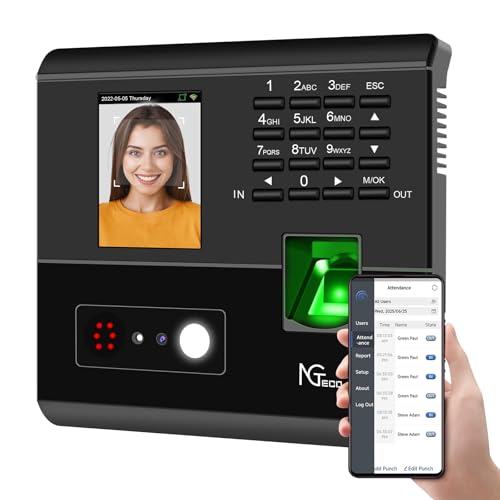
For most small businesses, the best biometric time clock is a fingerprint or face-recognition terminal tied to cloud payroll-ready software, with a standalone offline device reserved for sites that have poor connectivity. Which one fits depends on headcount, how many locations you run, whether employees wear gloves or work with dirty hands, and what your local law says about collecting biometric data. This guide compares the main product families and explains the trade-offs by budget tier, without dollar prices.
Our top picks



As an Amazon Associate we earn from qualifying purchases at no extra cost to you.
Legal and privacy checks before you buy
Biometric data is regulated in several places. Some US states and other jurisdictions require written notice, consent, a retention policy and secure storage before you collect fingerprints or face templates, and non-compliance can be costly. Rules change, so confirm the requirements with an employment lawyer or your local authority before rollout. Ask each vendor whether the device stores a mathematical template or an image, where templates are kept, how they are encrypted, and how a departing employee’s data is deleted. Offer a non-biometric alternative, such as a PIN or badge, where the law or your workforce policy calls for it.
At a glance
| Product family | Best for | Key stated features | Limits |
|---|---|---|---|
| uAttend biometric clocks (such as the BN6500 series) | Small and mid-size businesses wanting a cloud service | The maker lists fingerprint and badge options, cloud-based timesheets and payroll export | Ongoing service plan; cloud dependence |
| ZKTeco fingerprint and face terminals | Multi-site or higher-volume setups needing hardware variety | The maker lists fingerprint, face, card and password modes across models, with network connectivity | Software and support experience varies by reseller; configuration can be technical |
| Acroprint timeQplus biometric | Businesses that want a desktop-managed system with a long track record | The maker lists fingerprint readers with desktop or web-managed software | Older interface; fewer modern app features |
| Pyramid Time Systems terminals | Small firms wanting a physical clock with straightforward reporting | The maker lists fingerprint and proximity options with payroll exports | Fewer integrations than larger cloud platforms |
| Software-first platforms with a face-recognition kiosk, such as Hubstaff or Clockify kiosk modes | Teams that already use a phone or tablet and do not want dedicated hardware | The makers describe tablet kiosks, PIN or face verification and project tracking | Uses a tablet, so camera quality, mounting and lighting matter |
Product lines and model names change, so treat the families above as starting points and confirm current models on each maker’s site.
Fingerprint versus face recognition
Fingerprint terminals are common, well understood and usually the lower-cost entry point. They can struggle with worn, wet, dirty or cracked fingertips, which is a real consideration in construction, food service, cleaning and healthcare. Optical sensors tend to be more affected by grime than capacitive ones, according to general reviewer commentary, though results vary by model. Face-recognition terminals avoid touching a shared surface and can be faster at busy shift changes, which is why they have grown in popularity. Their limitations include lighting, masks, safety glasses and the stronger privacy concerns some employees have about face data. Mixed-mode terminals that accept fingerprint, face, card and PIN give you a fallback.
Cloud versus on-premises software
Cloud-based systems let managers approve timesheets from anywhere, push updates to the clock automatically and export to payroll. Their cost is usually a recurring service fee and a requirement for a reliable network connection. On-premises or desktop-managed software keeps data on your own machines and can work with limited internet access, but you handle backups, updates and remote access yourself. Whichever you choose, ask what happens if the connection drops: some terminals buffer punches and sync later, which matters for remote job sites and warehouses.
What to compare on a spec sheet
- User capacity: Confirm the number of fingerprint or face templates the terminal stores and the number of punches it can hold offline.
- Verification speed and accuracy: Makers publish figures, but real-world performance depends on your workforce and environment.
- Connectivity: Wi-Fi, Ethernet, or both. Wired is more dependable in metal-heavy buildings.
- Environment: Check any stated ingress protection or temperature range if the clock sits outdoors or in a dusty area.
- Payroll integration: Look for exports or direct connections to the payroll software you use.
- Buddy-punching controls: Biometrics reduce it, but also look at supervisor approvals and audit trails.
- Mounting and power: Wall mount, desktop stand, PoE or standard power supply.
- Compliance features: Overtime rules, break tracking and audit logs for wage-and-hour requirements.
Budget tiers
Budget: A single standalone fingerprint terminal or a tablet kiosk with an app suits a crew of a few people at one site. Expect fewer integrations and lighter support.
Mid-range: A cloud-managed fingerprint or mixed-mode terminal with payroll export fits most small businesses and gives you remote approvals and reporting.
Premium: Face or multi-modal terminals, multiple locations, scheduling, job costing and integrations justify a higher tier, especially when labour tracking is closely tied to billing or union rules.
Pick X if…
| Pick this | If you… |
|---|---|
| uAttend-style cloud fingerprint clock | run one or a few small sites and want simple cloud timesheets |
| ZKTeco face or multi-modal terminal | need hardware variety, higher throughput or multiple verification methods |
| Acroprint or Pyramid terminal | prefer a traditional physical clock with desktop-style reporting |
| Software kiosk on a tablet | want to avoid dedicated hardware and already use project or job tracking |
| Badge or PIN clock instead of biometrics | operate where biometric collection is restricted or unwelcome |
Installation and care notes
Mount the terminal at a height reachable for all staff, away from direct sunlight that can wash out face cameras, and near power and network access. Clean the sensor with the method the manufacturer recommends, since the wrong cleaner can damage coatings. Enrol each person in good conditions, and plan for re-enrolment if fingerprints change. Keep firmware current, restrict administrator access, and back up configuration and payroll exports.
Alternatives to consider
- Proximity badge or card clocks: Simple and fast, though they allow buddy punching if cards are shared.
- Mobile app clock-ins with geofencing: Useful for field crews, with the trade-off of relying on personal phones and location data.
- Full workforce-management suites: Combine time, scheduling and payroll in one platform for larger employers.
- Door-access biometric readers: Mainly for entry control, although some systems also log attendance.
Rollout tips that prevent problems
Start with a short pilot on one shift before switching the whole business over. Run the old method in parallel for a pay period so you can compare punches and catch missed enrolments. Write a plain-language policy that explains what is collected, why, how long it is kept and who can see it, and give every employee a copy. Train supervisors on how to correct a missed punch, because most payroll disputes come from forgotten or duplicated punches rather than from the hardware itself.
Plan for growth as well. If you expect to add staff or a second location, choose a platform that lets you add terminals under one account and apply different pay rules per site. Ask about hardware warranty length, replacement terms and whether firmware updates are included. Finally, keep a record of consent forms and deletion requests, since regulators and auditors may ask for them.
Think about downtime too. A clock that fails on payday creates real stress, so ask the vendor what the manual fallback is, how quickly a replacement ships, and whether employees can submit a correction request through an app or web portal. A short written fallback procedure takes minutes to prepare and can save a full day of reconciliation later.
Frequently Asked Questions
Are biometric time clocks legal?
In many places yes, but some jurisdictions require written notice, consent and specific data-handling practices. Speak with an employment lawyer or your local authority before deployment, and consider offering a non-biometric alternative.
Does the clock store my employees’ actual fingerprints?
Makers commonly say their devices store a mathematical template derived from the fingerprint rather than a viewable image. Ask the vendor to confirm exactly what is stored, where, and how it is encrypted and deleted.
What if someone cannot enrol a fingerprint?
Worn or damaged fingertips are a known issue. Choose a terminal that also accepts a badge, PIN or face, and use that as the fallback for anyone who cannot be reliably enrolled.
Do these clocks work without internet?
Some terminals store punches locally and sync later, while others depend on a live connection. Check the offline capacity and sync behaviour in the manufacturer’s specifications before buying.
Is face recognition better than fingerprint?
It is faster and contact-free for many users, but depends on lighting and can raise stronger privacy concerns. Fingerprint is simpler and more established, so the better choice depends on your workplace conditions and policy.
Can biometric clocks connect to payroll software?
Most mainstream systems export timesheets in common formats, and many list direct integrations. Confirm compatibility with your specific payroll provider and check how overtime and break rules are handled.
More from Amazon
Programs that pair well with the guide above. Offers and eligibility are set by Amazon and may change.
Free shipping on eligible items, Prime Video and more. Eligible new members can start with a free trial.
Start a Prime free trialAudiobooks and podcasts to listen to on the go. Eligible new members can start with a free trial.
Try Audible freeAd-free music streaming. Eligible new subscribers can start with a free trial.
Try Music Unlimited freeA free business account with business pricing and bulk-buying tools for work, shop or home office.
Create a business accountAs an Amazon Associate we earn from qualifying purchases.





