
Key takeaways
- Mount outdoor cameras above head height but not so high that faces are hard to read; many makers suggest roughly mid-height on an exterior wall.
- Avoid pointing cameras at neighbours’ windows or public spaces beyond what your local laws allow.
- Solar-capable models need several hours of direct light; shaded locations will need a conventional recharge.
- Place the HomeBase centrally and ideally wired to your router for reliability.
- Reduce false alerts by setting activity zones and sensitivity in the app.
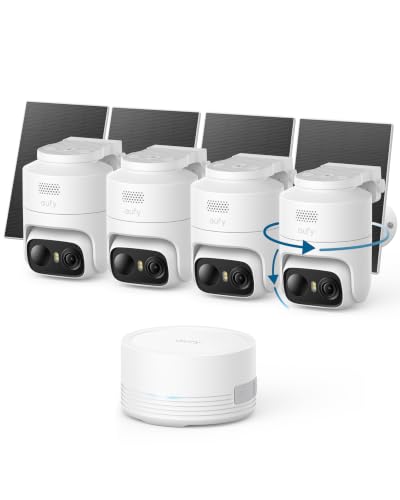
For most buyers, the best Eufy security camera is a battery-powered eufyCam system with a HomeBase hub if you want local storage across several outdoor spots, a SoloCam if you want a single wire-free camera with no hub, and a plug-in indoor camera for rooms. Eufy’s main appeal, as reviewers describe it, is local video storage without a mandatory monthly plan. This guide explains which camera type fits which job and the trade-offs by budget tier, without dollar prices. Eufy updates its lineup often, so model names below are families to look for on the maker’s site.
Our top picks


As an Amazon Associate we earn from qualifying purchases at no extra cost to you.
How the Eufy lineup is organised
Eufy Security, a brand of Anker, sells several camera families. The eufyCam line pairs battery cameras with a HomeBase hub that stores video locally and acts as the connection point. SoloCam models are standalone battery cameras that store video on built-in memory, with no hub required. Floodlight cameras are wired and combine a camera with bright lighting. Indoor cameras are plug-in units, some with pan and tilt. Video doorbells round out the range. The maker lists two-way audio, human detection and local storage as common features, and most of the outdoor cameras are described as weather-resistant.
At a glance
| Family (example models) | Best for | Key stated features | Limits |
|---|---|---|---|
| eufyCam S3 Pro / eufyCam 3 series | Whole-property coverage with several outdoor cameras | The maker lists high-resolution video, colour night vision, and a HomeBase hub with local storage; some models include a built-in solar panel | Hub required; higher cost of entry; battery life depends on use and settings |
| SoloCam S340 and similar | One or two spots, easy setup, no hub | The maker lists wire-free operation, built-in storage and, on some models, solar and dual-lens designs with pan and tilt | Local storage is limited to what the camera holds; fewer shared features across cameras |
| SoloCam E-series (such as E40) | Budget-friendly wire-free coverage | The maker lists 2K video, local storage and battery power | Simpler feature set than premium models |
| Floodlight Cam (such as E340) | Driveways, yards, garages needing bright light | The maker lists a camera combined with floodlights, wired power and local storage | Wired install; electrical work may need a professional |
| Indoor Cam (such as C120, E30 and pan-and-tilt units) | Rooms, nurseries, pets, entryways | The maker lists pan-and-tilt options, two-way audio and local storage on an SD card in some models | Plug-in power; privacy considerations inside the home |
eufyCam: the multi-camera system
If you want to cover a front yard, back door and side gate under one app, a eufyCam kit is the logical starting point. The cameras connect to a HomeBase, which stores clips locally. Reviewers generally note that this reduces dependence on a cloud service, though you can add an optional cloud plan if you want off-site backup. Higher-end models in the line are marketed with higher resolution, colour night vision and, on some versions, integrated solar charging to cut down on battery swaps. The trade-offs are the cost of the hub kit and the need to place the HomeBase on your network with a decent signal to the cameras.
SoloCam: the simple one-off
SoloCam models are the easy choice for a single spot, such as a shed, a rear entrance or a backyard corner. They connect directly to your Wi-Fi and store video on built-in memory. Some versions have a solar panel and a pan-tilt design, which the maker presents as a way to cover a wider area with one device. Because there is no hub, clips live on each camera, so a stolen or damaged camera can mean lost footage unless you use a cloud backup option.
Floodlight and indoor cameras
A floodlight camera adds deterrence through lighting and is usually wired into an existing outdoor light circuit. If you are not comfortable with household wiring, hire a licensed electrician; this is a safety issue, not a convenience one. Indoor cameras, including pan-and-tilt models, are simple to set up. Place them where privacy is respected: avoid bedrooms and bathrooms, tell household members and guests as appropriate, and check local rules about recording audio.
Privacy and security considerations
Eufy has faced criticism in past years over how some streams and thumbnails were handled, and reviewers continue to recommend buying with attention to privacy settings. Use a strong, unique account password, enable two-factor authentication where available, keep firmware up to date, and review which features send data to the cloud. Read the current privacy policy on the maker’s site before you commit.
Fit and placement notes
- Mount outdoor cameras above head height but not so high that faces are hard to read; many makers suggest roughly mid-height on an exterior wall.
- Avoid pointing cameras at neighbours’ windows or public spaces beyond what your local laws allow.
- Solar-capable models need several hours of direct light; shaded locations will need a conventional recharge.
- Place the HomeBase centrally and ideally wired to your router for reliability.
- Reduce false alerts by setting activity zones and sensitivity in the app.
Pick X if…
| Pick this | If you… |
|---|---|
| eufyCam with HomeBase | want several outdoor cameras and local storage in one system |
| SoloCam solar or pan-tilt | need one flexible camera in a spot without power and without a hub |
| SoloCam E-series | are on a budget and want basic wire-free coverage |
| Floodlight Cam | want lighting and recording together and have an outdoor circuit |
| Indoor Cam | want pet, baby or entryway monitoring inside the home |
Budget tiers
Budget: A single SoloCam E-series or a basic indoor camera. Good for one spot and light needs.
Mid-range: A multi-camera eufyCam kit or a solar SoloCam with pan and tilt gives wider coverage and better night video.
Premium: Higher-resolution eufyCam sets with extra cameras, a floodlight camera and the doorbell make for a complete perimeter, at the highest total outlay.
Alternatives to consider
- Ring cameras: Larger accessory ecosystem and optional professional monitoring, but video history typically needs a subscription.
- Arlo cameras: Polished apps and wire-free options, with more features behind a plan.
- Wyze cameras: Very budget-friendly and flexible, though with fewer weatherproof premium options.
- Google Nest and similar: Good if you already use that smart-home platform.
Getting reliable results from any Eufy setup
Most complaints about wire-free cameras come from setup choices rather than hardware. Start by testing the Wi-Fi signal at each mounting point with a phone before you drill. For eufyCam systems, remember that the cameras talk to the HomeBase rather than directly to your router, so the hub placement matters more than router distance. A wired connection from the hub to your router is generally more stable than wireless.
Tune motion settings early. Set the detection area to exclude the road, shared fences and swaying branches, and choose a recording length that balances clarity with battery drain. Use the human-detection options where the model offers them, because they cut down on alerts triggered by animals and passing cars. If you rely on solar charging, aim the panel at the sky rather than a wall and clean it occasionally.
Finally, think about storage. Local storage is convenient, but it is only as safe as the device it sits on. If a camera or hub is stolen, the footage can go with it. Consider an optional cloud backup for entrances, and place the hub indoors out of sight. Check the app for firmware updates a few times a year.
Frequently Asked Questions
Do Eufy cameras require a monthly subscription?
The maker states that local storage is available without a mandatory monthly plan. An optional cloud plan is offered for people who want off-site backup, so check the current terms on the Eufy site.
Do I need the HomeBase hub?
The eufyCam line uses it for local storage and connectivity. SoloCam models do not need it because they store video on the camera itself.
How long does the battery last?
The maker publishes estimated battery life, but real-world results depend on how often the camera records, temperature and settings. Solar-capable models can extend this when they get enough sunlight.
Are Eufy cameras safe to use?
Many people use them, but past privacy concerns mean you should enable two-factor authentication, use unique passwords, keep firmware updated and review the cloud-related settings. Hire a licensed electrician for any wired installation.
Can I use Eufy cameras with Alexa or Google Assistant?
The maker lists compatibility with common voice assistants for many models. Check the individual product page, since support varies between camera types.
Where should I avoid placing indoor cameras?
Avoid bathrooms, bedrooms and any place where people expect privacy. Inform household members and guests, and follow local laws on audio and video recording.
More from Amazon
Programs that pair well with the guide above. Offers and eligibility are set by Amazon and may change.
Free shipping on eligible items, Prime Video and more. Eligible new members can start with a free trial.
Start a Prime free trialAudiobooks and podcasts to listen to on the go. Eligible new members can start with a free trial.
Try Audible freeAd-free music streaming. Eligible new subscribers can start with a free trial.
Try Music Unlimited freeA free business account with business pricing and bulk-buying tools for work, shop or home office.
Create a business accountAs an Amazon Associate we earn from qualifying purchases.





