
Key takeaways
- Measure door thickness, backset and bore before ordering.
- Install with the door open and test the bolt throws freely before closing it. A misaligned strike plate is a common cause of jams.
- Enroll fingerprints several times at different angles. Enroll more than one finger per user.
- Wipe the sensor with a soft dry cloth. Avoid harsh cleaners that may damage the surface.
- Replace batteries when the lock warns you, not after. Keep spares.
- Check fire and building code for your home or rental. Doors on escape routes must remain openable from the inside without keys, so choose a lock with an inside thumb turn or lever.
For most homes, a deadbolt-style fingerprint smart lock from an established lock maker such as Yale, Kwikset or Schlage-class brands suits buyers who want proven hardware, while Aqara, Eufy and Ultraloq suit buyers who prioritize smart home integration and features. The right choice depends on your door, your smart home platform, and how you want to open the door when your hands are full.
Fingerprint locks let you unlock by touch, usually with backup options such as a keypad, key or app. They are popular for families, rental hosts and anyone tired of carrying keys. Makers describe different sensor types, finger capacities and battery systems, and these details change by model year, so read the current specs before buying.
Our top picks


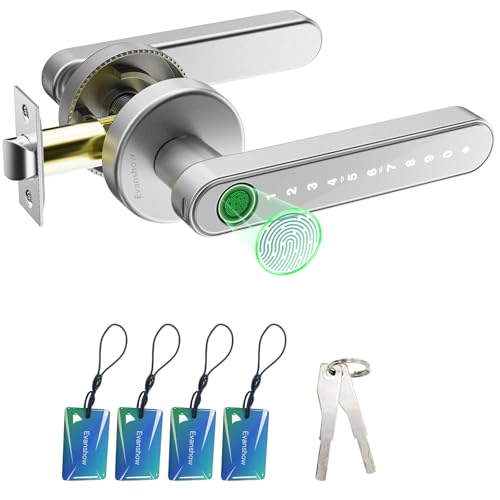
As an Amazon Associate we earn from qualifying purchases at no extra cost to you.
Fingerprint Door Locks at a Glance
| Lock family | Best for | Key stated features | Limits |
|---|---|---|---|
| Yale Assure Lock 2 Touch | Buyers wanting a trusted lock brand with fingerprint option | Fingerprint reader, optional smart module for several platforms, key override on some versions | Smart features may need an add-on module |
| Kwikset Halo Touch | Wi-Fi smart lock with fingerprint | Wi-Fi built in, fingerprint access, app control, as listed by the maker | Wi-Fi draws more battery than some other protocols |
| Aqara smart lock U-series | Smart home enthusiasts | Fingerprint and other unlock methods, works with several platforms via hub or Matter, as the maker lists | Some features need an Aqara hub |
| Eufy smart lock with fingerprint | Value-focused buyers in the Eufy ecosystem | Fingerprint reader, keypad, app control | Best experience with Eufy accessories |
| Ultraloq Bolt Fingerprint and U-Bolt series | Wide feature set at a modest tier | Fingerprint, keypad, app, key backup depending on model | Model lineup changes often; confirm door compatibility |
| Lockly Secure series | Buyers wanting a randomized keypad plus fingerprint | Fingerprint, scrambling keypad, app access on select models | Bulky housing on some models |
How Fingerprint Locks Work
Most locks use a capacitive sensor, which reads the pattern of ridges on your fingertip, or an optical sensor. You enroll a fingerprint by pressing the same finger several times. The lock stores a template and matches it later. Makers state how many prints can be stored, and say whether the print data stays on the lock. Read the privacy statement if you care where biometric data is kept.
Fingerprint readers can struggle with wet, dirty or very dry fingers, and cold weather can affect some sensors. Because of that, a good lock always includes a second method such as a keypad, key, or app.
What to Look For
Fit with your door
Check door thickness, backset (the distance from door edge to the center of the hole) and bore size against the maker’s listed range. Replacement-style deadbolts fit existing holes; some locks use a keyed cylinder and others hide the key entirely. If your door is unusually thick, metal, glass or a sliding style, check the compatibility list.
Unlock methods and backup
Look for fingerprint, keypad, app and key options. A physical key backup helps if batteries die. Some locks include a terminal for a 9-volt battery to give emergency power from outside.
Connectivity
Bluetooth only locks work when you are nearby. Wi-Fi models connect directly to the internet and can send alerts, but use more battery. Others use Thread, Zigbee or Z-Wave through a hub, or Matter for cross-platform support. Pick the option that matches your existing smart home.
Battery life
Makers list battery life, typically in months, usually with AA batteries or a rechargeable pack. Wi-Fi models tend to have shorter life. Look for low battery warnings and an emergency power option.
Weather and durability
Exterior locks face rain, dust and temperature swings. Look for the maker’s stated weather rating or operating temperature range. Locks on exposed entrances should be rated for outdoor conditions.
Security and certification
Many makers cite ANSI/BHMA grades for the lock mechanism, with Grade 1 being the highest for residential and light commercial use. Treat the grade as a statement about the physical lock, not the fingerprint reader. Ask the maker how firmware updates are delivered.
Budget, Mid-Range and Premium Tiers
Budget: Entry fingerprint locks from Eufy, Ultraloq and similar brands. They deliver the main function with simpler hardware and finish.
Mid-range: Yale, Kwikset and Aqara models with stronger build, broader smart home support and better apps. This tier suits most households.
Premium: Higher-grade locks with robust metal construction, higher certification grades, and multiple smart home protocols. They suit those who want long-term durability and professional installation.
Pick X If You Are…
| If this is you | Pick | Why |
|---|---|---|
| Wanting a trusted lock brand | Yale Assure Lock 2 Touch | Established lock maker with a fingerprint option |
| Wanting Wi-Fi without a hub | Kwikset Halo Touch | Built-in Wi-Fi per the maker |
| Running Apple, Google or Matter smart home | Aqara lock | Platform support listed by the maker |
| Shopping on a budget | Eufy or Ultraloq fingerprint lock | Core features at a lower tier |
| Hosting guests or renting | Lock with app-based temporary codes plus keypad | Easy to issue and revoke access |
| Living with children | Fingerprint lock with keypad backup | Kids can enter without keys; keypad helps when fingers are small or wet |
Installation and Care Notes
- Measure door thickness, backset and bore before ordering.
- Install with the door open and test the bolt throws freely before closing it. A misaligned strike plate is a common cause of jams.
- Enroll fingerprints several times at different angles. Enroll more than one finger per user.
- Wipe the sensor with a soft dry cloth. Avoid harsh cleaners that may damage the surface.
- Replace batteries when the lock warns you, not after. Keep spares.
- Check fire and building code for your home or rental. Doors on escape routes must remain openable from the inside without keys, so choose a lock with an inside thumb turn or lever.
Safety and Emergency Considerations
In a power outage, battery locks still work, but if the batteries die you need a backup. Keep a key somewhere secure, or use the emergency battery terminal if your model has one. In a fire, the inside handle should operate without any code or fingerprint so that everyone can leave. Tell family members and guests how the lock works, and make sure first responders can reach the home if needed, for example through a lockbox or a smart lock integration with trusted services where the maker offers it.
Alternatives
- Keypad smart locks. No biometric data, simple codes, and often cheaper.
- Retrofit smart lock modules. Keep your existing deadbolt and add smart control to the interior side.
- Smart lock with proximity unlocking. Unlocks using your phone, useful but depends on phone battery and settings.
- Fingerprint padlocks and gun-safe style locks. For sheds, gates and storage, not designed for main entry doors.
Second-Generation Features Worth Noticing
Newer fingerprint locks often add faster sensors, Matter support, rechargeable packs, auto-lock timers, and door-position sensing that confirms whether the door is closed. Some also store more fingerprints and offer guest codes with schedules. These extras are helpful, but only if they fit your routine. A household of two may never need dozens of stored prints, while a rental host may value scheduled codes more than anything else. Read the maker’s feature list against your own needs rather than paying for options you will not use, and look at the warranty terms for the electronics and the finish.
Frequently Asked Questions
Are fingerprint door locks secure?
Makers design them with encryption and lockout features, but security also depends on the lock mechanism, installation and settings. Look for a stated ANSI/BHMA grade and firmware updates. No lock is perfect, so layer with good doors, frames and lighting.
What if my fingerprint does not read?
Wet, dirty or cut fingers can fail. Use the backup keypad, key or app. Enrolling the same finger several times can improve recognition.
Do fingerprint locks need Wi-Fi?
Not always. Many work without Wi-Fi for local unlocking. Wi-Fi or hub connections add remote control and alerts.
How long do the batteries last?
Makers list battery life in months, depending on model and use. Wi-Fi models drain faster. Replace batteries when warned and keep spares nearby.
Will it fit my door?
Check door thickness, backset and bore hole size against the maker’s list. Most standard residential doors are covered, but unusual doors may need an adapter or a different lock.
Is my fingerprint data stored in the cloud?
It depends on the maker. Some store templates only on the lock, while others sync with an app. Read the privacy information before enrolling, and ask the maker if it is not clear.








