Key takeaways
- Plan features can change, so read the current Ring Protect details on the maker’s site, including how many devices a plan covers.
- Enable two-factor authentication and use a unique password for your Ring account.
- Review video sharing, community and law-enforcement request settings in the app and choose options you are comfortable with.
- Check the end-to-end encryption options the maker offers and the features that you give up by turning them on.
For most buyers, the best Ring camera depends on where it goes: a battery or plug-in outdoor camera for yards and entrances, a wired floodlight or spotlight camera for driveways, an indoor camera for rooms, and a doorbell for the front door. Ring’s strength, as reviewers describe it, is a large accessory ecosystem and easy app, while its main cost is that recorded video history usually requires a Ring Protect subscription. This guide explains which camera type suits which job, with budget tiers instead of dollar prices. Ring refreshes its lineup regularly, so treat the model names below as families to look for.
Our top picks


As an Amazon Associate we earn from qualifying purchases at no extra cost to you.
How the Ring camera range is organised
Ring sells indoor cameras, outdoor cameras in battery, plug-in and solar variants, spotlight and floodlight cameras with built-in lighting, and video doorbells. Most connect over Wi-Fi to the Ring app and offer live view, motion alerts and two-way talk. The maker states that features such as video recording, person alerts and history are tied to an optional subscription plan, and a few functions work without one, such as live view and basic alerts. Confirm the current plan details on Ring’s site before buying.
At a glance
| Family (example models) | Best for | Key stated features | Limits |
|---|---|---|---|
| Outdoor Cam (Plus, Pro and related models) | General outdoor coverage with flexible power | The maker lists battery, plug-in and solar options and weather resistance on its outdoor models | Recording features typically need a plan; battery models need recharging |
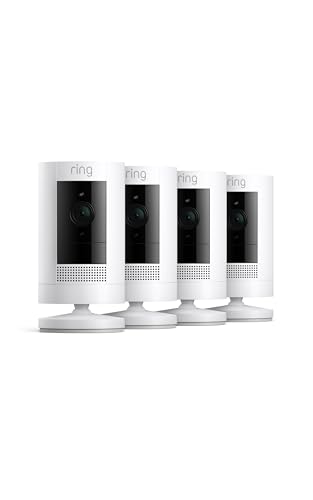
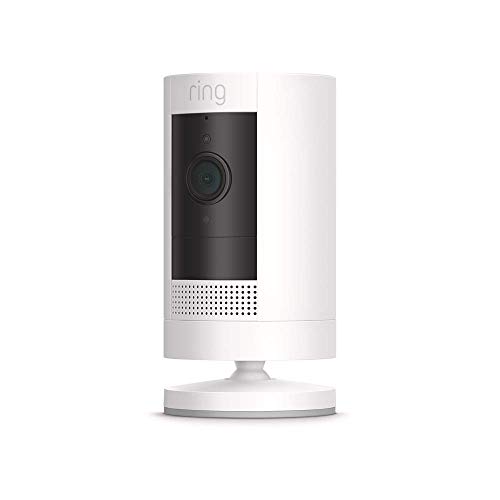
| Stick Up Cam (battery and plug-in) | Indoor or sheltered outdoor use, easy mounting | The maker lists multiple mounting options and live view with two-way audio | Older design in a refreshed lineup; check the maker for current availability |
| Spotlight Cam | Entrances, side yards and garages | The maker lists built-in spotlights, a siren and battery, plug-in or wired power depending on version | Brighter lights can bother neighbours; wired versions need electrical work |
| Floodlight Cam Wired | Driveways and large yards | The maker lists bright floodlights, a camera and a siren on a wired model | Wired install; professional help advised for household wiring |
| Indoor Cam (2nd gen and pan-tilt versions) | Rooms, pets, hallways | The maker lists plug-in power, privacy cover on some models and two-way talk | Plug-in; privacy considerations inside the home |
| Video Doorbells (Battery Doorbell, Wired Doorbell, Doorbell Pro) | Front-door monitoring | The maker lists doorbell chimes, live view and package alerts depending on the model | Fit depends on door frame, wiring and chime compatibility |
Outdoor cameras: choose your power source first
Ring’s outdoor cameras give you three ways to power them, and the best choice is mainly about where you are installing. Battery cameras are the easiest to place because there is no wiring, but you will need to recharge or swap the pack on a regular schedule. A solar panel accessory can reduce this chore where the camera gets steady sun. Plug-in cameras need a nearby outlet and avoid recharging altogether. If you have a convenient outdoor outlet or can run a cable discreetly, plug-in is usually the lowest-maintenance route.
Pick a camera with a field of view that matches the area. A wide-angle view helps cover a driveway or yard, while a narrower view suits an entrance. If you want reliable colour night video, check whether the model has a built-in light or relies on infrared alone.
Spotlight and floodlight cameras
These combine deterrence with recording. Spotlight models are compact and flexible in power options. Floodlight cameras are larger and typically wired to an outdoor lighting circuit. Anything involving household wiring is a safety matter: switch off power at the breaker, follow the manual and hire a licensed electrician if you have any doubt. Position lights so they do not shine into neighbouring windows.
Indoor cameras
An indoor camera suits pets, kids’ play areas or an empty home when you are away. Some Ring indoor models include a physical privacy shutter or a way to disable the camera when you are home, and the maker describes these features on the product pages. Keep cameras out of bedrooms and bathrooms, tell household members and guests, and check local rules around audio recording.
Subscription and privacy points
- Plan features can change, so read the current Ring Protect details on the maker’s site, including how many devices a plan covers.
- Enable two-factor authentication and use a unique password for your Ring account.
- Review video sharing, community and law-enforcement request settings in the app and choose options you are comfortable with.
- Check the end-to-end encryption options the maker offers and the features that you give up by turning them on.
Fit and placement notes
- Make sure your Wi-Fi signal at the mounting spot is strong enough. A weak connection causes delayed alerts and dropped video.
- Use the app’s motion zones to avoid constant alerts from the street or trees.
- Mount cameras under an eave when possible to reduce glare, rain and spiders on the lens.
- Do not aim cameras at neighbours’ windows or private spaces.
- Keep batteries within the temperature range the maker lists, since cold weather can shorten battery life.
Pick X if…
| Pick this | If you… |
|---|---|
| Battery Outdoor Cam | need a quick install on a wall or post without wiring |
| Plug-in Outdoor Cam | have a nearby outlet and want to avoid recharging |
| Spotlight Cam | want deterrent lighting at an entrance with flexible power |
| Floodlight Cam Wired | need strong lighting for a large driveway or yard and can wire it safely |
| Indoor Cam | want to keep an eye on pets or a hallway while away |
| Video Doorbell | want to see and speak to visitors at the front door |
Budget tiers
Budget: An indoor camera or a basic battery or plug-in outdoor model. Good for a single area with simple needs.
Mid-range: Outdoor battery cameras with a solar accessory, Spotlight Cam models and a doorbell build a practical perimeter.
Premium: Floodlight cameras, higher-resolution newer models and multiple devices under a subscription plan are the top tier, with the highest ongoing cost.
Alternatives to consider
- Eufy: Emphasises local storage without a required monthly plan.
- Arlo: Wire-free options with a polished app, but features are often tied to a plan.
- Wyze: Very affordable, with a wide range of camera styles.
- Google Nest: A good fit for homes already built around Google’s smart-home platform.
Building a sensible Ring setup
Many households start with a doorbell and one outdoor camera, then add devices as needs become clear. Put the first camera where the most activity occurs, usually the main entrance or a driveway. A second camera covering the rear door or back garden is the usual next step, since reviewers commonly point to rear and side entrances as the less-watched areas.
Consider whether you will add Ring Alarm sensors later. The cameras and the alarm share an app, so you can arm the system and see camera events in one place. If you plan to use a subscription, check how a plan applies to multiple devices at one address, as the cost structure may favour a household with several cameras.
Pay attention to where recordings go and how long they are kept. Review shared-user access periodically and remove anyone who no longer needs it. If you rent, ask your landlord before drilling into walls, and consider adhesive or clamp mounts where permitted. Finally, check the maker’s current support period for each model, because older cameras can eventually stop receiving feature or security updates.
Frequently Asked Questions
Do Ring cameras work without a subscription?
Live view and some basic alerts generally work without one, but recorded video history and many smart alerts require a Ring Protect plan. Check the current terms on Ring’s site before buying.
Which Ring camera is best for outdoors?
It depends on power. Battery models are easiest to install, plug-in models avoid recharging, and floodlight models add lighting. Choose according to where you can power the camera and how much light you want.
How often do I need to charge a Ring battery?
The maker publishes estimated battery life, but it varies with the number of motion events, temperature and video settings. A solar accessory can help in sunny locations.
Can Ring cameras be hacked?
Any connected camera can be at risk if passwords are weak. Use a unique password, turn on two-factor authentication, keep the app and firmware updated and consider the end-to-end encryption option.
Do I need an electrician to install a Ring floodlight?
A wired floodlight connects to household electrical wiring. If you are not experienced with it, hire a licensed electrician, switch off power at the breaker, and follow the instruction manual.
Can I use Ring cameras with Alexa?
The maker lists compatibility with Alexa for many models, allowing you to view feeds on compatible displays. Support differs by device, so check the product page.