Key takeaways
- Turn off the circuit breaker, not just the switch, before touching any wiring.
- Follow the maker’s manual for wire connections, mounting height, and weatherproofing.
- Use a licensed electrician if you are not experienced with household electrical work or if your existing fixture or wiring is old.
- Choose a mounting spot with a strong Wi-Fi signal. Weak signal causes delayed alerts and dropped video.
- Avoid aiming lights into neighbors’ windows.
For most households, a wired floodlight camera from an established ecosystem, such as the Ring Floodlight Cam Wired Pro or the Google Nest Cam with Floodlight, suits people who want reliable power and 24/7 coverage, while the Eufy Floodlight Cam E340 or a Wyze floodlight camera suits those who prefer local storage or a lower ongoing cost. The right choice depends on your existing smart-home system, your wiring, and whether you accept a subscription for cloud video.
Our top picks



As an Amazon Associate we earn from qualifying purchases at no extra cost to you.
At a Glance: Floodlight Camera Options
| Camera | Best for | Key stated points | Limits |
|---|---|---|---|
| Ring Floodlight Cam Wired Pro | Ring households wanting advanced detection | The maker lists wired power, 3D motion detection features, and integration with Ring alerts | Cloud video features depend on a subscription; needs a wired connection |
| Ring Floodlight Cam Plus (previous-generation style) | Ring households wanting a simpler wired unit | Wired floodlight camera in Ring’s line | Newer Pro model may replace it; availability varies |
| Google Nest Cam with Floodlight | Google Home households | The maker lists wired power, color video, and Google Home integration | Some features depend on a Nest Aware plan |
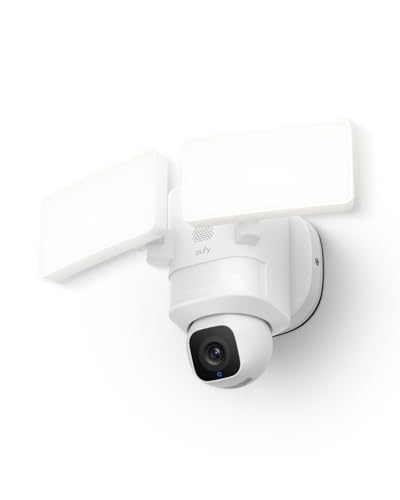
| Eufy Floodlight Cam E340 | Buyers wanting local storage | The maker lists local storage options and a wired installation | App experience and cloud options differ from larger ecosystems |
| Wyze Cam Floodlight v2 | Budget buyers | The maker lists a wired floodlight with a camera at a lower tier | Fewer ecosystem features; some features need a plan |
| Arlo floodlight camera | Arlo ecosystem users | The maker offers floodlight cameras in its line, with wireless options in some versions | Cloud features depend on an Arlo plan |
Camera lines change fast. Where a model is listed above, confirm the current version, power method, and subscription terms in the maker’s documentation before you buy.
Wired Versus Battery Floodlight Cameras
Most floodlight cameras connect to your home’s existing outdoor light wiring. A wired unit offers continuous power, so the floodlight can be bright and the camera can be always ready. It does need electrical work, and the power must be turned off at the breaker before installation. If you are not comfortable with household wiring, hire a licensed electrician. Battery or solar-assisted models exist but usually have less powerful lights or shorter standby, and they trade convenience for lower output.
What to Look For
Video resolution and field of view
Makers list resolution (for example 2K or higher on some current models) and field of view. Wider views cover more ground but may stretch distant detail. Look for color night vision if you want clearer images after dark; the floodlight usually helps with this.
Light output
Stated lumen output varies across models. Higher output lights a larger area and improves video, but can be a nuisance for neighbors if aimed carelessly. Adjustable brightness and schedules help.
Motion detection and zones
Good motion detection reduces false alerts from passing cars or tree movement. Look for adjustable zones, person detection, and sensitivity settings.
Storage and subscriptions
Some cameras store video in the cloud, others store locally on a card or hub, and many offer both. Cloud storage often needs a monthly or annual plan. Local storage avoids the ongoing fee but is exposed to loss if the device is stolen.
Smart-home compatibility
Check whether the camera works with Alexa, Google Home, or Apple Home, as the maker states. Ecosystem fit often decides the best camera more than the specification table does.
Security and privacy
Use a strong, unique password, turn on two-factor authentication, and keep the firmware updated. Aim the camera at your own property and follow local rules about recording public areas and neighbors.
Product Notes
Ring Floodlight Cam Wired Pro
The Wired Pro is the higher-tier model in Ring’s wired floodlight line, with the maker highlighting advanced motion-detection features. It suits those already invested in Ring doorbells and alerts. Reviewers note that cloud features rely on a subscription.
Google Nest Cam with Floodlight
This camera integrates with Google Home and suits households that already use Nest devices. The maker lists wired power and a floodlight. Some intelligence features depend on a Nest Aware plan.
Eufy Floodlight Cam E340
Eufy stresses local storage and no mandatory monthly fee. It may suit privacy-minded buyers or those who want to avoid subscriptions. Compare the app and its integrations before deciding.
Wyze Cam Floodlight v2
A budget-oriented wired camera. It suits buyers who want a floodlight and camera without the premium cost, accepting fewer ecosystem extras.
Arlo
Arlo offers floodlight cameras with its own app and subscription model. It may suit existing Arlo users who want one system.
Installation and Safety Notes
- Turn off the circuit breaker, not just the switch, before touching any wiring.
- Follow the maker’s manual for wire connections, mounting height, and weatherproofing.
- Use a licensed electrician if you are not experienced with household electrical work or if your existing fixture or wiring is old.
- Choose a mounting spot with a strong Wi-Fi signal. Weak signal causes delayed alerts and dropped video.
- Avoid aiming lights into neighbors’ windows.
Budget Tiers
- Budget: Wyze-type wired units. Good basics, fewer ecosystem extras.
- Mid-range: Eufy and entry Ring or Arlo options.
- Premium: Ring Floodlight Cam Wired Pro and Google Nest Cam with Floodlight, with deeper integration and advanced detection.
Pick X If… Decision Table
| If you… | Pick | Reason |
|---|---|---|
| Already use Ring | Ring Floodlight Cam Wired Pro | Unified app and alerts |
| Use Google Home | Google Nest Cam with Floodlight | Native integration |
| Want to avoid subscription fees | Eufy Floodlight Cam E340 | Local storage focus |
| Want the lowest cost | Wyze floodlight camera | Budget-oriented |
| Have no outdoor wiring | Battery or solar-assisted option | Avoids new wiring |
Alternatives
- Separate camera and floodlight: allows you to choose each independently.
- Doorbell camera: good for entry-point coverage only.
- Motion-sensor floodlight without camera: a simple deterrent with no recording.
Placement and Coverage Planning
Mount a floodlight camera high enough to cover the approach to a door, driveway, or yard while staying out of easy reach. Makers state recommended heights and detection ranges, and the real-world range is often shorter than the maximum figure on the box. Plan for overlapping coverage if you have more than one camera, and avoid pointing the lens toward bright lights or direct sun, which can wash out the image.
Think about Wi-Fi first. A strong signal at the mounting location is more important than a high resolution rating. If the signal is weak, a mesh extender or a camera with a wired network option can help. Also consider power outages: some models offer battery backup or can store clips locally, while others stop recording when power is lost.
Finally, review local rules and your neighbors’ privacy. Use privacy zones where the camera allows, and post notice if your area expects it.
Subscription Costs in Plain Terms
Even a well-priced camera can become costly over several years if it relies on a cloud plan for saved clips, person alerts, or package detection. Before buying, list the features you actually need and see which ones the maker places behind a plan. If you only need live view and push alerts, a free tier may be enough. If you want a searchable video history, either budget for a plan or choose a model with local storage.
Compare the cost of the camera plus several years of a plan against a local-storage alternative, and consider what happens to your saved video if you cancel.
Night Video, Audio, and Extras
Floodlight cameras usually record in color when the light is on and switch to infrared or low-light modes when it is off. Two-way audio lets you speak to a visitor, and a built-in siren, where offered, can discourage trespassers. Read the maker’s notes on whether these extras need a plan. Also check whether the camera can run on a schedule, so that the light stays off during hours when you do not want it to trigger, and whether alerts can be limited to people rather than every passing animal.
If you rent, ask your landlord before replacing a fixture. Keep the original fixture so it can be restored when you move.
Frequently Asked Questions
Do floodlight cameras need a subscription?
Most work without one for live viewing and basic alerts, but saved cloud video usually needs a plan. Some models offer local storage so you can avoid a fee. Read each maker’s plan details.
Can I install a floodlight camera myself?
If you are comfortable with basic wiring and turn off the circuit breaker, many people do. If you are unsure, or the existing wiring is old, hire a licensed electrician. Follow the maker’s manual.
Are floodlight cameras good in bad weather?
They are designed for outdoor use and come with weather-resistance ratings from the maker. Heavy rain, snow, and frost can still affect motion detection and image quality.
Will the floodlight bother my neighbors?
It can if aimed poorly. Adjust the angle, use motion-triggered mode, and lower the brightness or set schedules.
How do I reduce false motion alerts?
Set motion zones, lower sensitivity, and use person detection where available. Avoid aiming at busy streets or swaying trees.
Are floodlight cameras secure from hacking?
No device is risk-free, but you can reduce risk with a strong unique password, two-factor authentication, and regular updates. Buy from makers with a record of security updates.