Key takeaways
- Best smart kitchen appliances with app and voice control: a Wi-Fi multi-cooker, a connected coffee maker and a smart air fryer compared on features.
A smart kitchen appliance earns the label in one specific way: its listing states app or voice control, so you can start, schedule, monitor or adjust cooking from your phone instead of standing at the counter. Plenty of appliances wear a digital display and call themselves smart, so this roundup only includes models whose Amazon listings name a real connected feature — a Wi-Fi link to a companion app, voice control through Alexa or Google Assistant, or both.
Our top pick is the Instant Pot Pro Plus Wi-Fi Smart 10-in-1, because it brings full app control to the appliance most households use for the widest range of meals. The runner-up is the Keurig K-Supreme Plus SMART, the strongest connected option for pod-coffee households. These picks suit three kinds of buyers: busy families who want dinner started or monitored from another room, coffee drinkers who want a brew scheduled and tuned per person, and anyone replacing a basic air fryer who wants cooking notifications and guided settings. Every pick was chosen from its Amazon US listing — the stated connectivity, capacity and functions — rather than from practical claims, and the specs below come from those listings and the manufacturers’ stated specifications reproduced there.
Quick Picks
As an Amazon Associate we earn from qualifying purchases.
| Product | Best for | Key spec |
|---|---|---|
| Instant Pot Pro Plus Wi-Fi Smart 10-in-1, 6 Quart | App-controlled weeknight cooking | Wi-Fi multi-cooker with Instant Brands Connect app |
| Keurig K-Supreme Plus SMART Coffee Maker, 78 oz | Scheduled, personalized pod coffee | BrewID pod recognition with Wi-Fi app control |
| COSORI Air Fryer Pro Smart 5.8-Quart | Crispy foods with remote monitoring | VeSync app plus Alexa and Google Assistant control |
How to Choose
Start With the Job the Appliance Does Every Week
Smart features add the most value to the appliance you already reach for daily. A connected multi-cooker changes weeknight cooking because you can start a stew from the living room and check its progress without lifting the lid. A connected coffee maker changes mornings because the brew can be scheduled and tuned before you get out of bed. A connected air fryer changes snack and side-dish cooking because the app pings you when food is done or needs shaking. Pick the category first, then compare the connected features inside it — a brilliant app on an appliance you rarely use is still an appliance you rarely use.
Check Whether the Connection Is Wi-Fi or Bluetooth Only
Wi-Fi models can be controlled from anywhere your phone has a connection, which is what makes scheduling and remote monitoring genuinely useful. Bluetooth-only models stop responding once you leave the room, which reduces the smart features to a remote control you have to stand near. All three picks here use Wi-Fi, and each listing says so. If you are comparing other models, look for the words Wi-Fi in the listing title or feature list; a listing that only mentions an app, without naming the connection type, is often Bluetooth in disguise.
Match the App and Voice Assistant to What You Already Use
Each brand runs its own app: Instant Brands Connect for the Instant Pot, the Keurig app for the K-Supreme Plus SMART, and VeSync for the COSORI. Voice control also varies — the COSORI and the Keurig work with both Amazon Alexa and Google Assistant, so check the listing against the smart speaker you already own. None of these apps talks to the others, so a household that buys three different connected brands ends up with three accounts and three apps. That is manageable, but it is worth knowing before you commit to a mixed counter.
Confirm Your Network Meets the Requirement
Connected kitchen appliances almost universally require a 2.4GHz Wi-Fi band. The Keurig listing and manual state this plainly, and the COSORI listing notes the same requirement for VeSync control. Most home routers broadcast 2.4GHz alongside 5GHz, so this is rarely a problem, but a 5GHz-only setup, a mesh network that hides the 2.4GHz band, or an enterprise-style network with a sign-in portal can block pairing entirely. Check your router settings before ordering, not after unboxing.
Size the Appliance to Your Household and Counter
Connected models are not automatically the largest models. The Instant Pot Pro Plus comes in a 6-quart size that suits most families, the Keurig pairs its smart brewer with a generous 78-ounce removable reservoir, and the COSORI basket holds 5.8 quarts. Measure the counter footprint and the clearance under your cabinets as well as the capacity — an air fryer oven or multi-cooker that has to be dragged out of a cupboard for every use quickly loses the convenience its app was supposed to add.
The 3 Best Options
Instant Pot Pro Plus Wi-Fi Smart 10-in-1, 6 Quart — OUR TOP PICK
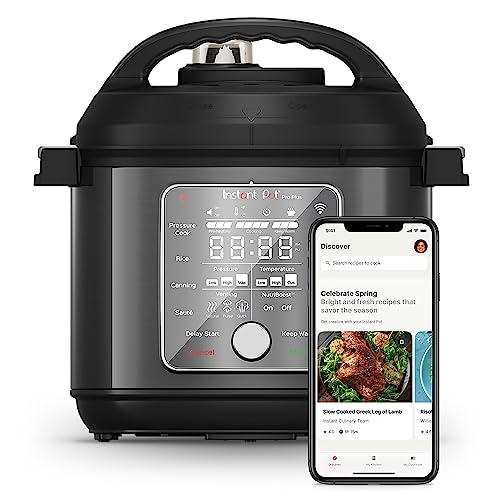
The Pro Plus is the connected flagship of the Instant Pot line: a 6-quart multi-cooker whose listing states Wi-Fi connectivity and full operation through the Instant Brands Connect app. From the app you can start and stop cooking, adjust time and temperature, monitor progress and follow guided recipes that send their settings to the cooker. It covers ten functions in one pot — pressure cooking, slow cooking, rice, steaming, sautéing, yogurt making, warming, canning, sous vide and the NutriBoost setting — so the app is controlling an appliance that already replaces several others on the counter.
Specs
- Capacity: 6 quart
- Functions: 10-in-1 — pressure cooker, slow cooker, rice cooker, steamer, sauté pan, yogurt maker, warmer, canning pot, sous vide, NutriBoost
- Connectivity: Wi-Fi with the Instant Brands Connect app
- App features: remote start and monitoring, guided recipes with step-by-step settings
- Model number: 112-0124-01
Best for: Families who cook several weeknight dinners a week in a multi-cooker and want to start, adjust or check on them from another room.
Watch out for: The smart model is sold in the 6-quart size, so very large households may still want a bigger non-connected pot. The app features also depend on Instant Brands keeping the Connect platform running, and none of the connectivity helps if you prefer cooking entirely from the front panel.
Keurig K-Supreme Plus SMART Coffee Maker, 78 oz
The K-Supreme Plus SMART is Keurig’s Wi-Fi connected single-serve brewer, and its headline smart feature is BrewID: the brewer recognizes the specific K-Cup pod inserted and automatically adjusts its brew settings to the roaster’s recommendations. Connected to the Keurig app, it can be scheduled, started remotely and tuned with five strength settings and six temperature settings across its brew sizes, with favorite settings stored per user in the app. MultiStream technology saturates the grounds more evenly during the brew, and the 78-ounce removable reservoir means the scheduling convenience is not undermined by constant refilling. It also works with Amazon Alexa and Google Home for voice-initiated brewing.
Specs
- Reservoir: 78 oz, removable
- Brew sizes: five sizes across the 6–12 oz range
- Settings: 5 strength settings, 6 temperature settings
- Technology: BrewID pod recognition, MultiStream extraction
- Connectivity: Wi-Fi (2.4GHz) with the Keurig app; Amazon Alexa and Google Home voice control; SMART Auto-Delivery pod reordering through the app
Best for: Pod-coffee households where different people like different strengths and temperatures, and where a scheduled morning brew is the main attraction.
Watch out for: It brews K-Cup pods only, so it is the wrong pick for anyone who wants to use loose ground coffee without an accessory filter. The Wi-Fi is 2.4GHz only, and BrewID and remote brewing stop working if the brewer is not connected, leaving a capable but conventional pod machine.
COSORI Air Fryer Pro Smart 5.8-Quart

The COSORI Pro Smart takes the brand’s 5.8-quart basket air fryer and adds VeSync app control plus voice control through Amazon Alexa and Google Assistant. From the app you can choose settings, monitor cooking progress, receive status notifications and use Scan-to-Cook, which reads packaged frozen foods and applies matching cooking instructions. The fryer itself has twelve customizable cooking functions and a detachable basket, and the listing is refreshingly honest about the limits of remote control: as a safety feature, starting a cook cycle through smart control still requires a press of the Start/Cancel button on the fryer itself.
Specs
- Capacity: 5.8 quart basket
- Model number: CS358-AF
- Functions: 12 customizable cooking functions
- Control: VeSync app, Amazon Alexa, Google Assistant, and on-unit controls
- Connectivity: Wi-Fi (2.4GHz network required for app control)
- App features: remote monitoring, cooking notifications, Scan-to-Cook, in-app recipes
Best for: Households that air fry several times a week and want a notification when food is done instead of hovering in the kitchen.
Watch out for: The safety press-to-start rule means true unattended remote starting is limited — the app is strongest for monitoring, adjusting and finishing, not for starting a cold fryer from across town. A 5.8-quart basket also cooks in batches for larger families.
Which One Fits Your Situation
You cook most dinners in one pot and want them started before you get home. Choose the Instant Pot Pro Plus. Its app control covers the full cooking process, and the ten functions mean the connected appliance is also your most versatile one.
Your household runs on pod coffee and everyone takes it differently. Choose the Keurig K-Supreme Plus SMART. BrewID, stored favorites and scheduled brewing are aimed squarely at multi-drinker homes, and the large reservoir keeps refills infrequent.
You air fry constantly and keep wandering off while food cooks. Choose the COSORI Pro Smart 5.8-Quart. Cooking notifications and app monitoring solve the forgotten-side-dish problem, and voice control helps when your hands are full.
Your kitchen Wi-Fi is weak or your router is 5GHz only. Fix the network first, or choose any of these for their on-unit controls and treat the app as a bonus — every pick here still works as a conventional appliance from its own panel.
Common Mistakes
- Buying the smart version and never opening the app. The connected premium only pays off if you pair the appliance and use scheduling, monitoring or guided settings at least weekly.
- Ignoring the 2.4GHz requirement. A 5GHz-only network or a hidden band will stop pairing; check the router before the appliance arrives.
- Assuming remote start works like a light switch. Safety rules, especially on air fryers, may require a physical button press at the appliance, so read the listing’s smart-control notes carefully.
- Forgetting the account and ecosystem lock-in. Each brand has its own app and account, and voice support differs; check Alexa or Google Assistant compatibility against the speaker you own.
- Judging by capacity alone. Counter footprint, cabinet clearance and reservoir or basket access decide whether a connected appliance stays out and gets used.
Frequently Asked Questions
Do smart kitchen appliances still work if the Wi-Fi goes down?
Yes, in the ways that matter day to day. All three picks here can be run from their own on-unit controls, so pressure cooking, brewing and air frying continue without a connection. What you lose during an outage is the connected layer: app start and monitoring, scheduling, voice control and features like BrewID that depend on the brewer reaching Keurig’s service.
Can I start cooking from outside the house?
With Wi-Fi models, generally yes for monitoring and, within limits, starting — that is the practical difference from Bluetooth appliances. The main exception is safety-driven: the COSORI listing states that starting a cycle through smart control requires pressing Start/Cancel on the fryer itself, and similar caution applies to any appliance that heats unattended. Treat remote start as a convenience for trusted, prepared loads rather than a way to cook completely unattended.
Do these appliances work with both Alexa and Google Assistant?
The COSORI Pro Smart and the Keurig K-Supreme Plus SMART list both Amazon Alexa and Google Assistant or Google Home support in their listings. Support is never something to assume from the brand alone, though — it is set model by model, so confirm the voice assistants named on the specific listing before buying if voice control is a deciding factor.
What happens if the manufacturer shuts down the app?
The appliance keeps working as a conventional appliance from its front panel, but the connected features — scheduling, remote monitoring, guided settings — would stop. This is the standing trade-off of every connected appliance, and it is one reason to favor established brands with large installed bases, like the three picked here, over unknown connected labels.
Is a smart multi-cooker worth choosing over a standard one?
Only if the connected features match how you cook. If you regularly want dinner started from another room, follow guided recipes that set the cooker for you, or check progress without opening the lid, the Instant Pot Pro Plus justifies its smart label. If you always cook standing at the counter with a handful of familiar settings, a standard multi-cooker does the same job and the app would go unused.
Closing
The right smart kitchen appliance is the one whose connection solves a problem you actually have: dinner monitored from the couch, coffee scheduled and tuned per drinker, or an air fryer that tells you when the food is done. The Instant Pot Pro Plus is the most broadly useful of the three, the Keurig K-Supreme Plus SMART is the pick for pod-coffee homes, and the COSORI Pro Smart rounds out a counter that leans on crispy, quick cooking — each verified against its Amazon listing for the smart features its name promises.
More from Amazon
Programs that pair well with the guide above. Offers and eligibility are set by Amazon and may change.
Free shipping on eligible items, Prime Video and more. Eligible new members can start with a free trial.
Start a Prime free trialAudiobooks and podcasts to listen to on the go. Eligible new members can start with a free trial.
Try Audible freeAd-free music streaming. Eligible new subscribers can start with a free trial.
Try Music Unlimited freeA free business account with business pricing and bulk-buying tools for work, shop or home office.
Create a business accountAs an Amazon Associate we earn from qualifying purchases.