Our Short List of 3

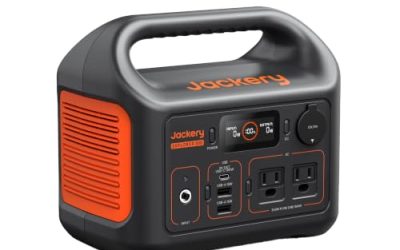
- Best for: A first station for camping trips, short outages and keeping phones and a laptop charged.
- 292Wh LiFePO4 battery
- 300W AC output with pure sine wave outlets
- Two AC outlets
- 100W USB-C PD port

- Best for: A home office or small-appliance backup where output strength and fast switchover matter more than all-night runtime.
- 288Wh LFP battery
- 600W AC output
- Power Lifting up to 1500W for resistive loads
- 10ms UPS switchover
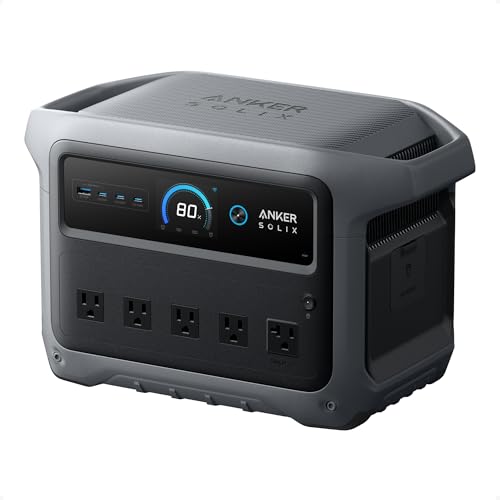
- Best for: A household that wants one station to cover outages, camping and a work-from-home desk without buying twice.
- 1,024Wh LiFePO4 battery
- 2,000W AC output, 3,000W peak
- Full charge in 49 minutes with HyperFlash
- 10 ports in total
All 4 Picks at a Glance
| Product | Specs | Action |
|---|---|---|
| Jackery Explorer 300 |
| Check price on Amazon |
| BLUETTI Elite 30 V2 |
| Check price on Amazon |
| Anker SOLIX C1000 Gen 2 |
| Check price on Amazon |
 Jackery Explorer 1000 v2 |
| Check price on Amazon |
Our Top Picks


Choosing a portable power station comes down to one honest question: what do you actually need to keep running when the wall outlet is gone? A unit that only charges phones is a different purchase from one that must carry a refrigerator through a night without grid power, and the gap between those two jobs is measured in watt-hours, output watts and weight. Buy too small and the station quits before the night ends; buy too large and you carry a heavy box whose extra capacity you never use.
This guide is for campers, remote workers, renters building a first emergency kit and homeowners who want quiet backup without fuel or fumes. The four stations below were picked from the names and specifications printed on their Amazon listings, so every capacity, output and charging figure here traces back to what the listing itself states.
Quick Picks
As an Amazon Associate we earn from qualifying purchases
| Product | Best for | Key spec from title |
|---|---|---|
| Jackery Explorer 300 | A light first station for phones, laptops and lights | 292Wh LiFePO4 battery, 300W output |
| BLUETTI Elite 30 V2 | Short, strong backup with fast UPS switchover | 288Wh, 600W, Power Lifting 1500W, 10ms UPS |
| Anker SOLIX C1000 Gen 2 | One mid-size station for home backup and camping | 1,024Wh LiFePO4 battery, 2,000W, full charge in 49 minutes |
| Jackery Explorer 1000 v2 | The longest runtime in this group for outages | 1,070Wh LiFePO4 battery, 1,500W, 1-hour fast charge |
How to Choose
Start with watt-hours, not watts
Watt-hours decide how long things run, while watts decide what can run at all, and confusing the two is the most common sizing error. A 300Wh station feeding a 30W load lasts roughly eight hours after conversion losses, while the same station feeding a 300W load lasts under an hour. List the three devices you cannot do without, note each one in watts, and multiply by the hours you need. A phone needs only a few watt-hours per charge, a laptop needs a few dozen, and a mini refrigerator draws steadily all day. Once that total is clear, the right capacity tier usually picks itself.
Read the AC output before the headline
The headline wattage on a listing is often the surge or peak figure, which the station can only hold for seconds while a motor starts. What matters for steady use is the continuous AC output printed beside it. A station rated at 300W continuous will not run a 1,000W kettle no matter how large its battery is, while a 2,000W station can carry a microwave or a power tool. Check whether the AC output is pure sine wave too, since sensitive electronics and modern chargers expect a clean waveform. Count the AC outlets as well, because two plugs beat one when a lamp and a laptop must share the box.
Battery chemistry decides how long it lasts
Most stations in this guide use lithium iron phosphate, known as LiFePO4 or LFP, and the chemistry matters more than the brand name on the case. LiFePO4 cells typically survive thousands of charge cycles before their capacity fades, so a station that is recharged weekly can stay useful for years. Older lithium-ion designs fade sooner under the same routine, which matters if the station will serve as a daily desk backup rather than a once-a-year emergency box. When a listing names no chemistry at all, treat that silence as a question to answer on the product page before ordering.
Recharge speed and ports shape real use
A station is only as useful as its next charge, so read the recharge figures the way you read capacity. Fast wall charging, such as a full charge in about an hour, turns a station around between outages, while slow charging leaves it half empty when the next storm arrives. Solar input matters for trips and long outages, but only if the wattage and voltage limits match a panel you own or plan to buy. Ports matter just as much: a 100W USB-C port charges a laptop directly, a 12V car socket runs a portable cooler, and a UPS function can bridge a brief grid drop without restarting your router.
The 4 Best Options
Jackery Explorer 300
- Best for: A first station for camping trips, short outages and keeping phones and a laptop charged.
- 292Wh LiFePO4 battery
- 300W AC output with pure sine wave outlets
- Two AC outlets
- 100W USB-C PD port
A first station for camping trips, short outages and keeping phones and a laptop charged.
The listing has carried both 292Wh and 293Wh capacity figures across revisions, so confirm the capacity line and the surge figure on the live listing before ordering.
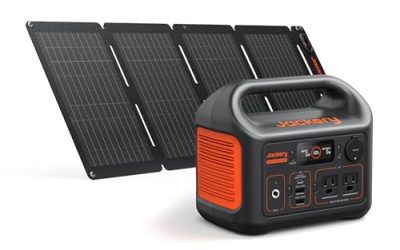
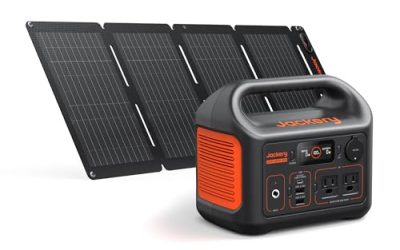
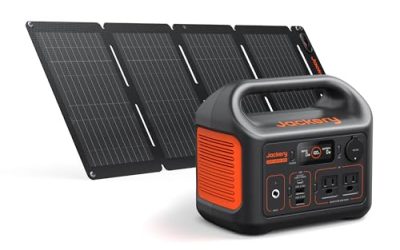
The Explorer 300 is the smallest station in this group, and that is exactly its appeal for buyers who want backup power without a heavy case. Its listing names a 292Wh LiFePO4 battery with 300W of output, aimed at camping, travel and blackouts, and the solar panel is optional rather than bundled. Two AC outlets, a 100W USB-C port and a car port cover phones, laptops, lights and a small fan, which is the realistic load for a weekend trip or a short evening outage.
Watch out for: The listing has carried both 292Wh and 293Wh capacity figures across revisions, so confirm the capacity line and the surge figure on the live listing before ordering.
BLUETTI Elite 30 V2
- Best for: A home office or small-appliance backup where output strength and fast switchover matter more than all-night runtime.
- 288Wh LFP battery
- 600W AC output
- Power Lifting up to 1500W for resistive loads
- 10ms UPS switchover
A home office or small-appliance backup where output strength and fast switchover matter more than all-night runtime.
At 288Wh the battery is small, so running it near 600W drains the pack in well under an hour; treat the extra output as headroom for surges, not as sustained power.
The Elite 30 V2 packs the strongest output of any small station here, which makes it the pick for short, demanding jobs rather than long, slow ones. Its listing names a 288Wh LFP battery with 600W of AC output, Power Lifting up to 1500W for resistive loads, a 10ms UPS switchover and a 0 to 80 percent charge in 45 minutes. That combination suits a desk setup that must survive a grid flicker, or a small appliance that needs a brief surge to start.
Watch out for: At 288Wh the battery is small, so running it near 600W drains the pack in well under an hour; treat the extra output as headroom for surges, not as sustained power.
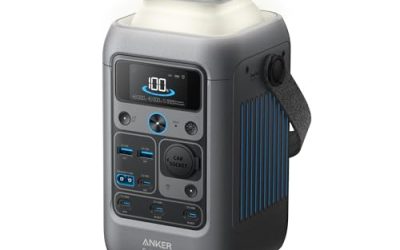
Anker SOLIX C1000 Gen 2
- Best for: A household that wants one station to cover outages, camping and a work-from-home desk without buying twice.
- 1,024Wh LiFePO4 battery
- 2,000W AC output, 3,000W peak
- Full charge in 49 minutes with HyperFlash
- 10 ports in total
A household that wants one station to cover outages, camping and a work-from-home desk without buying twice.
The 49-minute charge needs HyperFlash enabled in the app, and the listing notes that charging slows when the battery cells are cold, so check the charging conditions on the product page before relying on the fastest figure.
The C1000 Gen 2 is the balanced middle of this group, pairing a four-figure capacity with output strong enough for real household loads. Its listing names a 1,024Wh LiFePO4 battery, 2,000W of output with a 3,000W peak, ten ports and a full recharge in 49 minutes with HyperFlash enabled in the app. A 10ms UPS function keeps a desktop or a medical device running through a brief grid drop, and 600W of solar input gives it a way back to full charge away from the wall.
Watch out for: The 49-minute charge needs HyperFlash enabled in the app, and the listing notes that charging slows when the battery cells are cold, so check the charging conditions on the product page before relying on the fastest figure.
Jackery Explorer 1000 v2
- Best for: Longer outages, cabin weekends and campsites where a refrigerator, lights and devices must share one station.
- 1,070Wh LiFePO4 battery
- 1,500W AC output, 3,000W surge peak
- Three pure sine wave AC outlets
- 100W USB-C output, plus a 30W USB-C port
Longer outages, cabin weekends and campsites where a refrigerator, lights and devices must share one station.
The one-hour charge is an emergency mode that must be enabled in the app each time; the default full charge takes about 1.7 hours, and the station charges only from Jackery solar panels.
The Explorer 1000 v2 is the largest station in this group and the one to choose when runtime is the priority. Its listing names a 1,070Wh LiFePO4 battery, 1,500W of AC output with a 3,000W surge peak, three pure sine wave AC outlets and a 100W USB-C port, all in a case listed at 23.8 lb. The one-hour emergency charge, enabled in the Jackery app, shortens the wait between heavy uses, and the battery is rated for 4,000 cycles to 70 percent capacity.
Watch out for: The one-hour charge is an emergency mode that must be enabled in the app each time; the default full charge takes about 1.7 hours, and the station charges only from Jackery solar panels.
Which One Fits Your Situation
You want the lightest station for a weekend trip
Pick the Jackery Explorer 300. At a listed 7.5 lb it slips into a car trunk or a campsite kit without a second thought, and its 292Wh battery covers phones, a laptop and lights for a short trip. The 300W output is the limit to respect: it handles small electronics well, but a cooler or a heating device needs a larger station.
You need short, strong backup for a desk setup
Pick the BLUETTI Elite 30 V2. Its 600W output and 10ms UPS switchover are built for the moment the grid drops, keeping a router, a monitor and a laptop alive while you save work or switch to another plan. The 288Wh battery will not carry a full evening of heavy use, so treat it as a bridge through flickers and short outages.
You want one station for home backup and camping
Pick the Anker SOLIX C1000 Gen 2. Its 1,024Wh battery and 2,000W output cover a refrigerator, a laptop and lights at home, then pack down to a 24.9 lb case for a campsite. Ten ports mean fewer arguments over outlets, and the fast recharge matters when outages arrive in pairs.
You need the longest runtime in this group
Pick the Jackery Explorer 1000 v2. Its 1,070Wh battery is the largest here, and its 1,500W output with a 3,000W surge can start a refrigerator compressor or run a small kitchen appliance. Three AC outlets let a fridge, a lamp and a charger run together, which is the combination most households actually need during an outage.
Winter Power Safety
Keep the station indoors in a dry, ventilated spot and never cover its vents while it charges or runs a load. Add up the rated watts of everything plugged in and keep the total below the output printed on the listing, since overloading a station can trip it or damage the devices connected to it. Charge the station fully before a storm is forecast, and store it where children cannot reach the outlets or the power button. If a station has been sitting in a cold car or garage, bring it inside and let it reach room temperature before charging, and use only the wall, car or solar inputs the listing names.
Common Mistakes
- Buying by peak watts instead of continuous watts, then finding the station cannot run the intended appliance.
- Ignoring watt-hours and discovering the battery empties halfway through the night.
- Assuming every station has AC outlets, when some models are DC-only.
- Forgetting to check whether the solar panel is included or sold separately.
- Leaving a station empty in storage for months instead of topping it up before storm season.
Frequently Asked Questions
How many watt-hours do I need for a weekend trip?
For phones, lights and a laptop, a station near 300Wh usually covers a weekend if you charge devices once or twice a day. Add a portable cooler or a CPAP machine and the need climbs toward 1,000Wh, because those loads draw power for hours rather than minutes. List your devices in watts, multiply by the hours each one runs, and choose a capacity with room to spare.
Can a portable power station run a refrigerator?
A mid-size station with at least 1,000Wh and 1,500W of output can run many household refrigerators for several hours, though the exact runtime depends on the fridge size and how often its compressor cycles. Check the refrigerator label for its running watts and its startup surge, then confirm both figures sit below the station’s continuous and peak output before relying on it.
What is the difference between continuous watts and peak watts?
Continuous watts are what a station can deliver steadily for as long as the battery lasts, while peak watts are a brief surge allowance for starting motors and compressors. A station rated at 1,500W continuous with a 3,000W peak can start a refrigerator that briefly draws 2,500W, but it cannot run a 2,500W heater for an hour. Always size loads against the continuous figure.
Can I recharge a power station with a solar panel?
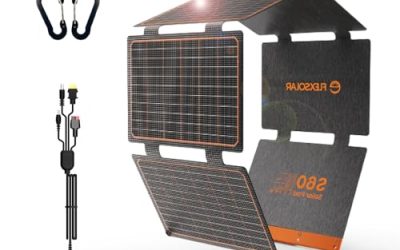
Most stations in this guide accept solar charging, but the panel must match the input limits printed on the listing, including maximum watts and voltage. A panel that is too large can be rejected by the station, while a small panel in weak winter sun may take a full day to add a useful charge. Confirm the input range and whether the panel is included before ordering.
More from Amazon
Programs that pair well with the guide above. Offers and eligibility are set by Amazon and may change.
Free shipping on eligible items, Prime Video and more. Eligible new members can start with a free trial.
Start a Prime free trialAudiobooks and podcasts to listen to on the go. Eligible new members can start with a free trial.
Try Audible freeAd-free music streaming. Eligible new subscribers can start with a free trial.
Try Music Unlimited freeA free business account with business pricing and bulk-buying tools for work, shop or home office.
Create a business accountAs an Amazon Associate we earn from qualifying purchases.