Our Short List of 3

- Best for: DELTA Pro 3 households that want the biggest single-pack step toward several days of coverage.
- Capacity: 4096Wh, as listed in the product information (title rounds this to 4000Wh)
- Battery type: LiFePO4
- Compatible host from title: EcoFlow DELTA Pro 3
- Model: EFD521-EB

- Best for: F3800 owners who want one large, cable-included step into multi-day home coverage.
- Capacity: 3840Wh, as listed in the product title
- Battery type: LiFePO4
- Compatible hosts from title: Anker SOLIX F3800 Series
- Included components: BP3800 expansion battery and battery-to-host cable

- Best for: BLUETTI owners on the named host list building toward two or more days of essential-load coverage.
- Capacity: 2764.8Wh, as listed in the product title and information
- Battery type: LiFePO4
- Compatible hosts from title: BLUETTI AC200L, AC300, AC500 and AC200MAX
- Included components: B300K battery and P090A battery expansion cable
All 4 Picks at a Glance
| Product | Specs | Action |
|---|---|---|
| EF ECOFLOW DELTA Pro 3 Extra Battery |
| Check price on Amazon |
| Anker SOLIX BP3800 Expansion Battery |
| Check price on Amazon |
| BLUETTI B300K Expansion Battery |
| Check price on Amazon |
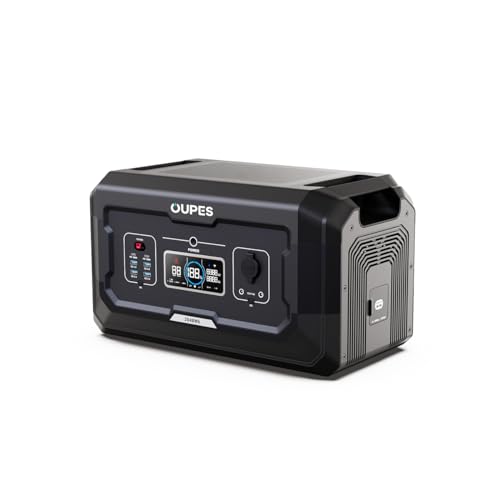 OUPES B2 Smart Extra Battery |
| Check price on Amazon |
Key takeaways
- Plan a multi-day outage around expansion batteries that fit your host station, stack where the listing allows and add real watt-hours, not guesses.
Planning for a multi-day outage changes the question completely. Overnight, you ask how much capacity gets you to morning. Across three or four days, you ask how much stored energy you can assemble around the station you already own, and how each added pack changes the daily budget for the fridge, the lights and the phones. The binding limit is still compatibility: an expansion battery only works with the host models its listing names, so a multi-day plan is built inside one ecosystem or it is not built at all.
This guide is for households in storm and wildfire-shutoff country that plan in days, owners of large home-backup stations who want the biggest single steps of capacity, and planners who prefer to stack several mid-size packs over time. The four packs below were selected from their Amazon listing titles and product information, using the host list, capacity and included components stated on each page.
Quick Picks
As an Amazon Associate we earn from qualifying purchases at no extra cost to you.
| Product | Best for | Key spec from title |
|---|---|---|
| EF ECOFLOW DELTA Pro 3 Extra Battery | DELTA Pro 3 homes planning the longest single-pack coverage | 4096Wh in product information, for DELTA Pro 3 |
| Anker SOLIX BP3800 Expansion Battery | F3800 systems that need days of refrigeration and light | 3840Wh LiFePO4, for SOLIX F3800 Series, battery-to-host cable included |
| BLUETTI B300K Expansion Battery | BLUETTI homes taking one large step toward multi-day cover | 2764.8Wh LiFePO4, fits AC200L, AC300, AC500 and AC200MAX, P090A cable included |
| OUPES B2 Smart Extra Battery | Planners who build day-by-day coverage one pack at a time | 2048Wh LiFePO4, fits Mega 1, Mega 2 and Mega 3, stacking described in listing |
How to Choose
Budget your watt-hours by the day, not by the event
Write the plan as a daily allowance. List what runs on day one of an outage, the fridge, a few lights, the router, device charging, a medical device if one is in the house, and assign each a rough daily watt-hour cost. That daily figure, multiplied by the number of days you want to cover, is the storage target your host plus packs must reach. This is why the large packs exist: a single 3840Wh or 4096Wh addition can cover the daily allowance on its own, while smaller packs must be stacked to reach the same total.
Decide between one large step and a staircase of packs
There are two honest ways to reach multi-day storage. The first is one large dedicated pack matched to a big host, like the BP3800 on an F3800 or the DELTA Pro 3 Extra Battery on its host. The second is a staircase: mid-size packs added one or two at a time, the pattern the OUPES listing describes with up to six B2 units on its larger Mega stations. One large step is simpler to install and manage. A staircase spreads the cost across seasons and lets you stop when coverage feels sufficient.
Count the recharge path as part of the plan
Stored energy is only half of a multi-day plan; the other half is what comes back in during the event. If your days include solar input or a generator run, the system only needs to bridge the gaps, and a smaller pack total can work. If the plan assumes no recharge at all, every watt-hour must be in the building before the lights go out, which pushes you toward the largest packs. Check what charging inputs your host lists, and size the battery total for the worse of your two scenarios, not the better one.
Place the stack once, in outage order
Multi-day systems get heavy fast. The packs in this guide weigh 65 to nearly 84 pounds each, and a host plus two packs can occupy a full corner. Set the system up in its permanent spot, host reachable, pack cables seated, and the loads you will actually plug in already decided. During an outage is the wrong time to discover the fridge cord does not reach or the pack blocks the host’s vents. A fixed, tested layout also makes the daily routine simple: check the remaining charge each morning and adjust the day’s loads.
Safety Notes
Build the whole system inside one maker’s ecosystem, matched by the host names in each listing. Expansion packs are designed for the voltage and controls of specific stations, so do not connect a pack to an unnamed host and do not use cables or adapters from unknown sources to bridge brands or generations. Follow the charging and storage guidance on each product’s listing, keep packs in a dry, ventilated place away from heat, and keep every connector dry. Complete the installation and a full test run while the grid is up, so a multi-day event is not the first time the system works together.
The 4 Best Options
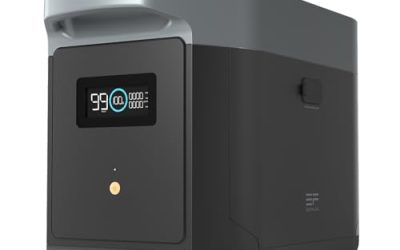
EF ECOFLOW DELTA Pro 3 Extra Battery
- Best for: DELTA Pro 3 households that want the biggest single-pack step toward several days of coverage.
- Capacity: 4096Wh, as listed in the product information (title rounds this to 4000Wh)
- Battery type: LiFePO4
- Compatible host from title: EcoFlow DELTA Pro 3
- Model: EFD521-EB
DELTA Pro 3 households that want the biggest single-pack step toward several days of coverage.
It fits the DELTA Pro 3 only, not the earlier DELTA Pro, and you should confirm the listing’s cable arrangements for your setup before the pack arrives.
This pack anchors the largest EcoFlow plan in this guide. Its product information lists 4096Wh of capacity for the DELTA Pro 3, which means one pack can carry a careful household’s daily allowance by itself, and the host-plus-pack total moves a home into genuine multi-day territory for refrigeration, lighting and communications. Because it is dedicated to a single host, there is no ambiguity about fit for DELTA Pro 3 owners. The cost of that scale is handling: at 72 pounds, it is a permanent resident of the spot you choose for it.
Anker SOLIX BP3800 Expansion Battery
- Best for: F3800 owners who want one large, cable-included step into multi-day home coverage.
- Capacity: 3840Wh, as listed in the product title
- Battery type: LiFePO4
- Compatible hosts from title: Anker SOLIX F3800 Series
- Included components: BP3800 expansion battery and battery-to-host cable
F3800 owners who want one large, cable-included step into multi-day home coverage.
Confirm your station is an F3800 Series model, since this pack does not serve Anker’s smaller stations, and measure the install spot for its size and weight first.
The BP3800 plays the same anchoring role for Anker homes, adding 3840Wh of LiFePO4 storage to stations in the SOLIX F3800 Series. For a planner, the appeal is arithmetic: one pack roughly doubles the base F3800-class storage the system starts with, and the listing includes the battery-to-host cable, so the expansion is a single delivery and a single connection. This is a pack for a fixed home installation, since at 83.78 pounds it is the heaviest item in this guide and effectively ends any thought of portability.
BLUETTI B300K Expansion Battery
- Best for: BLUETTI owners on the named host list building toward two or more days of essential-load coverage.
- Capacity: 2764.8Wh, as listed in the product title and information
- Battery type: LiFePO4
- Compatible hosts from title: BLUETTI AC200L, AC300, AC500 and AC200MAX
- Included components: B300K battery and P090A battery expansion cable
BLUETTI owners on the named host list building toward two or more days of essential-load coverage.
This listing family includes several BLUETTI packs and styles, so verify the selected style is the B300K for your host before ordering.
The B300K gives BLUETTI households a 2764.8Wh step, and its title covers four hosts, AC200L, AC300, AC500 and AC200MAX, which helps owners who might move up within the brand between now and the next storm season. In a multi-day plan it works as either the main addition on a mid-size host or the first of further additions where the host allows them. The included P090A expansion cable removes the most common day-one delay. At 65 pounds and over 20 inches long, it needs a planned home beside the host rather than a shelf.
OUPES B2 Smart Extra Battery
- Best for: OUPES Mega owners who want to reach multi-day totals gradually, one verified pack at a time.
- Capacity: 2048Wh, as listed in the product title and information
- Battery type: LiFePO4
- Compatible hosts from title: OUPES Mega 1, Mega 2 and Mega 3
- Included components: B2 Smart Extra Battery, extra battery cable and user manual
OUPES Mega owners who want to reach multi-day totals gradually, one verified pack at a time.
The stacking ceiling depends on the host, with the highest totals tied to Mega 2 and Mega 3 in the listing, so confirm your Mega model’s limit before planning a six-pack system.
The B2 is the planner’s pack, because its route to multi-day coverage is accumulation rather than one big purchase. Each unit adds 2048Wh to an OUPES Mega 1, Mega 2 or Mega 3, and the listing describes systems growing to six packs on the larger hosts, with totals up to 15.36kWh on Mega 3. That lets a household buy a day of coverage this year and another day next year. The box includes the extra battery cable and manual, and the title lists WiFi and Bluetooth app control for checking the system without standing over it.
Which One Fits Your Situation
A storm-season house that plans for three days without recharge
Buy the largest single step your host accepts. DELTA Pro 3 owners take the 4096Wh Extra Battery and F3800 owners take the BP3800, then trim the daily load list until host plus pack covers three days of it. With no recharge assumed, capacity is the whole plan, so this is the situation where the biggest packs earn their weight and floor space.
A household that gets some solar or generator input most days
You can plan smaller. A B300K on a BLUETTI host, or a first B2 on an OUPES Mega, may be enough when each day returns part of what the night used. The pack’s job becomes bridging, not storing everything, so spend the remaining budget on the recharge path and on a written daily routine for loads.
A planner building coverage across two or three budgets
The OUPES B2 staircase fits best. Start with one pack and the included cable, live through a season, then add the next pack if the daily allowance still feels tight. Because the listing describes up to six packs on Mega 2 and Mega 3, the plan has headroom without replacing the host or the packs already bought.
A large house that already owns a big stationary station
Match the anchor pack to the anchor station: BP3800 for the F3800 Series, the DELTA Pro 3 Extra Battery for that host. A single large pack keeps the installation to one connection, one cable run and one unit to keep charged and ready, which matters when the system is maintained by whoever is home, not by a hobbyist.
Common Mistakes
- Planning total capacity but never writing down a daily watt-hour allowance for the loads that matter.
- Assuming an expansion battery also increases output, then planning to run loads the host alone cannot start.
- Buying a pack for a host you intend to buy later, and discovering the pairing changed by then.
- Forgetting that each added pack adds serious weight, so the stack outgrows its shelf or corner.
- Skipping a full test run in fair weather, leaving the first real use for the outage itself.
Frequently Asked Questions
How do I work out how many watt-hours a multi-day plan needs?
Estimate one day first. A fridge, lights, router and phone charging might draw a modest daily total, while adding a freezer, medical equipment or work computers raises it quickly. Multiply that daily figure by the days you want to cover, then compare it with your host’s capacity plus the packs you are considering. The listings give each pack’s watt-hours, so the arithmetic uses their numbers, not guesses.
Is it better to buy one large pack or several smaller ones?
One large pack is simpler: one connection, one cable, one unit to manage, and the big packs here add 3840Wh or 4096Wh at once. Several smaller packs, as the OUPES listing describes, spread the cost and let you stop early. Choose by host first, since the host’s expansion limit decides which pattern is even available to you.
Can I keep adding packs until I reach any total I want?
No. Every host has an expansion ceiling stated by its maker, and the pack listing reflects the hosts it serves. The OUPES page describes up to six B2 packs on its larger Mega models, while other systems accept fewer. Plan against the ceiling for your exact station, and remember that floor space and total weight become limits of their own.
Should the system stay connected and charged all the time?
For outage planning, readiness is the point, so most owners keep the host and packs connected and follow the storage and charging guidance on the product listings. Set the system up once, keep it in its dry, ventilated spot, and check it on a routine, monthly, for example, so a dead or disconnected pack is discovered on a calm day rather than during a storm.
More from Amazon
Programs that pair well with the guide above. Offers and eligibility are set by Amazon and may change.
Free shipping on eligible items, Prime Video and more. Eligible new members can start with a free trial.
Start a Prime free trialAudiobooks and podcasts to listen to on the go. Eligible new members can start with a free trial.
Try Audible freeAd-free music streaming. Eligible new subscribers can start with a free trial.
Try Music Unlimited freeA free business account with business pricing and bulk-buying tools for work, shop or home office.
Create a business accountAs an Amazon Associate we earn from qualifying purchases.