Key takeaways
- An in-depth look at the Ring Video Doorbell 4, covering video quality, motion alerts, battery life and smart home integration for front doors.
A front door camera has one job above all others: show you who is there, clearly, the moment they arrive. The Ring Video Doorbell 4 aims to do that job with a sharper look at motion before it happens, steadier wireless connection, and a battery you can swap without taking the whole unit off the wall. It sits in the middle of the Ring lineup, above the basic battery models and below the hardwired premium units, which makes it a natural pick for homes that want a capable doorbell without rewiring the entry.
This in-depth look walks through what the Doorbell 4 does at the door, from video clarity and motion alerts to battery life, Alexa integration, and storm-season reliability. You will find guidance on placement, Wi-Fi, motion zones, and the Ring Home plan, plus the limits worth knowing before mounting. If your front door faces a busy walkway, a dark porch, or wild weather, the details below should help you decide whether this model fits your home.
Quick Picks
As an Amazon Associate we earn from qualifying purchases
| Product | Best for | Key spec from title |
|---|---|---|
| Ring Video Doorbell 4 | Front doors needing clear video and flexible battery or wired power | 1080p HD video with color Pre-Roll previews |
How to Choose
Match the power source to your door
Battery power suits renters and homes without usable doorbell wiring, since the Doorbell 4 runs on a removable rechargeable pack and mounts with basic tools. Hardwiring suits owners who want continuous trickle charging and fewer battery swaps, provided the existing transformer supplies 8 to 24 VAC at 40 VA max. Check the transformer label and the chime wiring before buying, and confirm that the mounting spot sits within strong Wi-Fi range. A doorbell that loses connection on a windy night helps nobody, so treat power and signal as one decision, not two separate ones.
Judge video by the doorway, not the box
A wide field of view matters more on a narrow porch than on an open entry, because the camera must catch parcels left low and visitors standing close. The Doorbell 4 records 1080p HD video with a 160-degree horizontal view, which covers most porches well, while color Pre-Roll adds a few seconds of footage from before motion was detected. Night vision matters too, since many deliveries and visitors arrive after dark. Walk out to your door, look at the angles, the lighting, and the places parcels land, then ask whether the camera can see all of them.
Tune motion alerts before you judge them
Motion alerts can feel either helpful or noisy, and the difference usually comes down to setup rather than the sensor itself. Customizable motion zones let you focus on the walkway and porch while ignoring the street, and sensitivity settings shape how often passing cars or swaying branches wake the camera. Give the zones a few days of real foot traffic, then narrow them until alerts match genuine visits. A doorbell that cries wolf every few minutes soon gets muted, which defeats the purpose of having it at all.
Plan for the subscription and the app
Live view and motion alerts work without a paid plan, but saving and sharing clips needs a Ring Home plan, so factor that into the long-term picture. The Ring app controls zones, alerts, quick replies, and linked Alexa devices, so comfort with a phone-based setup matters as much as comfort with a drill. Think about who else in the household needs alerts, whether an Echo device should announce visitors, and how you want to check the door when you are away. A doorbell is part of a small system, not a standalone gadget.
The 1 Best Options
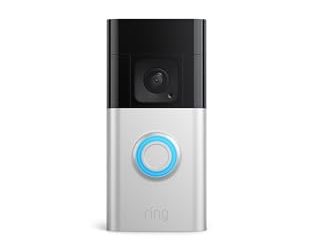
Ring Video Doorbell 4

The Ring Video Doorbell 4 is the battery-powered doorbell for households that want a clear view of the front door without committing to a hardwired install. Its headline feature is color Pre-Roll, which captures a few seconds of color video before motion was detected, so you can see what led up to an alert rather than only what happened after it. Dual-band Wi-Fi helps the unit hold a steadier connection than single-band models, and the quick-release battery makes recharging a simple swap instead of a full removal job. It pairs closely with Alexa, so an Echo device can announce visitors and show the live feed.
Specs
- 1080p HD Live Video with Live View and Night Vision
- Color Pre-Roll video previews in color, at lower resolution than 1080p, with no audio in Pre-Roll
- Field of view of 160 degrees horizontal and 84 degrees vertical
- Advanced Motion Detection with Customizable Motion Zones
- Two-way audio with noise cancellation
- Removable rechargeable Quick-Release Battery Pack included in the box
- Can be hardwired to an existing doorbell system or transformer for continuous charging at 8 to 24 VAC, 40 VA max, 50 or 60 Hz, or connected to a Ring plug-in adapter
- Dual-band Wi-Fi connection, 802.11 a/b/g/n at 2.4 GHz and 5 GHz
- Recommended minimum upload speed of 2 Mbps per device
- Dimensions of 5.1 in x 2.4 in x 1.1 in, which is 128 mm x 62 mm x 28 mm
- Satin Nickel finish, with a digital coupon for one free additional faceplate in select colors after device setup
- Box includes Video Doorbell 4, rechargeable Quick-Release Battery Pack, Satin Nickel Faceplate, Corner Kit, Installation Tools and Screws, USB Charging Cable, User Manual, and Security Sticker
- Works in temperatures from minus 5 degrees F to 120 degrees F, which is minus 20 degrees C to 50 degrees C
- Average install time of about 5 minutes, with a 1-year limited warranty
Best for: Homes that want clear front-door video, flexible battery or wired power, and close Alexa integration without a premium hardwired model.
Watch out for: Saving and sharing clips needs a Ring Home plan, and heavy motion activity drains the battery faster than a quiet doorway.
ASIN: B08JNR77QY
Which One Fits Your Situation
You rent and cannot rewire the entry
A battery doorbell is the answer when drilling into new wiring is off the table, and the Doorbell 4 fits that brief well. Mount it with the included hardware, charge the removable pack indoors, and swap it back in within minutes. Keep a spare charged pack handy for constant traffic, and check the Wi-Fi signal at the mounting spot before you commit to a position. When you move, the unit comes down cleanly with no wiring to undo.
Your porch faces a busy walkway
Busy foot traffic calls for careful motion zones, and this is where the Doorbell 4 earns its keep. Narrow the zones to the porch and the path to the door, lower the sensitivity a notch, and let color Pre-Roll show you what triggered each alert. Parcels left near the steps stay in frame thanks to the wide horizontal view. If alerts still flood in, tighten the zones further rather than switching the unit off.
You live with Alexa everywhere
Households already running Echo speakers and displays get the most from this doorbell, since Alexa can announce visitors, sound a chime, and show the live feed on a display. Set up routines so a press or motion event triggers the announcement you actually want, and decide which rooms should hear it. The doorbell becomes part of the home system this way, rather than another isolated app on your phone.
Storms and outages worry you most
A front-door camera matters most when weather turns rough, so mount the Doorbell 4 where driving rain cannot pool on the lens and where the Wi-Fi router still reaches it during a storm. Battery power keeps it watching when wired chimes lose power, though a dead home network still limits remote viewing. Keep the battery charged ahead of forecast storms, and treat the doorbell as one layer of storm readiness alongside lighting, locks, and a charged phone.
Common Mistakes
- Mounting the doorbell too high or too low, so faces sit outside the frame or parcels vanish below the bottom edge, when a height near four feet usually frames visitors and deliveries together.
- Leaving motion zones at their widest setting, which invites alerts from the street and passing traffic, then muting the app in frustration instead of narrowing the zones to the porch and walkway.
- Skipping the Wi-Fi check at the door, then blaming the camera for slow live view when the signal at the entry was weak all along, so run a signal check from the exact mounting spot first.
- Forgetting that clip history needs a Ring Home plan, which leads to surprise when an earlier event cannot be replayed, so decide on the plan before you need footage from a missed delivery.
- Letting the battery run flat during a busy week or ahead of a storm, when a regular charging habit and a spare pack keep the door covered without gaps.
Frequently Asked Questions
Does the Ring Video Doorbell 4 need existing doorbell wiring?
No, it runs on a removable rechargeable battery pack, so homes without usable wiring can still use it. You can also hardwire it to an existing doorbell system or transformer for continuous charging, or connect a Ring plug-in adapter. Battery mode gives you flexible placement, while wired mode reduces charging chores. Choose the setup that matches your door, your wiring, and how often you want to handle the battery.
What does color Pre-Roll actually show?
Color Pre-Roll captures a few seconds of color video from before motion was detected, giving context for alerts. You can see a visitor approaching or a courier setting down a parcel, rather than only the moment after the sensor fired. The Pre-Roll footage runs at lower resolution than the main 1080p video and carries no audio. It is a useful clue, not a replacement for the full clip.
Do I need a Ring Home plan to use this doorbell?
No, live view, two-way talk, and motion alerts work without a paid plan. A Ring Home plan is needed to save, replay, and share recorded clips, and to use features that depend on stored video. Without a plan, you can still answer the door from your phone in real time. If keeping a history of visits and deliveries matters to you, add the plan before you need to look back.
How does the Doorbell 4 work with Alexa?
The doorbell works closely with Alexa, so an Echo speaker can announce visitors and a display can show the live feed. You can answer the door through two-way talk, set up announcements for presses and motion, and link the doorbell into routines with other smart home devices. Keep the doorbell on the same Wi-Fi network as your Alexa devices, and check the Ring app for announcement options.
More from Amazon
Programs that pair well with the guide above. Offers and eligibility are set by Amazon and may change.
Free shipping on eligible items, Prime Video and more. Eligible new members can start with a free trial.
Start a Prime free trialAudiobooks and podcasts to listen to on the go. Eligible new members can start with a free trial.
Try Audible freeAd-free music streaming. Eligible new subscribers can start with a free trial.
Try Music Unlimited freeA free business account with business pricing and bulk-buying tools for work, shop or home office.
Create a business accountAs an Amazon Associate we earn from qualifying purchases.