
Key takeaways
- Plan camera positions first, then measure cable runs with extra length for routing.
- Use Cat5e or Cat6 cable rated for the environment; solid copper conductors are preferred over copper-clad aluminum, which reviewers and makers often caution against for PoE.
- Keep the recorder in a ventilated, dry, secure spot and put it on a battery backup so footage continues through brief power cuts.
- Place cameras high enough to be out of easy reach but low enough to capture faces, and avoid pointing directly at bright lights.
- Change default passwords, update firmware, and avoid exposing the recorder directly to the internet; use the maker’s secure remote-access method.
For most homeowners who can run Ethernet cable, a kit built around a dedicated PoE recorder from Reolink, Amcrest, Lorex or Annke covers the need with the least fuss, while people who already run a home network and want a polished app are better served by Ubiquiti UniFi Protect. Power over Ethernet (PoE) sends data and power down one cable, so each camera needs no nearby outlet, no battery swaps and no Wi-Fi signal. The trade-off is installation effort: cable has to be pulled through walls, attics or conduit before anything works.
Our top picks

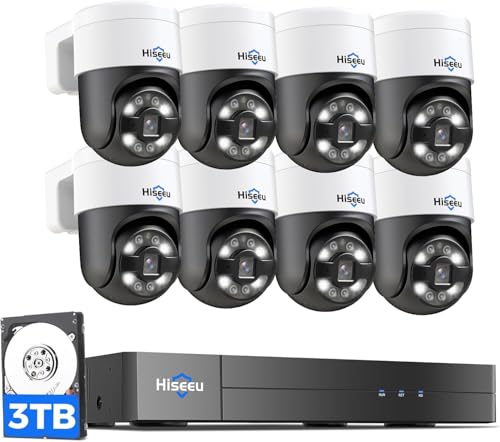

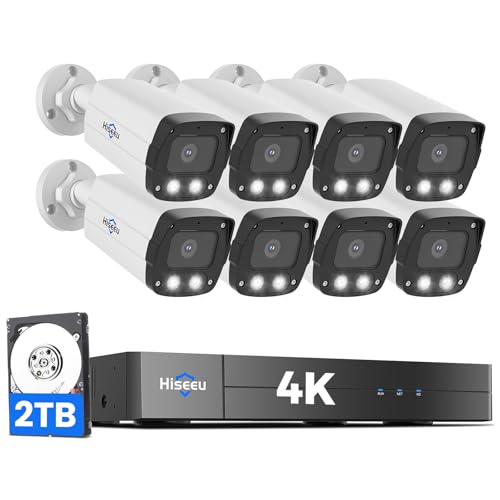
As an Amazon Associate we earn from qualifying purchases at no extra cost to you.
Systems at a Glance
| System family | Best for | Key stated traits | Limits |
|---|---|---|---|
| Reolink PoE NVR kits | Budget to mid-range buyers wanting a boxed kit | The maker lists 4K (8 MP) PoE cameras with a recorder that powers them directly and a hard drive included in many kits | App and web interface are functional rather than polished; cloud features are secondary |
| Amcrest PoE NVR systems | Buyers wanting an ONVIF-friendly recorder | The maker lists 4K and 5 MP options with local storage and ONVIF support | Interface feels dated to some reviewers |
| Lorex PoE systems | Buyers wanting a big-brand kit with smart detection | The maker lists 4K recorders, person and vehicle detection on selected models, and expandable drives | Some advanced features depend on the specific recorder |
| Annke PoE kits | Budget-conscious DIY installers | The maker lists multi-camera kits with a bundled recorder and drive | Smaller ecosystem, fewer add-on accessories |
| Ubiquiti UniFi Protect | Network enthusiasts and larger properties | Cameras connect through a UniFi controller or recorder; the maker lists PoE-powered cameras and a unified app | Higher entry cost tier, steeper learning curve, pieces are bought separately |
| Axis and similar commercial lines | Small businesses needing long-term reliability | Professional-grade optics and management software | Premium tier, overkill for most homes |
How PoE Camera Systems Work
A PoE system has three parts: cameras, a recorder or server, and the cable between them. In a kit, the recorder usually has PoE ports built in, so each camera plugs straight into the back of the unit. In a networked setup, cameras connect to a PoE switch, and recording software or a network video recorder (NVR) sits elsewhere on the network.
The standards matter. IEEE 802.3af delivers up to roughly 15 watts at the source, and 802.3at (PoE+) delivers up to roughly 30 watts. Most fixed cameras sit comfortably within the first figure, while pan-tilt-zoom models or cameras with heaters and infrared arrays may need the higher one. Ethernet runs are limited to about 100 meters (328 feet) per cable, so a detached garage or long driveway may need a switch or extender part-way.
What to Look For
Resolution and sensor
Makers commonly list 4 MP, 5 MP and 8 MP (4K) options. Higher resolution helps with facial detail and license plates at distance, but it also increases storage use. Reviewers often point out that sensor size, lens quality and low-light processing influence real image quality more than the megapixel number.
Recorder channels and storage
Recorders are sold in 4, 8, 16 and larger channel counts. Buy one with spare channels if you may add cameras later. Hard drive capacity determines how many days of footage are kept; a 4K camera recording continuously fills a drive much faster than a 1080p one. Motion-based recording stretches storage considerably.
Smart detection
Person, vehicle and package detection cut false alerts from swaying trees and passing headlights. Where this runs matters: some systems do it on the camera, some on the recorder and some in the cloud. On-device detection keeps working during an internet outage.
Local versus cloud storage
The main appeal of PoE kits is local recording with no required subscription. Some brands offer optional cloud backup. If someone could steal the recorder itself, think about where it is mounted and whether an off-site backup makes sense.
Weatherproofing and mounting
Look for an IP66 or IP67 rating stated by the maker for outdoor units, and use outdoor-rated, ideally shielded cable. Seal cable entry points and use a drip loop so water does not run along the cable into the camera. Any work near mains wiring, or drilling through walls that might hide wires, is a job for a licensed electrician.
Best Picks by Need
Best boxed kit for most homes: Reolink or Annke
These kits bundle cameras, recorder, drive and cable in one purchase and sit in the budget to mid-range tiers. Reviewers generally describe image quality as strong for the money, with the trade-off of less polished software. They are a sensible start for a first PoE install of four to eight cameras.
Best for flexibility: Amcrest
Amcrest’s ONVIF support lets you mix other compatible cameras with its recorders, which helps if you want to expand with a different brand later. It suits people comfortable with a slightly technical interface.
Best with smart alerts out of the box: Lorex
Lorex positions its mid-range and premium systems around on-recorder person and vehicle detection and a mobile app with live view. Check which recorder model includes which feature before buying, since the line spans several tiers.
Best for a polished ecosystem: Ubiquiti UniFi Protect
UniFi suits people who want one app for cameras and network gear. It is modular, so budget for cameras, a PoE switch and a recorder or controller separately. Reviewers praise the app and integration, while noting the cost and the need for networking knowledge.
Best for businesses: Axis or similar
Commercial lines focus on durability, lens options and software management. They are far beyond what a typical household needs.
Pick X If You Want…
| Pick | If you want |
|---|---|
| Reolink or Annke kit | Lowest effort, boxed hardware, local recording, budget tier |
| Amcrest | ONVIF openness and the option to mix brands |
| Lorex | Smart detection and a mainstream app from a well-known brand |
| UniFi Protect | A single polished platform and you already use UniFi networking |
| Axis or commercial | Business-grade longevity and support |
Installation Tips
- Plan camera positions first, then measure cable runs with extra length for routing.
- Use Cat5e or Cat6 cable rated for the environment; solid copper conductors are preferred over copper-clad aluminum, which reviewers and makers often caution against for PoE.
- Keep the recorder in a ventilated, dry, secure spot and put it on a battery backup so footage continues through brief power cuts.
- Place cameras high enough to be out of easy reach but low enough to capture faces, and avoid pointing directly at bright lights.
- Change default passwords, update firmware, and avoid exposing the recorder directly to the internet; use the maker’s secure remote-access method.
Alternatives
- Wi-Fi or battery cameras: Simpler to place, but they need charging or outlets and rely on signal quality. A reasonable choice for renters or spots where cable cannot reach.
- PoE cameras on an existing switch with free software: Buyers with spare computing hardware can run third-party recording software, trading convenience for control.
- Hybrid: a few PoE cameras plus a video doorbell: Many households cover the front door with a doorbell and the perimeter with two or three PoE units.
Budget Tiers Explained
Budget tier
Boxed kits from Reolink, Annke and similar makers anchor this tier. Expect a recorder with built-in PoE ports, four to eight cameras and a bundled hard drive. Reviewers generally find image quality good for the money. The compromises are usually software polish, a smaller accessory range and fewer advanced detection features.
Mid-range tier
Lorex and Amcrest systems with larger drives, smarter detection and varifocal or higher-resolution cameras sit here. This is often the best balance for homes with a long driveway or several entrances, where better lenses and storage planning pay off.
Premium tier
UniFi Protect and commercial lines such as Axis belong here. You pay for polish, integration, longevity and support rather than for raw image quality alone. This tier makes sense for large properties, small offices or enthusiasts who already run managed switches.
Planning the Cable Run
Most PoE headaches come from the cable, not the camera. Sketch every camera location, measure the route including vertical drops, and add a margin. Keep Ethernet away from parallel runs of mains wiring, which can introduce interference, and use proper conduit or outdoor-rated, UV-resistant cable on exposed stretches. Weatherproof junction boxes protect connectors at the camera. If the route passes through insulation, near chimneys or over ceilings you cannot inspect, a qualified installer or electrician can save time and prevent damage. Label both cable ends so troubleshooting later is simple.
Also think about the recorder’s home. A hidden, ventilated shelf near the router is typical. Keep it off the floor and away from heat sources, and consider a small battery backup, since a recorder that loses power loses footage at the worst moment.
Frequently Asked Questions
Do PoE cameras need Wi-Fi?
No. They connect by Ethernet cable, which carries both data and power. Wi-Fi is only needed if you want your phone to view the system remotely and the recorder connects to the router wirelessly, though a wired connection to the router is better.
Can I add PoE cameras from a different brand to my recorder?
Sometimes. Recorders that support ONVIF can often accept third-party cameras, but features such as smart detection may not carry over. Check the recorder’s compatibility list from the maker before mixing brands.
How much storage do I need?
It depends on camera count, resolution, compression and whether you record continuously or only on motion. Makers publish estimators, and a larger drive is an inexpensive upgrade. Many buyers choose a drive sized for at least a few weeks of motion-based recording.
What happens if the power goes out?
The recorder and PoE ports lose power, so cameras go dark. A small uninterruptible power supply keeps the recorder and cameras running for a short period, which is useful for capturing events during an outage.
Is a PoE switch required?
Not if the recorder has built-in PoE ports, as most kits do. You need a PoE switch if you have more cameras than ports or want cameras far from the recorder. Confirm the switch’s total power budget covers all cameras.
Can I install a PoE system myself?
Many buyers do, since the cameras use low-voltage cable. Follow the manufacturer’s instructions, take care when drilling, and hire a qualified electrician or installer for anything involving mains wiring or hard-to-reach routes.
More from Amazon
Programs that pair well with the guide above. Offers and eligibility are set by Amazon and may change.
Free shipping on eligible items, Prime Video and more. Eligible new members can start with a free trial.
Start a Prime free trialAudiobooks and podcasts to listen to on the go. Eligible new members can start with a free trial.
Try Audible freeAd-free music streaming. Eligible new subscribers can start with a free trial.
Try Music Unlimited freeA free business account with business pricing and bulk-buying tools for work, shop or home office.
Create a business accountAs an Amazon Associate we earn from qualifying purchases.





