
Key takeaways
- Budget: Wyze and entry Reolink models. Expect 1080p or 2K video, microSD storage and a basic app.
- Mid-range: Eufy and standard Ring or Arlo floodlights. These add stronger lamps, person detection and more mounting options.
- Premium: Pro versions with higher resolution, radar or enhanced motion detection, and deeper ecosystem features. They typically come with the most capable subscription tiers.
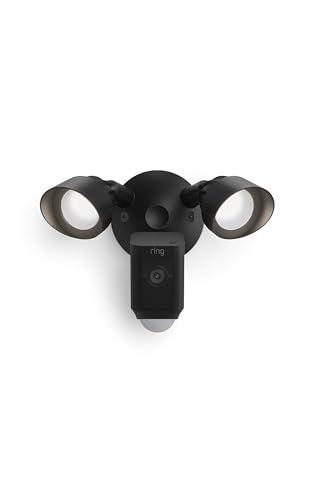
The best floodlight camera for most homes is a wired model that replaces an existing floodlight fixture, such as Ring Floodlight Cam Wired Pro, Arlo Pro Floodlight or Eufy Floodlight Cam, while Reolink and Wyze suit buyers who want lower-cost or local-storage options and a plug-in or battery floodlight suits spots with no wiring. Pick based on whether you have a junction box, whether you accept a subscription, and how wide an area you need to light.
Our top picks


As an Amazon Associate we earn from qualifying purchases at no extra cost to you.
At a Glance: Floodlight Camera Families
| Family | Best for | Power | Storage | Main limit |
|---|---|---|---|---|
| Ring Floodlight Cam (wired and Pro lines) | Alexa households and large ecosystem | Hardwired to existing fixture | Cloud plan for most history | Subscription for recording; limited without it |
| Eufy Floodlight Cam series | No-subscription local storage | Hardwired | Local storage on the unit | Fewer smart-home integrations |
| Arlo Pro Floodlight and related | Polished app and wire-free options | Wired or battery depending on model | Cloud plan for most features | Subscription for history and smart alerts |
| Google Nest Cam with Floodlight | Google Home users | Hardwired | Cloud plan for history | Value depends on the plan |
| Reolink floodlight cameras | Local recording and PoE or Wi-Fi options | Wired or PoE depending on model | microSD or recorder | App and integrations less polished |
| Wyze Floodlight Pro and similar | Budget-tier coverage | Hardwired | microSD or cloud plan | Fewer extras and shorter support history |
Makers update floodlight models regularly. Where an older version remains on sale, treat it as a previous generation and compare its listed features with the newer one.
What to Look for in a Floodlight Camera
Brightness and light spread
Makers rate floodlights in lumens. A higher number lights more yard, but a very bright light can bother neighbors. Two lamp heads, a common design, give a wide spread across a driveway or patio. Look for adjustable brightness and motion zones so the light fires only when needed.
Camera quality
Resolutions in current models range from 1080p to 2K or higher. The camera sits inside the light bar housing, so wide field of view and good dynamic range matter, since floodlights can cause glare. Reviewers often prefer models that keep faces visible when the lamp activates.
Power and wiring
Most floodlight cameras are hardwired into the home’s electrical box, usually replacing an existing fixture. If you are unfamiliar with household wiring, hire a qualified electrician, and switch off the circuit at the breaker before any work. Some brands offer plug-in or battery floodlights for places without wiring, though battery versions tend to have reduced brightness and need recharging.
Storage and subscriptions
Ring, Arlo and Nest depend on paid cloud plans for recorded clips and many smart alerts. Eufy and Reolink emphasize local storage, so there is no mandatory fee for basic recording. Wyze records to a microSD card and offers an optional plan. Read each maker’s current plan details before you buy.
Siren, two-way audio and smart alerts
Many models include a siren and two-way talk. Person and vehicle detection reduce false alerts caused by pets and trees, but some of these features sit behind a plan. If you live in a busy area, motion zones and sensitivity settings are important.
Weather and operating range
Look for an ingress rating such as IP65 or higher, and read the listed temperature range. Floodlight cameras sit under eaves and receive heat from the lamp, so makers design them with outdoor use in mind, but always follow the manual for mounting orientation and water sealing.
Notes on Individual Families
Ring Floodlight Cam
Ring offers wired and Pro versions, plus battery-powered floodlight options. Reviewers describe the app as easy and the ecosystem as broad, especially for homes using Alexa. The main drawback is the subscription needed to save and review video.
Eufy Floodlight Cam
Eufy lists local storage and on-device AI for human detection, which means video stays on the unit. Reviewers like the lack of monthly fees, though cloud-based sharing and smart-home options are narrower than at Ring or Google.
Arlo Pro Floodlight
Arlo provides wire-free and wired floodlight choices with a polished app. Expect to pay for a plan if you want video history and smart notifications.
Google Nest Cam with Floodlight
This model fits a Google Home setup, with familiar-face alerts on paid plans. Outside Google’s ecosystem it is less compelling.
Reolink
Reolink offers floodlight cameras with spotlight, siren and local recording. Reviewers point to value and storage control, with a few reports of a less refined app.
Wyze
Wyze brings a budget approach, with a hardwired floodlight and local microSD recording. It suits cost-conscious buyers, though some reviewers mention variable app reliability.
Pick X If…
| Your situation | Pick |
|---|---|
| You use Alexa and accept a subscription | Ring Floodlight Cam |
| You dislike monthly fees and have a junction box | Eufy Floodlight Cam or Reolink floodlight |
| You want a polished app and wire-free flexibility | Arlo Pro Floodlight |
| Your home runs on Google Home | Google Nest Cam with Floodlight |
| You want the lowest cost | Wyze floodlight |
| No wiring is available | Battery or plug-in floodlight camera |
Budget Tiers
- Budget: Wyze and entry Reolink models. Expect 1080p or 2K video, microSD storage and a basic app.
- Mid-range: Eufy and standard Ring or Arlo floodlights. These add stronger lamps, person detection and more mounting options.
- Premium: Pro versions with higher resolution, radar or enhanced motion detection, and deeper ecosystem features. They typically come with the most capable subscription tiers.
Installation and Safety Notes
Floodlight cameras connect to mains electricity. Turn off the power at the circuit breaker, confirm it is off with a tester and follow the manual. If the old fixture uses a different wiring configuration, or you are working at height, hire a licensed electrician. Mount the unit as high as the maker advises, usually in the range of two to four meters, so that the camera view reaches the target area. Aim the lights downward to limit glare in neighbors’ windows and to follow local light-pollution rules. Do not stack decorative wiring beyond what the maker lists, and replace any damaged gasket to keep water out of the housing.
Alternatives
- Spotlight camera: a camera with a smaller built-in light that is cheaper and easier to place.
- Separate floodlight and camera: offers more flexible aiming and replacement but costs more to install.
- Video doorbell: covers the front door at face height, and is easier to wire in many homes.
Before You Buy: A Short Checklist
Check whether your existing fixture sits on a junction box that can carry the weight of a camera light bar, and whether the wiring is accessible from the attic or the wall. Measure the distance from the mount to the area you want to cover, then compare it with the detection range the maker lists. Confirm your Wi-Fi signal reaches the spot, since floodlight cameras are often mounted on the far side of the house. Decide early whether you accept a subscription, because this shapes which brands are realistic. Read the maker’s notes on motion zones, brightness settings and siren control so the light does not trigger on passing cars or neighbors. Finally, keep the manual and note the breaker label for future maintenance. If lamp heads can be replaced, read how long the maker says they last, as a floodlight camera left on every night wears faster than one triggered by motion.
Frequently Asked Questions
Do floodlight cameras need a subscription?
Not always. Eufy, Reolink and Wyze list local recording options. Ring, Arlo and Nest rely on paid plans for video history and many smart features, so read the plan details first.
Can I install a floodlight camera myself?
Some homeowners do, but because the unit connects to mains wiring, hire a qualified electrician if you are unsure. Always turn off the breaker and follow the maker’s manual and local code.
How bright should a floodlight be?
Makers list lumens, and higher numbers cover wider yards. Choose adjustable brightness so the light is strong for a driveway but gentler near neighbors. Aim downward to reduce glare.
Will pets and trees trigger false alerts?
They can. Use motion zones and sensitivity controls, and look for person detection if the maker offers it. Some detection features may require a subscription.
Can a floodlight camera work without Wi-Fi?
Most need Wi-Fi for alerts and live view. Some models record locally during an outage, but notifications generally stop. A model with Ethernet or PoE offers a more reliable link if your router is nearby.
Where should I mount it?
Under an eave over a garage, driveway or backyard door is typical. Choose a height that the maker lists, keep the lens away from direct glare and avoid placing it where trees block the view.
More from Amazon
Programs that pair well with the guide above. Offers and eligibility are set by Amazon and may change.
Free shipping on eligible items, Prime Video and more. Eligible new members can start with a free trial.
Start a Prime free trialAudiobooks and podcasts to listen to on the go. Eligible new members can start with a free trial.
Try Audible freeAd-free music streaming. Eligible new subscribers can start with a free trial.
Try Music Unlimited freeA free business account with business pricing and bulk-buying tools for work, shop or home office.
Create a business accountAs an Amazon Associate we earn from qualifying purchases.





