
Key takeaways
- Where footage is stored: locally on a card or recorder, in the maker’s cloud, or both.
- Who can access it: account security, two-factor authentication, and whether the maker states end-to-end encryption is available.
- Whether the camera can be physically disabled: a lens cover or shutter, or a setting that turns the lens off at home.
- What the camera sees: privacy masking lets you black out zones such as a neighbor’s window.
- Network exposure: cameras that connect directly to the internet are a bigger target than ones on a local network behind a firewall.
If privacy is your top concern, choose a camera that records to local storage (a memory card or a home recorder) and works without a mandatory subscription, such as Reolink or Ubiquiti UniFi Protect systems, while households already inside Apple’s ecosystem can look at HomeKit Secure Video cameras, where the maker states that analysis happens on a home hub and recordings are stored in encrypted form. Cloud-first brands such as Ring, Arlo and Wyze are convenient, but they involve more of your footage passing through company servers. This guide compares the main approaches and what each maker states about storage and control.
Our top picks


As an Amazon Associate we earn from qualifying purchases at no extra cost to you.
At a Glance: Privacy-Minded Camera Options
| Option | Best for | Stated storage and privacy features | Limits |
|---|---|---|---|
| Reolink (Wi-Fi and PoE lines) | Local recording with no required subscription | Maker lists microSD slots and NVR recording on many models | Remote viewing still relies on the maker’s app and relay unless you configure access differently |
| Ubiquiti UniFi Protect cameras | Whole-property systems with a local recorder | Maker lists footage stored on a UniFi recorder on your network | Needs a compatible recorder and some networking comfort |
| Apple HomeKit Secure Video-compatible cameras (for example Aqara and Eve models) | Apple households | Apple states video is analyzed on a home hub and stored encrypted in iCloud | Requires an iCloud plan and a home hub; camera choice is narrower |
| Eufy (eufyCam and indoor lines) | Local-first convenience | Maker lists on-device or home-base storage and no required monthly fee for basic recording | App and cloud features are optional but still involve company services; read current privacy settings |
| Ring, Arlo, Wyze, Google Nest | Ease of use and smart alerts | Cloud plans for history and detection; some models also accept local storage | More data held by the vendor; advanced features may require subscription |
Specifications and policies change, so read each maker’s current privacy documentation before buying.
What “Privacy” Means for a Camera
People use the word to mean several different things, and cameras differ on each.
- Where footage is stored: locally on a card or recorder, in the maker’s cloud, or both.
- Who can access it: account security, two-factor authentication, and whether the maker states end-to-end encryption is available.
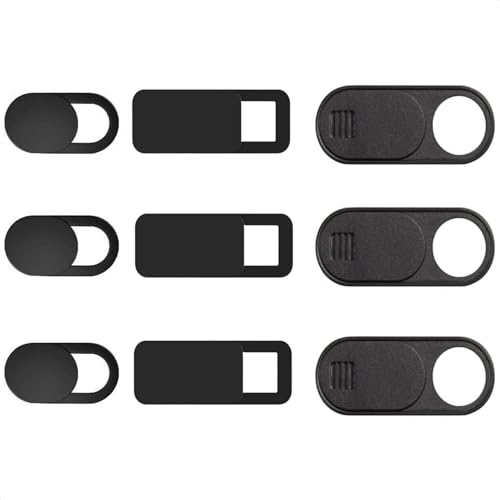
- Whether the camera can be physically disabled: a lens cover or shutter, or a setting that turns the lens off at home.
- What the camera sees: privacy masking lets you black out zones such as a neighbor’s window.
- Network exposure: cameras that connect directly to the internet are a bigger target than ones on a local network behind a firewall.
Local-First Systems
Reolink
Reolink sells Wi-Fi, battery and power-over-ethernet cameras, many with a microSD slot and compatibility with its own NVR. Because PoE cameras use a single cable for power and data, they can be placed on a network with no outside connection if you only want local review. Reviewers generally praise the value of the hardware and note that the app is functional but less polished than some rivals.
Ubiquiti UniFi Protect
UniFi Protect cameras record to a UniFi recorder on your own network. Reviewers describe it as one of the more capable prosumer ecosystems, with detection features processed on the recorder. The trade-offs are upfront hardware and a steeper setup than a plug-and-play camera.
Eufy
Eufy markets local storage in a home base or on the camera, with no mandatory subscription for core recording. The brand drew public criticism in 2022 over claims about its cloud handling, and it has since revised its stated practices. Anyone choosing Eufy should read the current settings, switch off features they do not use, and enable two-factor authentication.
Apple HomeKit Secure Video
Apple states that, with Secure Video, the camera sends footage to a home hub, which analyzes it for people, animals or vehicles and uploads encrypted clips to iCloud. Apple says it cannot view the recordings. The setup suits households that already use iPhones and a HomePod or Apple TV as a hub. Compatible cameras are fewer in number and generally cost more than basic cloud cameras.
Cloud-First Brands
Ring, Arlo, Wyze and Google Nest make setup easy and offer detection features that rely on cloud processing. They are reasonable choices if convenience outweighs control, but privacy-minded buyers should check the following before buying:
- Whether end-to-end encryption is offered and what it disables.
- How long clips are retained and how to delete them.
- Whether the camera works without a subscription for live view and local clips.
- How the company states it handles law-enforcement requests.
Privacy Features Worth Looking For
- Physical shutter or lens cover on indoor cameras, so the lens is blocked when you are home.
- Privacy zones to mask areas that should never be recorded, such as neighboring properties.
- Two-factor authentication on the account, and a unique password that you do not reuse.
- Local storage option that works without an internet connection.
- Firmware update policy stated by the maker.
- Geofencing or schedules that turn indoor recording off when you are home.
Placement and Legal Notes
Place cameras on your own property and point them away from neighbors’ windows and private areas. Laws on recording audio, covering shared spaces and filming other people vary by location, so check local rules before installing. Avoid placing indoor cameras in bedrooms and bathrooms, and tell guests and household workers where recording devices are installed.
Pick X If: Decision Table
| If you … | Choose | Why |
|---|---|---|
| Want footage to stay on your own hardware | Reolink PoE with NVR or UniFi Protect | Local recorders, no required cloud |
| Use iPhone and a home hub | HomeKit Secure Video camera | Encrypted, hub-processed design stated by Apple |
| Want easy setup with local card option | Eufy or Reolink Wi-Fi camera | Plug-and-play with microSD or home base |
| Need an indoor camera you can physically block | Model with a lens shutter or privacy mode | Visible, hardware-level off state |
| Prefer smart alerts over control | Ring, Arlo or Nest | Mature apps and cloud detection |
Budget Tiers
- Budget: Wi-Fi cameras with a microSD slot and local-only mode. Cheapest, but app quality and update cadence vary.
- Mid-range: Reolink PoE kits with an NVR, or Eufy systems with a home base.
- Premium: UniFi Protect with a recorder, or HomeKit Secure Video cameras plus a hub and cloud plan.
Alternatives
- Video doorbells with local storage if your main need is the front door.
- Self-hosted recorder software such as Frigate or Blue Iris, for technically inclined buyers who want full control, with the maintenance that implies.
- Non-camera sensors such as door, window and motion sensors if you want alerts without recording video at all.
Frequently Asked Questions
Which security camera is the most private?
No camera is private by default, but systems that record to your own recorder, such as Reolink PoE with an NVR or UniFi Protect, keep footage under your control. Disconnecting the system from the internet reduces exposure further, at the cost of remote viewing.
Are cameras with local storage safe from hacking?
They are not immune. Local storage reduces dependence on a vendor’s servers, but cameras can still be attacked through weak passwords or outdated firmware. Use strong unique passwords, two-factor authentication where available and regular updates.
Do I need a subscription for a private setup?
Not always. Many local-first cameras record to a card or recorder with no required plan, although optional cloud features may carry one. Apple’s Secure Video does require an iCloud plan.
Can I use an indoor camera without worrying about privacy?
Choose one with a shutter or a privacy mode and schedule it to stay off while you are home. Keep it out of bedrooms and bathrooms, and tell other household members it is there.
What is end-to-end encryption on a camera?
It means only your devices can decrypt the video, not the maker. Some brands offer it as an option that may disable features such as cloud clip search. Read the maker’s description before turning it on.
Is it legal to record neighbors’ areas?
Laws vary by location. Aim cameras at your own property, use privacy masking for adjoining areas, and check local rules on video and audio recording.
More from Amazon
Programs that pair well with the guide above. Offers and eligibility are set by Amazon and may change.
Free shipping on eligible items, Prime Video and more. Eligible new members can start with a free trial.
Start a Prime free trialAudiobooks and podcasts to listen to on the go. Eligible new members can start with a free trial.
Try Audible freeAd-free music streaming. Eligible new subscribers can start with a free trial.
Try Music Unlimited freeA free business account with business pricing and bulk-buying tools for work, shop or home office.
Create a business accountAs an Amazon Associate we earn from qualifying purchases.





