
Key takeaways
- Door frame width: narrow door frames may need an angle or wedge mount for a better view.
- Wi-Fi range: poor signal at the door causes lag and missed alerts; consider a mesh node or extender.
- Wi-Fi band: many doorbells work only on 2.4 GHz; read the maker’s specification.
- Operating temperature: cold weather shortens battery life, so check the stated range.
- Battery swap: some models have removable batteries, which makes recharging easier.
- Smart home support: confirm compatibility with Alexa, Google Home or Apple Home as relevant.
For most homes, a battery-powered video doorbell from a major ecosystem, such as the Ring Battery Doorbell, Google Nest Doorbell (battery), Eufy Video Doorbell E340 or Arlo Essential Video Doorbell Wire-Free, is the best match, with Eufy and Reolink leading for buyers who want local storage and no required subscription, and Ring or Nest leading for buyers who want smart home integration. “Wireless” here usually means battery power and Wi-Fi; most models can also connect to existing doorbell wiring.
Our top picks


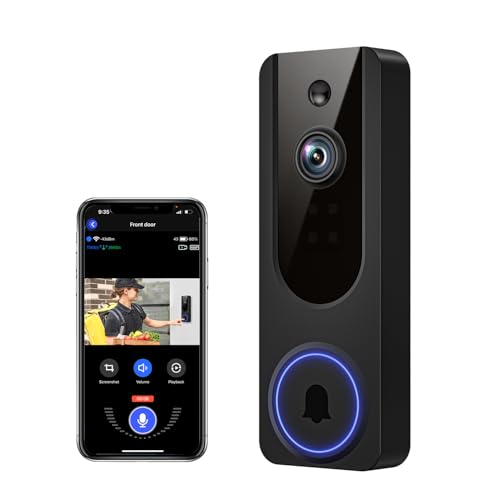
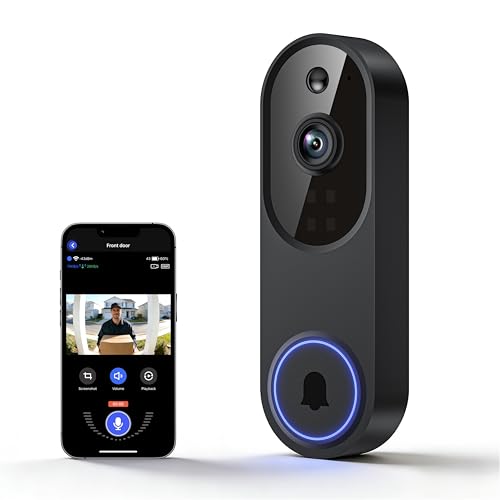
As an Amazon Associate we earn from qualifying purchases at no extra cost to you.
At a Glance: Wireless Doorbell Options
| Model line | Best for | Key stated features | Limits |
|---|---|---|---|
| Ring Battery Doorbell (current generation) | Ring ecosystem, easy setup | Battery or wired, app alerts, color night video | Video history needs a subscription |
| Google Nest Doorbell (battery) | Google Home users | Battery or wired, familiar-face features with plan, tall field of view | Some features need a plan |
| Eufy Video Doorbell E340 / E330 | Local storage preference | Dual cameras on some models, local storage, battery operation | Larger body, base unit or chime needed |
| Arlo Essential Video Doorbell Wire-Free | Arlo ecosystem | Battery operation, HD video, chime support | Cloud features need a plan |
| Reolink Video Doorbell (Wi-Fi or PoE) | Local recording, no subscription | Local microSD storage, wired or Wi-Fi options | Some versions need wiring |
| Wyze Video Doorbell line | Budget buyers | Wire-free or wired versions with app alerts | Fewer integrations |
Lineups update regularly. Match the exact model name and generation with the maker’s page when you shop.
Battery Versus Wired: What “Wireless” Means
A wireless doorbell has no power cable to a transformer. It runs from a rechargeable battery and connects by Wi-Fi. That makes it a good fit for apartments, rentals, brick or stone exteriors, and homes with no existing bell wiring. The trade-offs are recharging and, in cold climates, shorter battery life. Many models also accept existing doorbell wiring, which keeps the battery topped up and can ring an indoor chime. If you have working low-voltage doorbell wiring, check the maker’s voltage requirements before connecting; if you are unsure about the transformer or wiring, ask an electrician.
Chimes and Alerts
Wireless doorbells send alerts to your phone, but you may also want something audible inside. Some brands sell a plug-in chime or a base station with a speaker; others work with smart speakers that announce visitors. Check whether the chime is included in the box or sold separately. If you have an existing mechanical chime, only wired installations will ring it.
Video Quality and Field of View
Makers list resolution from 1080p up to 2K and beyond. A taller or squarer field of view, as in the Nest Doorbell and some Eufy and Ring models, lets you see packages on the ground. Wide fields of view can reduce detail at distance, so consider how far your doorstep is from the street. Night video may be infrared or color; makers describe ranges differently, so compare cautiously.
Subscriptions and Storage
This is the biggest practical difference. Ring, Nest and Arlo emphasize cloud video, and saving history or using advanced detection typically requires a plan. Eufy and Reolink emphasize local storage through a base unit or microSD card, which can cover basic needs without a plan. Read the maker’s current plan page before you buy so the monthly cost does not surprise you.
Picks by Situation
Apartment or Rental
A battery model with tool-free or adhesive mounting is the obvious fit. Check the lease and use only mounting methods allowed by the landlord. Several makers sell mounting kits for door frames.
Home With Existing Doorbell Wiring
Choose a model that supports wired power for continuous charging, such as a Nest or Ring battery model. The chime may ring when connected, depending on the model.
Privacy-Minded Buyers
Local storage models from Eufy or Reolink keep clips on a device you own, per the makers’ pages. Still use strong passwords and two-factor login.
Budget Buyers
Wyze and similar lines offer basic features at the lowest tiers, with trade-offs in integrations and finish.
Budget Tiers
| Tier | What you get | Trade-off |
|---|---|---|
| Budget | Basic HD video, app alerts, wire-free options | Fewer features and integrations |
| Mid-range | 2K video, local or cloud storage choice, chime options | Larger size |
| Premium | Package detection, face features, smart home integration | Plans for advanced features |
Fit and Compatibility Notes
- Door frame width: narrow door frames may need an angle or wedge mount for a better view.
- Wi-Fi range: poor signal at the door causes lag and missed alerts; consider a mesh node or extender.
- Wi-Fi band: many doorbells work only on 2.4 GHz; read the maker’s specification.
- Operating temperature: cold weather shortens battery life, so check the stated range.
- Battery swap: some models have removable batteries, which makes recharging easier.
- Smart home support: confirm compatibility with Alexa, Google Home or Apple Home as relevant.
Pick X If You Want…
| Pick this | If you want |
|---|---|
| Ring Battery Doorbell | Wide ecosystem and easy setup |
| Google Nest Doorbell (battery) | Google Home integration and tall view |
| Eufy Video Doorbell E340 | Local storage and a dual-camera view |
| Reolink Video Doorbell | No required subscription and local recording |
| Wyze Video Doorbell | A lower-tier option |
Alternatives
- Peephole cameras: replace the door viewer and suit apartments without exterior mounting.
- Standalone outdoor cameras: cover porches with more flexible placement but lack a call button.
- Traditional wireless chime plus camera: a simple button with a separate camera, if you prefer to split functions.
Safety and Privacy
Recording laws, particularly for audio, differ by place. Aim the camera at your own entrance and not at neighbors’ windows, and consider posting a notice if required locally. Follow the maker’s instructions for charging the battery and do not use damaged batteries. When working with existing doorbell wiring, switch off the circuit first or hire a qualified electrician.
Placement and Setup Tips
Mount the doorbell at the height the maker suggests, usually near chest height, so faces and packages both appear in the frame. Test the view at different times of day. A bright background such as a white wall or direct sun can make visitors look dark, and many apps offer exposure or backlight settings to compensate. If the camera sees a busy street, use motion zones so passing cars do not drain the battery and flood you with alerts.
Run the Wi-Fi setup near the door, not from the living room, so you confirm the signal is strong where it matters. If the signal is weak, a mesh node or extender close to the entry usually improves it. Name the doorbell clearly in the app and add household members so they receive alerts as well.
Features Worth Paying Attention To
- Pre-roll or pre-buffer: captures a few seconds before motion triggers, so you see the visitor arrive. Not all battery models offer it.
- Two-way audio: lets you speak to visitors from your phone. Quality varies between models.
- Quick replies: some apps let you send a short pre-recorded message to delivery drivers.
- Package alerts: usually a plan feature on cloud systems, and available on some local-storage models.
- Do-not-disturb schedules: reduce notifications at night.
- Tamper alerts: notify you if the device is removed, on models that support it.
Which Ecosystem Should You Join?
Doorbells work best alongside other devices from the same family. Ring offers a wide range of cameras, lights and chimes. Google Nest ties into Google Home displays and speakers. Arlo pairs with its own camera lineup, and Eufy and Reolink build around base stations or local storage. Choose based on what you already own and how you want to store video. Changing ecosystems later means replacing hardware and rebuilding automations.
| If you already use | Consider |
|---|---|
| Alexa devices and displays | Ring or Arlo, per the makers’ compatibility lists |
| Google Home speakers and displays | Google Nest Doorbell |
| No ecosystem, wanting local storage | Eufy or Reolink |
| A tight budget | Wyze or a similar budget line |
Maintenance
Wipe the lens with a soft cloth when it gets dusty or spotted. Recharge or swap the battery according to the app’s level readout, ideally before it reaches the very low state. Keep firmware updated, and replace the battery if the maker notes capacity decline. In freezing weather, battery life may fall noticeably, so some owners keep a spare charged pack ready where the model supports swapping.
Frequently Asked Questions
Do wireless doorbells need Wi-Fi?
Yes, nearly all do. A weak signal at your door causes delays, so check signal strength before mounting and consider an extender.
How long does the battery last?
Makers quote months under typical use. Busy doorsteps, cold weather and long live-view sessions shorten that, according to reviewers.
Can I connect it to my existing doorbell wiring?
Many models can. Check the maker’s voltage requirements and, if unsure, ask an electrician.
Do I have to pay a monthly fee?
It depends. Cloud-based systems usually charge for saved video, while local-storage models can cover basics without a plan.
Will it ring a chime inside?
Only if it has a compatible chime or a connected speaker. Some include one, others sell it separately, and mechanical chimes need wired setups.
Is it safe to install myself?
Battery models are generally simple. If you touch wiring or a transformer, follow the manual, switch off power and call a professional if uncertain.
More from Amazon
Programs that pair well with the guide above. Offers and eligibility are set by Amazon and may change.
Free shipping on eligible items, Prime Video and more. Eligible new members can start with a free trial.
Start a Prime free trialAudiobooks and podcasts to listen to on the go. Eligible new members can start with a free trial.
Try Audible freeAd-free music streaming. Eligible new subscribers can start with a free trial.
Try Music Unlimited freeA free business account with business pricing and bulk-buying tools for work, shop or home office.
Create a business accountAs an Amazon Associate we earn from qualifying purchases.





