Key takeaways
- This aqara smart lock u100 review covers fingerprint unlock, Apple Home Key, keypad codes, hub needs, battery life, and door fit in full detail before you buy.
Choosing a keyless deadbolt means deciding how your household will get through the front door, and the Aqara Smart Lock U100 asks you to weigh several ways of unlocking against one another. A fingerprint reader is fast when your hands are full, a keypad suits guests and children without a phone, and Apple Home Key lets an iPhone or Apple Watch open the door. The lock needs a hub for remote control, runs on batteries, and must fit a standard deadbolt door, so the real question is whether its entry methods match your household habits.
This article is for Apple households in Apple Home, for families who share access with children, cleaners, or guests, and for renters and hosts who want codes they can change without cutting new keys. The product below was chosen from its name and specifications on its Amazon listing, listed as the Aqara Smart Lock U100, a fingerprint keyless entry deadbolt with Apple Home Key, a touchscreen keypad, Bluetooth, and IP65 weather resistance.
Quick Picks
As an Amazon Associate we earn from qualifying purchases.
| Product | Best for | Key spec from title |
|---|---|---|
| Aqara Smart Lock U100 | Apple households wanting fingerprint, keypad, and phone-tap entry in one deadbolt | Fingerprint keyless entry door lock with Apple Home Key |
How to Choose
Entry methods and who uses them
A smart lock earns its place by matching how each person in the household actually enters the home, so count the methods before you count the features. Fingerprint unlock suits the people who come and go most often, since a finger is always with you and needs no phone, code, or card. A keypad suits guests, children, dog walkers, and cleaners, because a code can be shared and changed later without handing over a physical key. Phone-tap entry through Apple Home Key suits iPhone and Apple Watch owners who already carry their device everywhere. If your household mixes Apple and Android users, check which methods each person can use, because Home Key only works on Apple devices.
Hub, app, and ecosystem requirements
Many smart locks work over Bluetooth for nearby control and need a hub for remote control, voice assistants, and automations, so read the connectivity requirements before you buy. The U100 connects over Bluetooth and Zigbee, and remote access, remotely configured passwords, and links to Google Home, Alexa, and IFTTT all need an Aqara Zigbee 3.0 hub. Apple Home integration works through Apple Home, with Home Key available on a compatible iPhone or Apple Watch. If you already own an Aqara hub, the lock slots into your existing setup with little extra cost. If you own no hub, factor it into your plans, because without one you lose remote locking, remote code changes, and voice control.
Door fit, deadbolt type, and installation
A smart lock replaces the deadbolt, not the whole door, so the door itself decides whether the lock will fit and work well. Measure the door thickness, the backset, and the existing deadbolt bore, and check them against the maker fit guide before you buy. The U100 is a deadbolt replacement, so it suits doors with a separate deadbolt above the handle, not a door with a built-in lever lock and no deadbolt. Check that the door closes and latches smoothly without pushing or lifting, because a misaligned door can stop the bolt from throwing fully. A smart lock does not replace good door hardware, so fix a worn strike plate or loose frame first.
Power, battery life, and backup access
A battery lock must keep working through cold weather and the day the batteries run low, so check the power setup and the backup options. The U100 runs on four AA batteries that come in the box, and the maker states battery life of up to eight months, though heavy use and cold weather will shorten that figure in practice. A USB-C port on the lock allows emergency charging from a portable battery, for the day the batteries die while you are outside. A mechanical key is included for emergencies, so keep one somewhere you can reach if the electronics fail. Check battery level in the app, and replace the batteries before winter, because cold drains alkaline cells faster.
The Best Option
Aqara Smart Lock U100
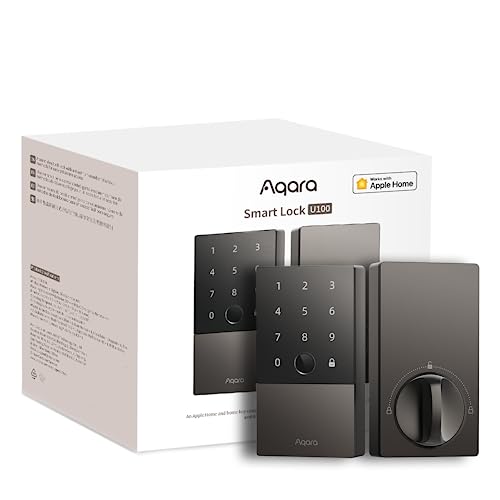
The Aqara Smart Lock U100 is a fingerprint keyless entry deadbolt for Apple households and families who want several ways through the door without keys. Its fingerprint reader stores up to fifty fingerprints, the touchscreen keypad takes codes you can set for family and visitors, and Apple Home Key lets a compatible iPhone or Apple Watch unlock the door. It runs on four AA batteries, includes a mechanical key for emergencies, and carries an IP65 rating on the exterior panel. Remote control and voice assistants need an Aqara Zigbee 3.0 hub. A smart lock does not replace good door hardware, so check the fit with your door before buying.
Specs
- Fingerprint reader stores up to 50 fingerprints
- Apple Home Key support for iPhone and Apple Watch, including when the device is out of power
- Touchscreen keypad with remotely configurable passwords through the Aqara Home app
- One-time local passwords for visitors and a mechanical key for emergency use
- Auto-lock with a built-in gyroscope and a Do Not Disturb mode
- Powered by 4 AA 1.5V batteries, included, with battery life of up to 8 months
- USB-C port for emergency charging
- Zinc alloy body with an IP65 rating on the exterior panel
- Works from minus 31 degrees Fahrenheit to 151 degrees Fahrenheit
- Bluetooth and Zigbee connectivity; Aqara Zigbee 3.0 hub required for remote access and third-party ecosystems
- Model SDL-D01, Gray, 5.27 x 3.46 x 2.91 inches, 3.85 pounds
Best for: Apple households and families who want fingerprint, keypad, and phone-tap entry in one deadbolt.
Watch out for: Remote control, remote code changes, and voice assistants need an Aqara Zigbee 3.0 hub, which is sold separately, and the included NFC card is not part of this listing.
ASIN: B0BZSD2L1W
Smart Lock Safety Basics
A smart lock runs on batteries and electronics, so a few habits keep it reliable and keep your home secure. Replace the four AA batteries on a schedule rather than waiting for a low-battery warning, and keep the included mechanical key somewhere you can reach from outside the home, such as with a trusted neighbour or in a lockbox. Never share your main code with visitors; give guests a one-time or temporary code instead, and delete codes when a guest, cleaner, or tenant no longer needs access. Keep the exterior keypad clean and dry, and remember that only the exterior panel carries the IP65 weather rating, while the interior panel is meant for indoor use. Test the auto-lock and the manual thumbturn after installation, and check that the bolt throws fully into the strike plate. If the door sticks or the bolt drags, fix the alignment before relying on the lock.
Which One Fits Your Situation
You live in an Apple household
If your family uses iPhones and Apple Watches, the U100 fits naturally, because Apple Home Key lets each person tap a phone or watch to unlock the door. Set up each family member in Apple Home so everyone has their own access, and use the fingerprint reader as a backup for the moments when a phone is left inside. Add an Aqara hub if you want remote locking and automations, such as locking the door when the last person leaves.
You share access with guests and helpers
If cleaners, dog walkers, relatives, or short-term guests need to enter while you are away, the U100 gives you codes instead of copied keys. Create a separate code for each helper, use one-time local passwords for one-off visits, and remove codes when the arrangement ends. The fingerprint reader stays for family members, while the keypad handles everyone else. A hub adds remote code changes, so you can set a code from work and delete it the same evening.
Your door faces rain and cold
If your front door is exposed to rain, snow, or wide temperature swings, the U100 exterior panel carries an IP65 rating and works from minus 31 degrees Fahrenheit to 151 degrees Fahrenheit, which covers most climates. Check that the door has a proper overhang or that the lock sits far enough from direct driving rain, because no rating replaces shelter. Replace batteries before winter, since cold shortens battery life, and keep the USB-C emergency charging option in mind.
You want keyless entry without a hub
If you do not want to buy a hub or join a smart home system, the U100 still works as a standalone keyless deadbolt. Fingerprint unlock, keypad codes, and the mechanical key all work over Bluetooth and local control, with no hub in the loop. You will miss remote locking, remote code changes, and voice control, but for a household that only needs to stop carrying keys, that trade is often fine. Add a hub later if your needs change.
Common Mistakes
- Buying the lock before measuring the door thickness, backset, and deadbolt bore, then finding it does not fit the existing holes.
- Assuming remote control and voice assistants work out of the box, when they need an Aqara Zigbee 3.0 hub that is sold separately.
- Sharing one main code with every guest and helper, instead of giving each person a separate code that can be deleted later.
- Waiting for a low-battery warning in deep winter, when cold weather can drain the four AA batteries faster than expected.
- Fitting the lock to a door that sticks or a strike plate that is loose, then blaming the lock when the bolt will not throw fully.
Frequently Asked Questions
Does the Aqara Smart Lock U100 work with Apple Home Key?
Yes, the U100 supports Apple Home Key, so a compatible iPhone or Apple Watch can unlock the door with a tap. The listing states that Home Key works even when the iPhone or Apple Watch is out of power, which helps when a phone dies on the way home. You manage and share access through Apple Home, and the lock also supports fingerprint unlock, keypad codes, and a mechanical key.
Do I need an Aqara hub to use the U100?
No hub is needed for the core ways of unlocking, since fingerprint, keypad, and mechanical key all work locally. A hub is needed for remote control, remotely configured passwords, and links to Google Home, Alexa, and IFTTT, because those features run through an Aqara Zigbee 3.0 hub. If you only want keyless entry at the door itself, you can use the lock without a hub and add one later.
How long do the batteries last in the U100?
The listing states battery life of up to eight months from the four included AA batteries, though use and cold weather change that figure. Heavy use and frequent auto-locking use more energy, and cold weather shortens battery life. A USB-C port allows emergency charging from a portable battery, and a mechanical key is included for emergencies. Check the battery level in the app regularly.
Will the U100 fit my door?
The U100 is a deadbolt replacement, so it suits doors that already have a separate deadbolt above the handle. Measure your door thickness, backset, and deadbolt bore before ordering. Check that the door closes and latches smoothly, because a misaligned door can stop the bolt from throwing fully. A smart lock does not replace good door hardware, so fix a worn strike plate or loose frame first.
More from Amazon
Programs that pair well with the guide above. Offers and eligibility are set by Amazon and may change.
Free shipping on eligible items, Prime Video and more. Eligible new members can start with a free trial.
Start a Prime free trialAudiobooks and podcasts to listen to on the go. Eligible new members can start with a free trial.
Try Audible freeAd-free music streaming. Eligible new subscribers can start with a free trial.
Try Music Unlimited freeA free business account with business pricing and bulk-buying tools for work, shop or home office.
Create a business accountAs an Amazon Associate we earn from qualifying purchases.