Key takeaways
- Keep home internet running during outages with a router mini UPS sized for your modem, ONT and router chain, with runtime math and safe placement tips.
Keeping home internet alive during an outage is a chain problem, not a router problem. The signal reaches your laptop only if every box in the path stays powered: the fiber terminal or modem where the line enters, the router, and any mesh node covering your room. One dark link ends the connection as completely as a cut cable. A router mini UPS earns its place by feeding that whole chain for hours, so the real decision is how many boxes you must cover, and how long the night may last.
This guide is written for households that ride out overnight storm outages, families whose work and school depend on the connection lasting, and anyone adding backup to a fiber install. Every model below was selected from the name and stated details on its Amazon product page, so capacities come from the watt-hours and milliamp hours the titles print. Four picks cover the common chain sizes, from a single router to a three-box fiber setup.
Quick Picks
As an Amazon Associate we earn from qualifying purchases.
| Product | Best for | Key spec from title |
|---|---|---|
| Melasta Mini DC UPS | A modem and router chain with mixed voltages | 56Wh, PD30W bidirectional USB-C, 5V/9V/12V/15V/24V outputs, cables included |
| TalentCell Mini UPS SL3400 | The longest overnight outage on a full chain | 27000mAh, 97.2Wh, DC 12V/9V, 18W USB-A/USB-C PD output |
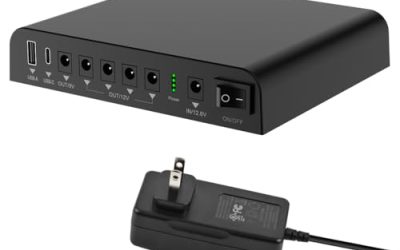
| DCP-36 Mini UPS for WiFi Router | A fiber ONT and router that must run as a pair | 10400mAh, DC 5V/9V/12V, automatic switching, FTTH support |
| Marsriva KP3 Mini UPS | A single-router flat where cuts are short | 10000mAh, 36Wh, 0ms transfer, multi-port |
How to Choose
Map every box between the wall and your laptop
Before choosing a capacity, list the chain out loud. A cable home usually has a modem and a router. A fiber home has an optical terminal, often called an ONT or ONU, plus the router, and a mesh household adds one or more nodes. Each box has its own power label, and the mini UPS has to satisfy all of them at once. This is where first purchases fail: the router gets backup, the terminal does not, and the household learns during the first outage that a glowing router with a dark terminal serves no web pages.
Budget watt-hours for the whole night, not the first hour
Add the watt draw of every box in your chain; a modem and router together often land near twelve watts, and a mesh node adds several more. Then divide the watt-hours in a title by that total and allow for losses. A 97.2Wh pack is the overnight candidate for a two-box chain, a 56Wh pack covers an evening and a working morning stretch, and a 36Wh pack is honest cover for one router through shorter cuts. Buying for the full night, rather than the average flicker, is the difference between backup and decoration.
Decide between one larger unit and the shape of your outlets
A single larger pack beside the entry point is simplest when the terminal and router sit together, which is common in fiber installs where both boxes were mounted by the technician. Homes where the modem lives in a hallway and the router in an office may do better with the router on a compact unit and accept that the chain still depends on the terminal’s location. Check the output list in the title: several DC voltages from one unit, as the Melasta and DCP-36 offer, is what lets one pack feed a mixed chain.
Keep the backup itself safe through the storm
A mini UPS is a lithium battery working hardest exactly when conditions are worst, so place it like it matters. Give it an open shelf with air around it, away from windows that leak in a storm and away from soft furnishings. Never exceed the combined output in watts across all ports, since protection shutdowns arrive at the worst moment. After the outage, let the pack recharge fully before the next event, and glance at it every few months: a swollen or unusually warm unit should be retired, not nursed along.
The 4 Best Options
Melasta Mini DC UPS
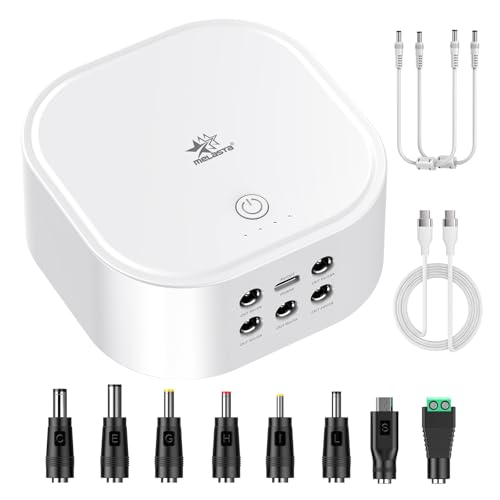
The Melasta leads this list because home chains are rarely one voltage, and its title answers that directly: a 56Wh battery, outputs at 5, 9, 12, 15 and 24 volts, a PD30W bidirectional USB-C port, and cables included. One pack can feed a 12V terminal and a 9V or 12V router without a tangle of converters, and the USB-C port doubles as outage charging for the phone that becomes the family hotspot of last resort. It is the balanced household pick: enough stored energy for a long evening, and the flexibility most chains actually need.
Specs
- Brand: Melasta, per the product title
- Capacity: 56Wh (10.8V), per the product title
- USB-C: PD30W bidirectional in and out, per the product title
- DC output: 5V, 9V, 12V, 15V and 24V, per the product title
- Intended gear: Router and modem, per the product title
- Cables: Included, per the product title
Best for: A two-box home chain whose modem and router run on different voltages.
Watch out for: Set each output to the voltage on that device’s label; the wide range helps only when it is matched box by box.
ASIN: B0FM86QLHF
TalentCell Mini UPS SL3400

When the outage pattern is measured in nights rather than hours, capacity stops being a luxury. The TalentCell title lists 27000mAh and 97.2Wh with DC 12V and 9V outputs and 18W USB-A and USB-C PD ports, the largest store of energy in this group by a wide margin. A modem and router drawing near twelve watts can lean on that pack through a long night and into the morning, which is exactly the window when outage news, school closures and work decisions arrive. The cost is bulk: plan a permanent shelf spot beside the chain.
Specs
- Brand: TalentCell, per the product title
- Model: SL3400, per the product title
- Capacity: 27000mAh, 97.2Wh, per the product title
- Battery: Lithium ion, per the product title
- DC output: 12V and 9V, per the product title
- USB output: 18W USB-A and USB-C PD, per the product title
Best for: A household that measures storm outages in nights and needs the chain up at dawn.
Watch out for: The listing notes some device port sizes need a separate adapter, so check your barrel sizes against the included cables early.
ASIN: B07WLD32RP
DCP-36 Mini UPS for WiFi Router
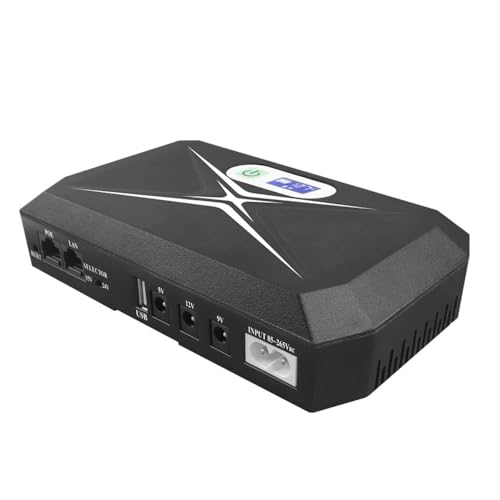
Fiber homes should start here. The DCP-36 title names FTTH outright, supports DC 5V, 9V and 12V at up to 2A, carries a 10400mAh battery, and switches automatically when the grid drops. That combination was clearly drawn around the terminal-plus-router pair: both boxes stay fed from one pack, the handover needs no one awake to flip anything, and the set-top box named in the title can ride along if its label matches. For a household whose internet dies the instant power blips, automatic behaviour is worth more than a larger number on the box.
Specs
- Model: DCP-36, per the product title and listing
- Capacity: 10400mAh, per the product title
- DC output: 5V, 9V and 12V, per the product title
- Switching: Automatic, per the product title
- Intended gear: WiFi router, FTTH terminal, modem, set-top box, per the product title
Best for: A fiber installation where the ONT and router must survive the night as a pair.
Watch out for: Stay under the per-port current in the title; a hungry terminal and router on one port can exceed what a single output offers.
ASIN: B0DM4H8NHW
Marsriva KP3 Mini UPS

Not every home needs an overnight plan. Where the grid’s habit is short cuts and flickers, the KP3’s headline figures are the right ones: 10000mAh and 36Wh, a 0ms transfer, and multiple ports in a palm-sized case. The router never reboots, calls survive the stumble, and a camera or phone can share the pack within its limits. It is the honest pick for an apartment or a single-router house, with the clear understanding that a day-long outage will outlast it and a bigger pack belongs on the shelf instead.
Specs
- Brand: Marsriva, per the product title
- Model: KP3, per the product title
- Capacity: 10000mAh, 36Wh, per the product title
- Transfer: 0ms, per the product title
- Ports: Multi-port, per the product title
- Intended gear: Router, LED light, smartphone, CCTV camera, per the product title
Best for: A single-router home where outages are brief but frequent.
Watch out for: The total output ceiling is small, so a modem, router and mesh node together can push past what this unit should carry.
ASIN: B0FF9PQ528
Which One Fits Your Situation
A fiber household that works and learns from home
Choose between the DCP-36 and the TalentCell. The DCP-36 was shaped for the terminal and router pair and switches on its own; the TalentCell is the pick when outages in your area routinely last past midnight. Either way, test the setup on a calm weekend by unplugging the chain, so the first real outage holds no surprises.
A cable household with a mesh node in the bedroom
Your chain is three boxes, so budget for all three or accept covering two. The Melasta’s voltage spread and 56Wh suit a modem and router in one spot; add the mesh node only if the combined draw stays inside the pack’s limits, and place the node you sit nearest on the plan first.
A single-router apartment with flickery power
The Marsriva KP3 is your unit. Instant transfer is the whole game when cuts last seconds, and the compact case disappears beside a router on a small shelf. If your building later shows a pattern of longer outages, step up to the Melasta rather than stacking a second small pack.
A rural home where outages arrive with every storm
Go straight to the TalentCell SL3400 and its 97.2Wh. Rural restoration runs long, and the extra stored energy covers the gap between the storm and the repair crew. Keep expectations honest, though: if the provider’s roadside equipment is dark too, your chain waits with everyone else until it returns. Give the pack a permanent shelf spot, not an improvised one each storm.
Common Mistakes
- Counting only the router and forgetting the modem or fiber terminal in the same chain.
- Adding a mesh node’s draw to the runtime estimate after buying, not before.
- Leaving one box on a different voltage output than its label specifies.
- Assuming home backup fixes an outage that also darkened the provider’s street equipment.
- Burying the mini UPS behind the router in a closed cabinet where heat builds during a long discharge.
Frequently Asked Questions
Will a mini UPS keep my fiber internet up all night?
It can, if the whole chain is covered and the capacity fits the draw. A terminal and router near twelve watts need the larger packs here for a full night, such as the 97.2Wh TalentCell. The service also has to be alive at the provider’s end; your backup covers your side of the line.
How do I work out how many hours my setup will run?
Add the watts printed on each device label in the chain, then divide the watt-hours in the mini UPS title by that total and trim the answer for losses. Twelve watts against 56Wh lands near four hours of realistic use. Recheck the sum whenever you add a mesh node or a camera.
Can one mini UPS power the modem in one room and the router in another?
Only if a cable can run between them, which most homes will not accept. The practical pattern is one unit where the chain’s boxes sit together, or a compact unit on the router alone when the terminal rarely loses its own feed. Long DC cable runs also lose voltage, so keep them short.
What is the first thing to do when the power comes back?
Let the mini UPS recharge fully before you forget about it, and confirm every box in the chain rebooted in the right order, terminal first, then router. A pack left half charged after one storm is the quiet reason the next outage ends early, so make the recharge part of the cleanup routine.
More from Amazon
Programs that pair well with the guide above. Offers and eligibility are set by Amazon and may change.
Free shipping on eligible items, Prime Video and more. Eligible new members can start with a free trial.
Start a Prime free trialAudiobooks and podcasts to listen to on the go. Eligible new members can start with a free trial.
Try Audible freeAd-free music streaming. Eligible new subscribers can start with a free trial.
Try Music Unlimited freeA free business account with business pricing and bulk-buying tools for work, shop or home office.
Create a business accountAs an Amazon Associate we earn from qualifying purchases.