Key takeaways
- Grade ratings: some makers cite ANSI/BHMA grades for their locks. Compare the grade the maker states and treat it as one factor among several.
- Weather: outdoor keypads should state an operating temperature range suited to your climate.
- Batteries: alkaline AA packs are common; makers quote months of life under typical use, and busy rentals shorten that. Replace batteries on a schedule rather than waiting for the low-battery warning.
- Audit logs: an app history showing when each code was used helps with disputes.
- Code hygiene: avoid obvious patterns, and delete codes after each stay.
For most short-term rental hosts, a keypad smart lock that supports scheduled guest codes, such as the Yale Assure Lock 2, Schlage Encode Plus or Level Lock+, is the best fit, while hosts who want to keep their existing deadbolt hardware should look at retrofit units like the August Wi-Fi Smart Lock or the Wyze Lock Bolt. What matters most for a rental is not the finish or the app polish but how reliably the lock creates, schedules and deletes codes for each guest, and how it behaves when the battery runs low or the Wi-Fi drops.
Our top picks



As an Amazon Associate we earn from qualifying purchases at no extra cost to you.
At a Glance: Lock Options for Rentals
| Lock | Best for | Key stated features | Limits |
|---|---|---|---|
| Yale Assure Lock 2 (keypad or touchscreen) | Hosts wanting a full replacement with module options | Keypad entry, optional Wi-Fi or Z-Wave style modules depending on version, battery powered | Connectivity depends on the module chosen; read the version carefully |
| Schlage Encode Plus | Hosts who want built-in Wi-Fi and code scheduling | Keypad, built-in Wi-Fi, scheduled codes, works with several smart home platforms | Full deadbolt replacement; battery changes needed |
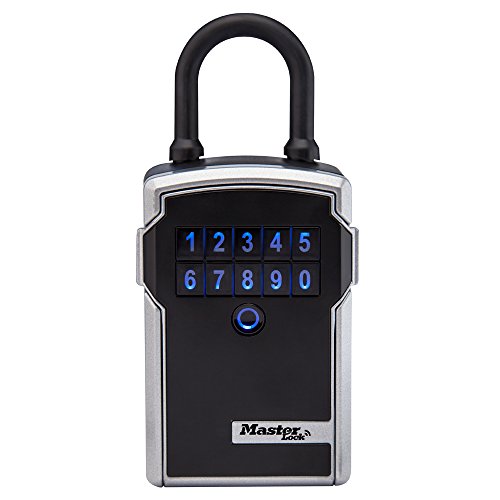
| Level Lock+ or Level Bolt | Hosts who want a slim, hidden-hardware look | Fits inside the door, keeps existing exterior hardware on some models | Keypad support varies by model; compatibility with the door matters |
| August Wi-Fi Smart Lock | Retrofit on an existing deadbolt | Replaces the thumb turn, keeps the key cylinder and outer hardware | Needs an accessory keypad for code entry |
| Wyze Lock Bolt | Budget keypad option | Keypad and fingerprint, app control | Fewer integrations with rental software than larger brands |
Product lines change often, so match a specific model number to the maker’s compatibility list before you buy.
What Rental Hosts Actually Need
Scheduled, Expiring Codes
Every guest should get a unique code that activates at check-in and expires at check-out. A lock that stores many user codes and supports time windows is far more useful than one limited to a handful of permanent codes. Check the maker’s stated number of codes and whether schedules are set in the app or only by hand at the keypad.
Connection to Your Booking Software
Some rental management tools and hosting platforms integrate directly with certain locks or hubs and can create codes automatically from reservations. If you want that, choose a lock listed as supported by your software. Without automation, you will be typing codes yourself for every stay.
Offline Behavior
Wi-Fi goes down. A lock that keeps its stored codes and works from the keypad without internet avoids lockouts, but it cannot receive new codes until it reconnects. Hosts who rely on remote code creation generally prefer built-in Wi-Fi or a hub with a stable connection near the door.
Backup Entry
Keep a physical key option or a battery-terminal jump contact. Many makers include a key cylinder or a way to power the lock from outside a dead battery, which reduces middle-of-the-night calls.
Installation and Door Compatibility
Full replacement locks need a standard door prep with a compatible bore and backset; the maker lists door thickness ranges. Retrofit locks like the August model attach to the existing deadbolt, so they depend on your thumb turn shape and a cylinder that turns smoothly. A sticky deadbolt drains batteries on any motorized lock, so fix alignment first. If the door is metal, fire-rated or a glass door, read the maker’s notes, and for fire-rated doors follow local building rules before drilling or modifying anything. If you are unsure, hire a locksmith.
Budget Tiers
| Tier | What you get | Trade-off |
|---|---|---|
| Budget | Keypad locks with app control, fewer integrations | Fewer supported platforms, simpler schedules |
| Mid-range | Established brands with Wi-Fi or hub options and broad code capacity | May need a module or hub for remote access |
| Premium | Slim designs, metal construction, extra security certifications as listed by the maker | Higher cost; compatibility checks matter |
Security and Durability Notes
- Grade ratings: some makers cite ANSI/BHMA grades for their locks. Compare the grade the maker states and treat it as one factor among several.
- Weather: outdoor keypads should state an operating temperature range suited to your climate.
- Batteries: alkaline AA packs are common; makers quote months of life under typical use, and busy rentals shorten that. Replace batteries on a schedule rather than waiting for the low-battery warning.
- Audit logs: an app history showing when each code was used helps with disputes.
- Code hygiene: avoid obvious patterns, and delete codes after each stay.
Pick X If You Want…
| Pick this | If you want |
|---|---|
| Schlage Encode Plus | Built-in Wi-Fi with scheduled guest codes |
| Yale Assure Lock 2 | Choice of module and broad smart home support |
| Level Lock+ or Bolt | A discreet look that preserves your door’s exterior |
| August Wi-Fi with keypad accessory | To keep your existing deadbolt |
| Wyze Lock Bolt | The most budget-friendly keypad starting point |
Alternatives
- Key lockboxes with changeable codes: a wall-mounted lockbox is the simplest option for hosts who want no electronics on the door, though codes are less easily scheduled.
- Smart lockbox models: some lockboxes offer app-based temporary codes and sit between a plain box and a lock.
- A professional property management service: useful if you manage many units and want key handoff handled for you.
Guest Experience Tips
Put clear instructions in the check-in message, including how to wake the keypad, what to do if the code fails, and who to call. Test every new code before the guest arrives, and keep a contact number ready. A visible, working keypad reassures guests, while a lock that needs an app download can cause friction for less technical visitors. Choose models that allow code entry without an account.
Managing a Lock Across Many Stays
The day-to-day routine matters as much as the hardware. A simple workflow keeps problems low: create the guest code when the booking is confirmed, set it to activate at check-in time, set it to expire at check-out time, and confirm after each turnover that the old code is gone. If you use a cleaner or co-host, give them their own named code so the activity log shows who entered and when. Avoid sharing one permanent code among several people.
Battery Routine
Low batteries are the most common cause of rental lock problems. Many locks give warnings through the app or by a light or sound at the keypad, but warnings are easy to miss between guests. Keep fresh batteries in the property, replace them between bookings on a regular schedule, and use the brand the maker recommends. Avoid mixing old and new cells in the same pack.
Lockout Plan
Plan for the worst night. Keep a spare key in a separate lockbox, store the maker’s emergency power instructions where you can find them, and keep a local locksmith’s number handy. Tell guests who to contact first, and make sure that contact is reachable at check-in hours.
Integration Considerations
Smart locks connect in several ways. Wi-Fi models talk to your router directly and are simple to set up but can use more battery. Bluetooth models need your phone nearby unless a bridge is attached. Z-Wave and Zigbee locks connect through a hub and are often preferred by hosts with several doors or properties, because they handle many locks on one network. Thread and Matter support is appearing on newer models, according to the makers. If you plan to use an automation platform to generate codes, confirm that it lists your exact lock model as supported.
| Connection | Good for | Watch out for |
|---|---|---|
| Built-in Wi-Fi | Single-door hosts, quick setup | Shorter battery life, depends on router |
| Bluetooth with bridge | Low-cost retrofit | Bridge must be placed within range |
| Z-Wave or Zigbee with hub | Multiple doors, automation | Hub cost, more setup |
| Offline keypad only | Simplicity and no network risk | No remote code changes |
Legal and Privacy Notes
Rental regulations differ by city and country. Some places require specific lock types, fire-egress features or disclosure of electronic access logs. Make sure the lock allows easy exit from inside, as safety codes generally require, and follow local rules for rental safety equipment such as smoke and carbon monoxide alarms. If you are unsure, check with your local authority or a licensed locksmith.
Frequently Asked Questions
Can a smart lock create a different code for each guest?
Yes, most keypad models support multiple user codes, and many allow start and end times. Check the maker’s stated code capacity and whether scheduling needs the app or a hub.
What happens if the Wi-Fi goes down?
Stored codes generally continue to work at the keypad, but remote changes cannot be sent until the lock reconnects. Hosts often add a backup physical key or lockbox.
Will the lock work with my existing deadbolt?
Retrofit locks like the August Wi-Fi Smart Lock are designed to fit many existing deadbolts, while full replacements need a standard door prep. Read the maker’s compatibility checker for your door.
How often should batteries be changed in a rental?
There is no single answer. Makers quote months of life, but heavy use shortens it. A fixed replacement schedule between busy seasons is a common practice.
Do I need a hub?
Some locks have built-in Wi-Fi, others use Bluetooth, Z-Wave or Thread and need a bridge or hub for remote control. The maker’s product page lists what each version requires.
Should I tell guests about the smart lock?
Yes. Explain how it works in your listing and check-in message, and if the lock logs entries, mention that in your property information so guests are informed.
More from Amazon
Programs that pair well with the guide above. Offers and eligibility are set by Amazon and may change.
Free shipping on eligible items, Prime Video and more. Eligible new members can start with a free trial.
Start a Prime free trialAudiobooks and podcasts to listen to on the go. Eligible new members can start with a free trial.
Try Audible freeAd-free music streaming. Eligible new subscribers can start with a free trial.
Try Music Unlimited freeA free business account with business pricing and bulk-buying tools for work, shop or home office.
Create a business accountAs an Amazon Associate we earn from qualifying purchases.