
For most homes, a battery camera paired with a small solar panel, such as the Eufy SoloCam S340 or the Reolink Argus series with its solar panel, is the practical answer for a yard, driveway or shed with no outlet nearby, while buyers who want continuous recording with no battery worries should look at an integrated solar camera such as the Eufy SoloCam S40 or Ring Stick Up Cam Pro/Battery with its optional solar panel. Solar charging works best where the panel gets several hours of direct sun, and it supplements the battery rather than replacing it in every climate.
Our top picks

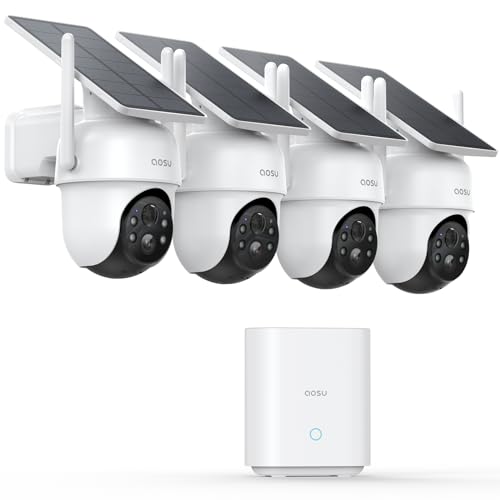


As an Amazon Associate we earn from qualifying purchases at no extra cost to you.
At a Glance: Solar Camera Options
| Camera line | Best for | Key stated features | Limits |
|---|---|---|---|
| Eufy SoloCam S340 | Wide coverage on one camera | Dual-lens design with panning, built-in solar panel, local storage | Larger body; built-in panel angle is fixed to the camera |
| Eufy SoloCam S40 | Simple all-in-one solar camera | Integrated solar panel, local storage, no required subscription for basics as listed by the maker | Fixed view |
| Reolink Argus series with solar panel | Flexible panel placement | Separate panel on a cable, battery camera, several variants including cellular-capable ones | Separate panel to mount; variants differ |
| Ring Stick Up Cam Battery with Solar Panel | Existing Ring ecosystem | Battery camera with optional solar accessory | Cloud features may need a plan |
| Arlo Essential with solar panel | Existing Arlo ecosystem | Battery camera with compatible solar panel | Subscription needed for many features |
Model names and bundles shift each year. Confirm the exact bundle contents in the maker’s product page before purchase.
How Solar Cameras Really Work
A solar camera is a battery camera with a trickle charger. The panel does not run the camera directly; it tops up a rechargeable battery between motion events. In bright, long days the panel can keep up with a lot of activity. In winter, under tree cover or at high latitudes, makers and reviewers both note that the battery can still decline, so plan to charge manually at times.
Panel Size and Placement
Makers rate panels in watts. Panels that are fixed to the camera body must face the sun in the spot where the camera needs to look, which is not always the same direction. A separate panel on a cable, as with the Reolink Argus line, lets you place the camera under an eave and the panel on a sunnier surface. Aim the panel toward the sun’s path, keep it clear of shade and wipe off dust, leaves and snow.
Connectivity
Most solar cameras connect by Wi-Fi, so the signal must reach the mounting spot. If you need a camera far from the house, look for cellular versions or pair the camera with a Wi-Fi extender. Some brands use a base station with local storage and a dedicated link, which can improve range.
Picks by Situation
Driveway or Front Yard
An all-in-one model like the Eufy SoloCam S40 is simple to mount. Choose a position with direct sun for the panel and a view of the area you care about.
Large Property or Barn
A camera with a pan lens, such as the SoloCam S340, covers more ground. A cellular-capable Reolink variant helps where Wi-Fi does not reach.
Rental Property You Do Not Visit Often
Prioritize larger panels and local storage so you are not dependent on frequent recharging. Always follow local rules on recording and on notifying tenants and neighbors.
Shaded Spots
Solar is a poor fit. Consider a wired or plug-in camera instead, or run a panel cable to a sunnier spot.
Budget Tiers
| Tier | What to expect | Trade-off |
|---|---|---|
| Budget | Basic solar battery camera with 2K video and local storage | Fixed view, simpler app features |
| Mid-range | Panning lens, better night video, detection features | Larger body, more setup |
| Premium | Cellular options, larger panels, ecosystem integration | Plans or data fees |
What to Look For
- Battery capacity: the maker lists capacity in mAh; larger helps through cloudy periods.
- Panel wattage: compare stated panel output and the cable length if the panel is separate.
- Weather rating: look for a stated IP rating and operating temperature range, especially for cold climates where batteries lose capacity.
- Storage: microSD or base station storage avoids relying on cloud subscriptions.
- Motion tuning: activity zones and sensitivity controls reduce wasted battery on passing traffic.
- Mounting hardware: an adjustable mount lets you angle the panel independent of the lens in some designs.
Installation and Safety Notes
Mount cameras securely and follow the maker’s instructions, particularly on ladders. Keep panel cables clear of walkways and secure them against wind. Lithium batteries should not be punctured or exposed to extreme heat; follow the maker’s guidance on temperature and replacement. If any step involves household wiring, such as a plug-in alternative, consult a qualified electrician.
Pick X If You Want…
| Pick this | If you want |
|---|---|
| Eufy SoloCam S40 | A simple all-in-one solar camera |
| Eufy SoloCam S340 | Wider coverage from a panning, dual-lens camera |
| Reolink Argus with solar panel | Flexible panel placement and options for remote sites |
| Ring or Arlo with solar panel | To stay inside an existing ecosystem |
Alternatives
- Wired PoE cameras: continuous power and video, ideal if you can run a cable.
- Plug-in outdoor Wi-Fi cameras: reliable power where an outdoor outlet exists.
- Floodlight cameras: pair lighting with recording when you have existing wiring.
Estimating Whether Solar Will Keep Up
No camera maker can promise how your site behaves, but a few questions give a reasonable guess. How many motion events will the camera see each day? A quiet side yard may record a handful of clips, while a driveway facing a busy road can trigger hundreds. How long is each clip? Longer clips and higher video quality use more power. How much direct sun does the panel get in the darkest month? A south-facing panel in the northern hemisphere, set at an angle toward the sun, collects more than a flat panel under an eave.
If daily activity is low and the panel receives several hours of direct sun, the battery will usually hold a steady level. If activity is high or the site is shaded, plan to supplement with a manual charge every few weeks. Many apps show the battery level, and some allow alerts when it drops below a threshold, which is worth enabling.
Mounting Tips
- Use the maker’s recommended mounting height so motion sensors detect people as intended.
- Angle the panel so rain and snow slide off.
- Seal cable entry points against moisture and keep connectors facing downward.
- Check the Wi-Fi signal with a phone at the mounting spot before drilling.
- Review the view at night as well as daytime, since reflections from walls and glass can trigger false alerts.
Maintenance
Solar cameras are low-maintenance but not no-maintenance. Wipe the panel gently with a soft damp cloth a few times a year, and after storms, pollen seasons or snow. Check mounts for loosening after high winds. Update firmware when the app offers it. If the battery performance declines substantially after a few years, ask the maker about replacement options, and never open a sealed battery pack yourself. Dispose of old batteries through proper recycling channels.
Solar Versus Other Power Methods
| Power method | Strength | Weakness |
|---|---|---|
| Solar plus battery | No cable, flexible placement | Depends on sunlight, battery aging |
| Battery only | Simple, no panel | Manual recharging |
| Plug-in or wired | Continuous power, steady video | Needs an outlet or cable run |
| PoE | One cable for power and data | Needs switch or injector and cabling |
For sites with strong sun and no easy wiring, solar is a sensible compromise. For shaded or very busy locations, a wired option is more dependable.
Frequently Asked Questions
Do solar cameras work in winter?
They can, but shorter days, low sun angles and snow cover reduce charging. Makers and reviewers suggest topping up manually when the battery trends down, and keeping the panel clear.
How much sun does the panel need?
Makers typically quote a few hours of direct sun per day for sustained use. More activity needs more sun.
Do solar cameras need Wi-Fi?
Most do. Cellular-capable variants exist for places without a network, but they require a data plan.
Is a subscription required?
Many makers offer local storage and basic alerts without one, while advanced detection and cloud history may need a plan. Read the maker’s plan details.
Can I use a solar camera without a panel?
Yes, the battery works on its own, and you recharge it by hand. The panel simply reduces how often that is necessary.
How do I keep the panel working well?
Aim it toward the sun, keep it clear of dirt and snow, and avoid shaded spots. Use a soft cloth and follow the maker’s cleaning notes.
More from Amazon
Programs that pair well with the guide above. Offers and eligibility are set by Amazon and may change.
Free shipping on eligible items, Prime Video and more. Eligible new members can start with a free trial.
Start a Prime free trialAudiobooks and podcasts to listen to on the go. Eligible new members can start with a free trial.
Try Audible freeAd-free music streaming. Eligible new subscribers can start with a free trial.
Try Music Unlimited freeA free business account with business pricing and bulk-buying tools for work, shop or home office.
Create a business accountAs an Amazon Associate we earn from qualifying purchases.





